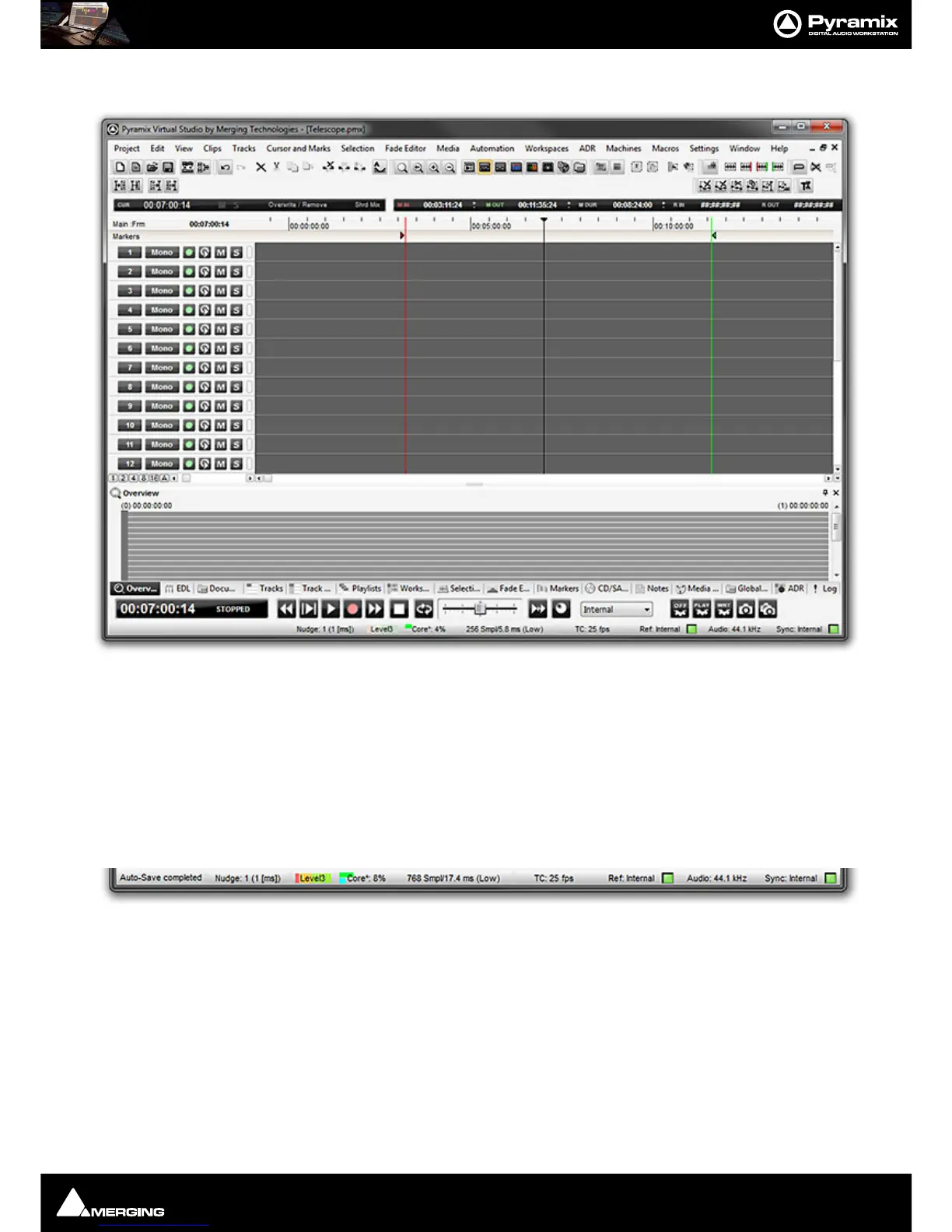
Introduction : Pyramix Virtual Studio Overview
1 - 27
Project Window
The Pyramix Project window is always completely enclosed by the main window. A Project window only exists if
a Project is open, and appears automatically when a new Project is started. A Project window can be resized,
moved, minimized or maximized within the main window. If the Project window is made large enough, two sepa-
rate panels are visible: the Project Editing Panel at the top, contains the Timeline which shows a graphic repre-
sentation of the Composition. The lower section of the screen is the Project Management Panel. The dividing
line between these panels may be grabbed with the mouse and moved up or down, thereby varying the space
allocated to each panel. The Project Editing Panel can be maximized to fill the Project window by clicking on the
arrow at bottom right where the scroll bars meet. A second click restores the previous window arrangement.
Status Bar
At the very bottom of the Pyramix Window the Status bar shows:
Message Area
Messages from Pyramix are shown here.
Nudge
Currently selected nudge setting
Playback Buffer Meter
Graphic representation of the current state of the Playback buffers together with the buffer Level selected cur-
rently. When the transport is not running or there are no audio Clips under the playhead cursor this will have no



 To Next Page