Mixer : HORUS Preamp Remote Controls
10 - 238
Note: Where a button is half lit this indicates there are mixed settings “behind” the button. E.g.
buttons on a VCA Group Strip. When a buttin in this condition is pressed the parameter is
switched On in all channels affected.
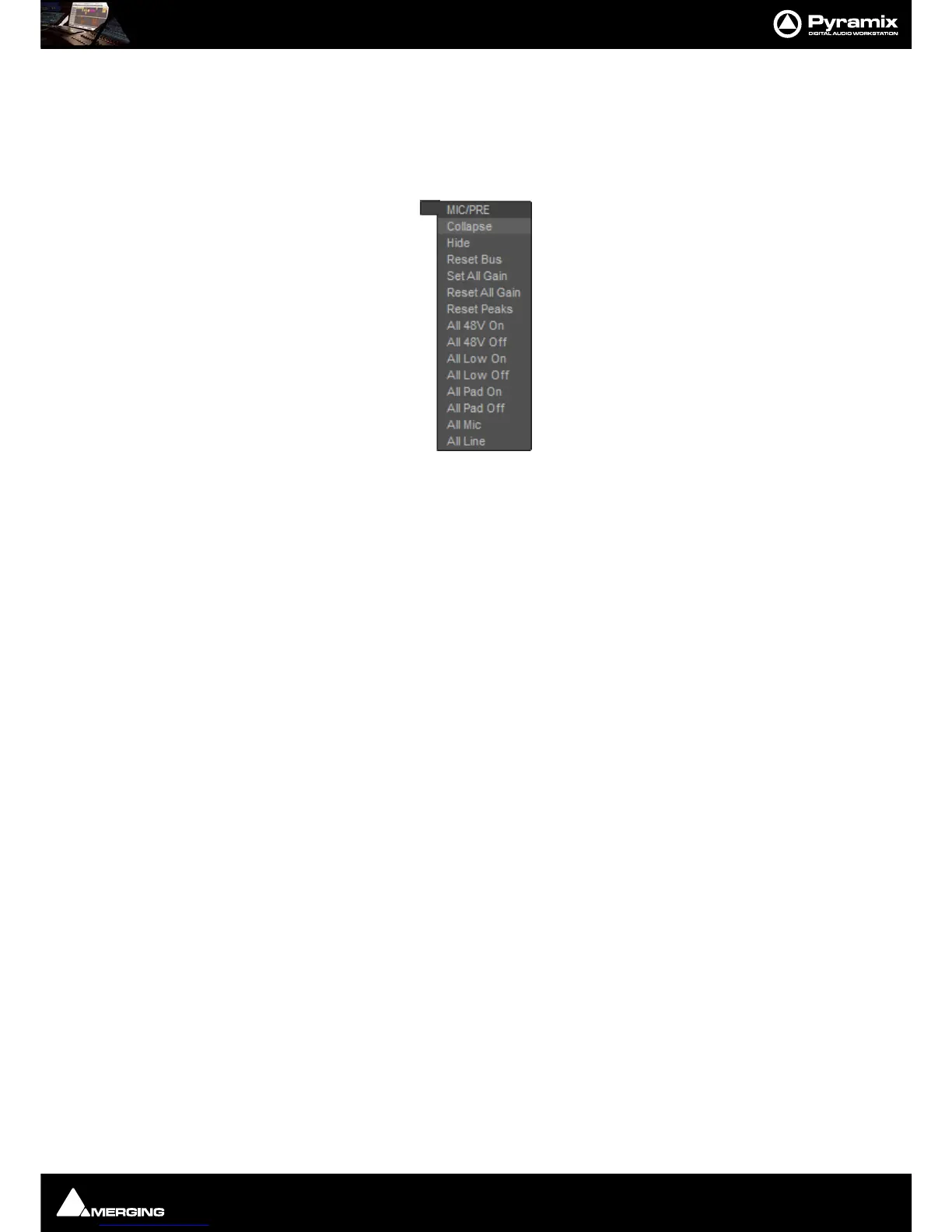
HORUS Preamp Remote Controls Context Menu
Hovering over the expand/collapse + or - button for the section pops-up a context menu:
Collapse Hides the controls but leaves the gain value visible.
Hide Removes the Preamp control section from the Mixer display. It can be restored by
hovering the mouse over the bottom
+ button and selecting Console > Show All.
Reset Bus Resets all the Preamp Gain settings to 0dB.
Set All Gain Sets all the Preamp Gain settings to 30dB.
Reset All Gain Resets all the Preamp Gain settings to 0dB.
All 48V On As it says.
All 48V Off As it says.
All Low On Switches all the HPFs On.
All Low Off Switches all the HPFs Off.
All Pad On As it says.
All Pad Off As it says.
All Mic Switches all the Preamps to Mic mode.
All Line Switches all the preamps to Line mode.
Mic Preamp Recall Options
When opening an existing project, opening or switching between multiple projects and when creating a new
project from scratch or from a template the Mic Preamp settings behavior is customizable in
All Settings > Hard-
ware > Mic/Pre Remote
. Please see: Mic/Pre Remote on page 657



 To Next Page