Productivity : Bars & Beats
26 - 572
Metronome
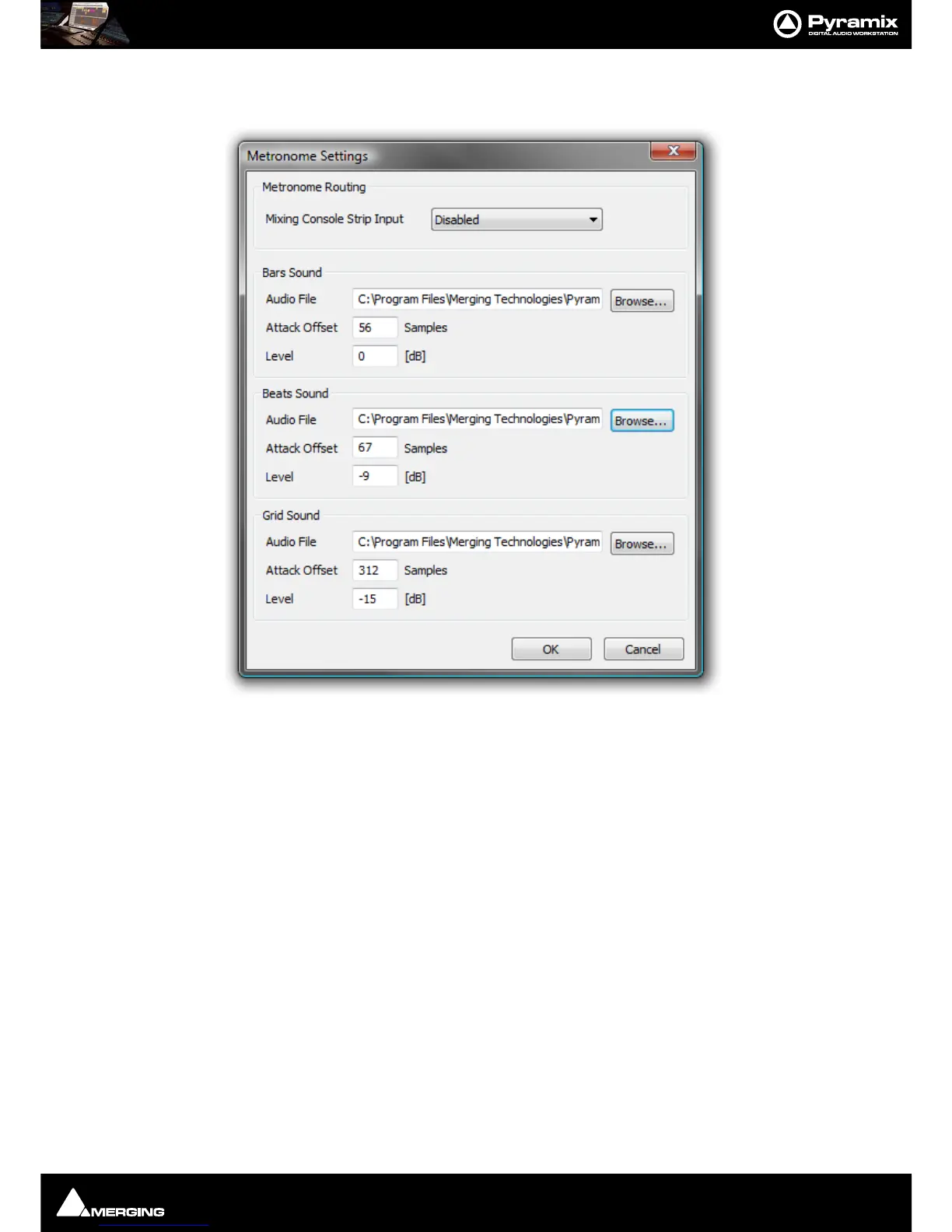
Metronome Settings... Opens the Metronome Settings dialog:
Note: The Metronome Settings can also be accessed by clicking on Metro on the Bars & Beats
Ruler Toolbar. See below.
Metronome Routing
Mixing Console Strip Input Choose a console strip for the Metronome sound from the drop-down list.
Bars Sound
Audio File Shows the audio file currently selected. Browse... opens a Browser window to
locate and select audio files.
Attack Offset Enter a value in Samples to adjust the exact timing.
Level Enter a value in [dB] to set the Bars Sound playback level.
The
Beats Sound and Grid Sound settings are the same as for Bars Sound.
Any audio file can be used, for the
Bars, Beats and Grid sounds. By default, some suitable WAV files are installed
with Pyramix in the same location where you installed the Pyramix software. By default. this will be:
C:\Program Files\Merging Technologies\Pyramix Virtual Studio\Metronome Bars.wav etc.
Bars & Beats
Offset Offsets the Bars & Beats scale start from the main Time Scale. Value can be typed
in the TimeCode register and or nudged up or down with the increment, decre-
ment buttons.
Store Offsets the Bars & Beats scale start to the current Playhead Cursor position.



 To Next Page