Automation : Display and Editing of Automation Data
15 - 374
All...
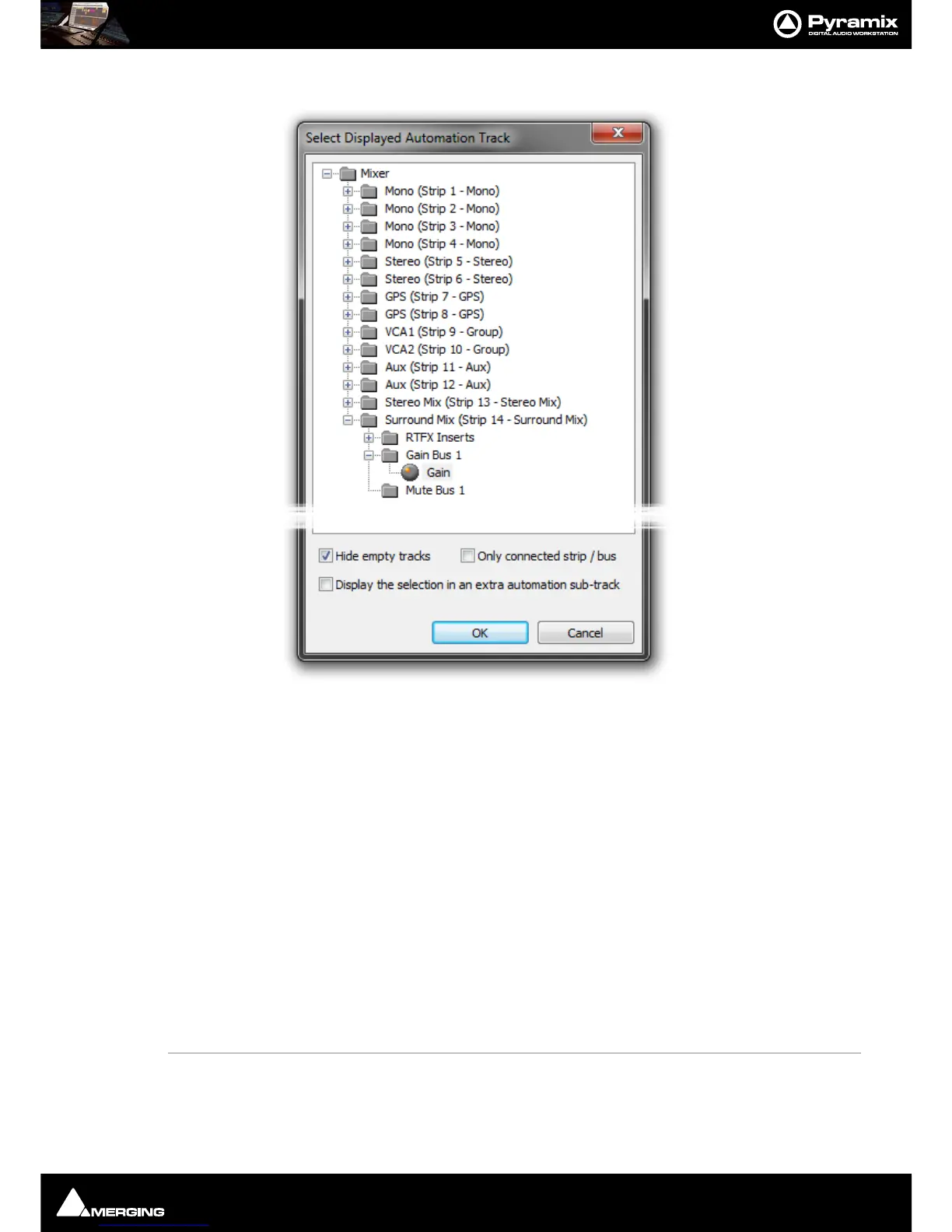
Opens the Select Displayed Automation Track dialog:
Every automatable parameter of every Strip and Bus is available. However, default is to have the
Only connected
strip / bus
box ticked so only parameters from the Mixer Strip connected to the Track are shown.
Clicking on the plus sign next to a folder will show the all automatable parameters associated with it. Simply
choose the parameter you wish to have displayed.
Hide Empty Tracks When ticked (default), Tracks with no automation data written are
not shown in the tree.
Display the selection in an extra automation sub-track When ticked, a new Automation Sub-Track is cre-
ated to contain the automation curve for the selected parameter
when the
OK button is clicked.
Only connected strip / bus When ticked (default) only the parameters from the current Strip
or Bus are shown. When un-ticked every parameter in the Mixer is
available.
OK Confirms selection and closes the dialog
Cancel Cancels the selection and closes the dialog.
Note: If you choose a Strip AND a specific parameter to display in this dialog then Auto Display
should be turned OFF.
Auto Display When Auto Display is selected, the automation curve displayed will be from the
last control on the Mixer Strip associated with the Track that has been adjusted or
switched. (Defaults is
ON)



 To Next Page