Machine Control : External Machines
22 - 502
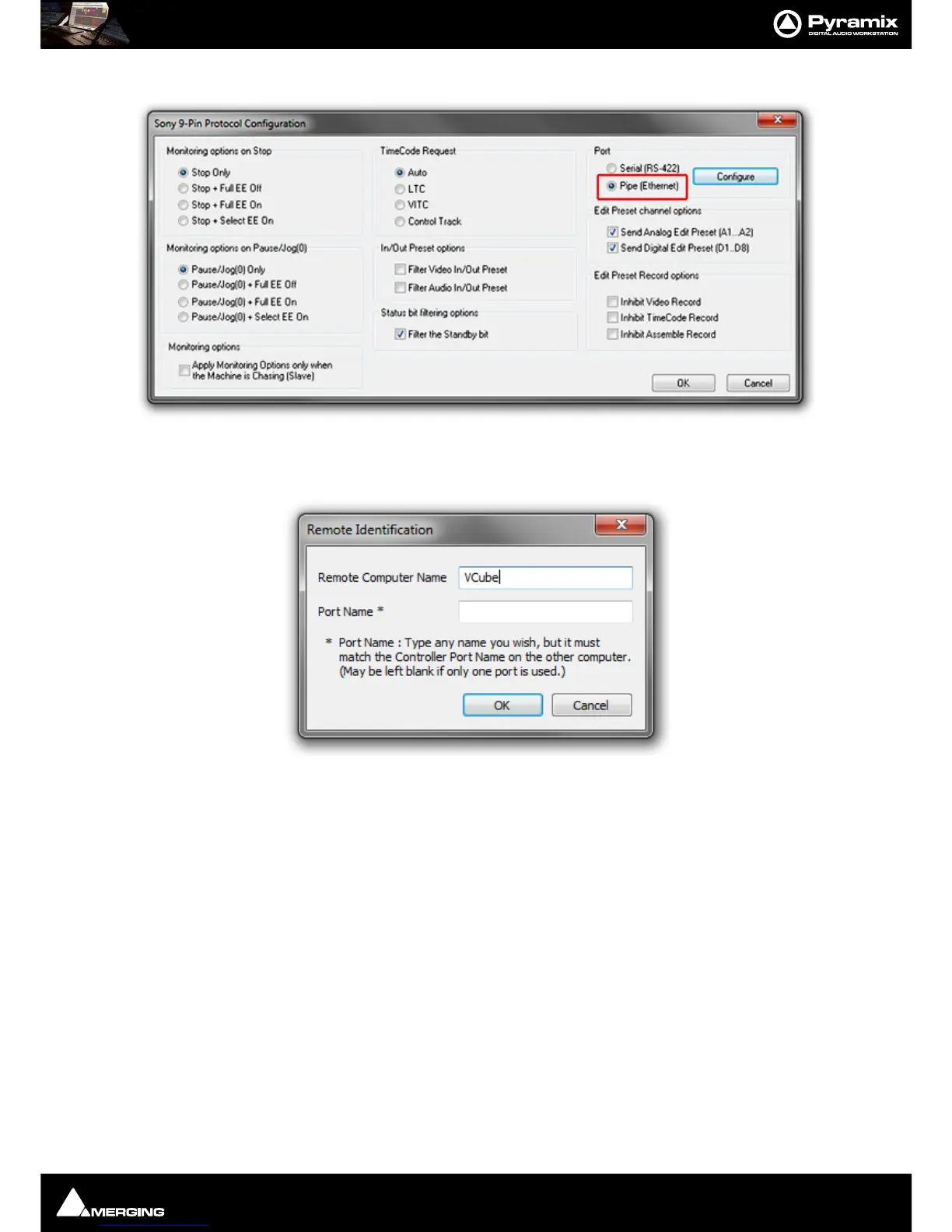
• Click on the Properties button to open the Sony 9-Pin Protocol Configuration dialog.
•In the
Port section click on the Pipe (Ethernet) radio button
• Click on the
Configure button to open the Remote Identification dialog.
• Type the
Remote Computer Name in the field (or leave blank for local machine)
•
Port Name is only useful with multiple Pyramix systems. Leave the field blank to control a VCube
machine.
• Click on
OK to close the dialog.
• Make any other changes you need in the
Sony 9-Pin Protocol Configuration (Please see: Sony 9-
Pin Protocol Configuration (Machine) on page 704
for a detailed description of the options.)
•Click
OK to confirm all the entries and to add the new machine to the list.
• On the Slave Pyramix machine(s) carry out the same procedure except using
Settings > Remote
Control > Controller
.
• On Slave Machines also enter a
Port Name in case you wish to control several Pyramix machines.
Now in the Pyramix
Transport Control Panel Window (Alt + T) the 9-pin connections will be present. Set it
(them) up as standard RS422.
Note: For solid and stable synchronization ensure that all machines use the same video refer-
ence.



 To Next Page