18 Operations Guidance pattern use
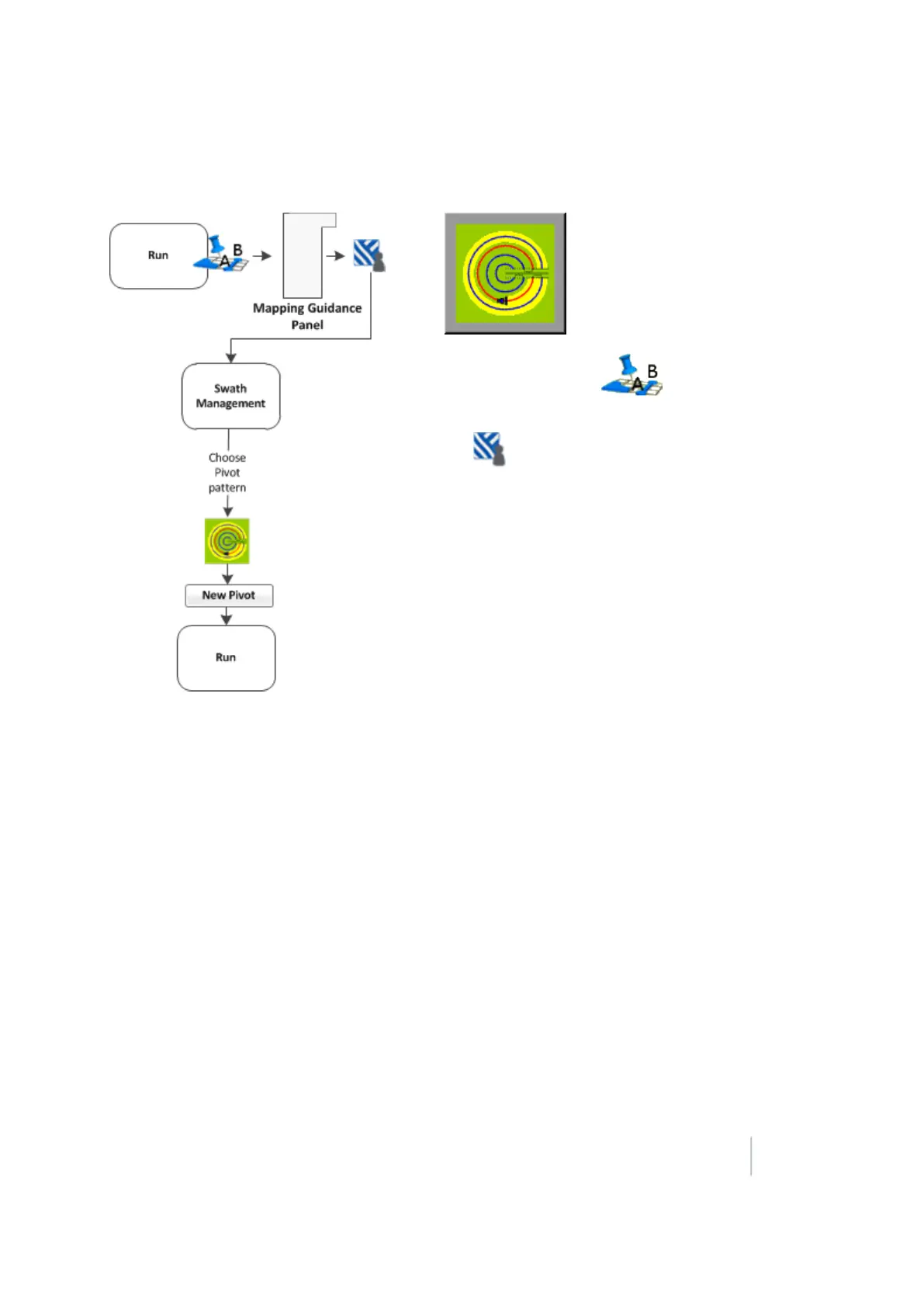
Pivot pattern
1.
At the Run screen, tap to open the
Mapping Guidance panel.
2.
Tap Swaths.
3. At the Swath Management screen, select the Pivot
pattern from the pattern list.
4. Tap New Pivot.
5.
The Run screen displays.
6. Drive to a point on the outermost rut of the pivot
and then tap Set A.
7. Follow the pivot rut around to the end and then
tap Set B. The Enter Distance to Pivot Field Edge
screen displays.
8. Enter the distance or the number of rows from the
current path to the outside of the pivot and then
tap OK. The pivot displays, showing the swaths it generated.
9.
If you need to shift or skip a swath, see:
ll Shift a swath (page 378)
l Skip a swath (page 379)
Outer edge radius adjustment
The pivot has an outer edge radius that is used to calculate the coverage area. After you create a
pivot, you can adjust this outer edge radius.
1. At the Run screen, tap Swaths. The Swath Management screen displays.
2.
Select the pivot to be adjusted from the list of available pivots.
Note – The default is the AB curve.
Version 9.25, Revision B FM-1000 Integrated Display User Guide 367



 To Next Page