18 Operations Guidance pattern use
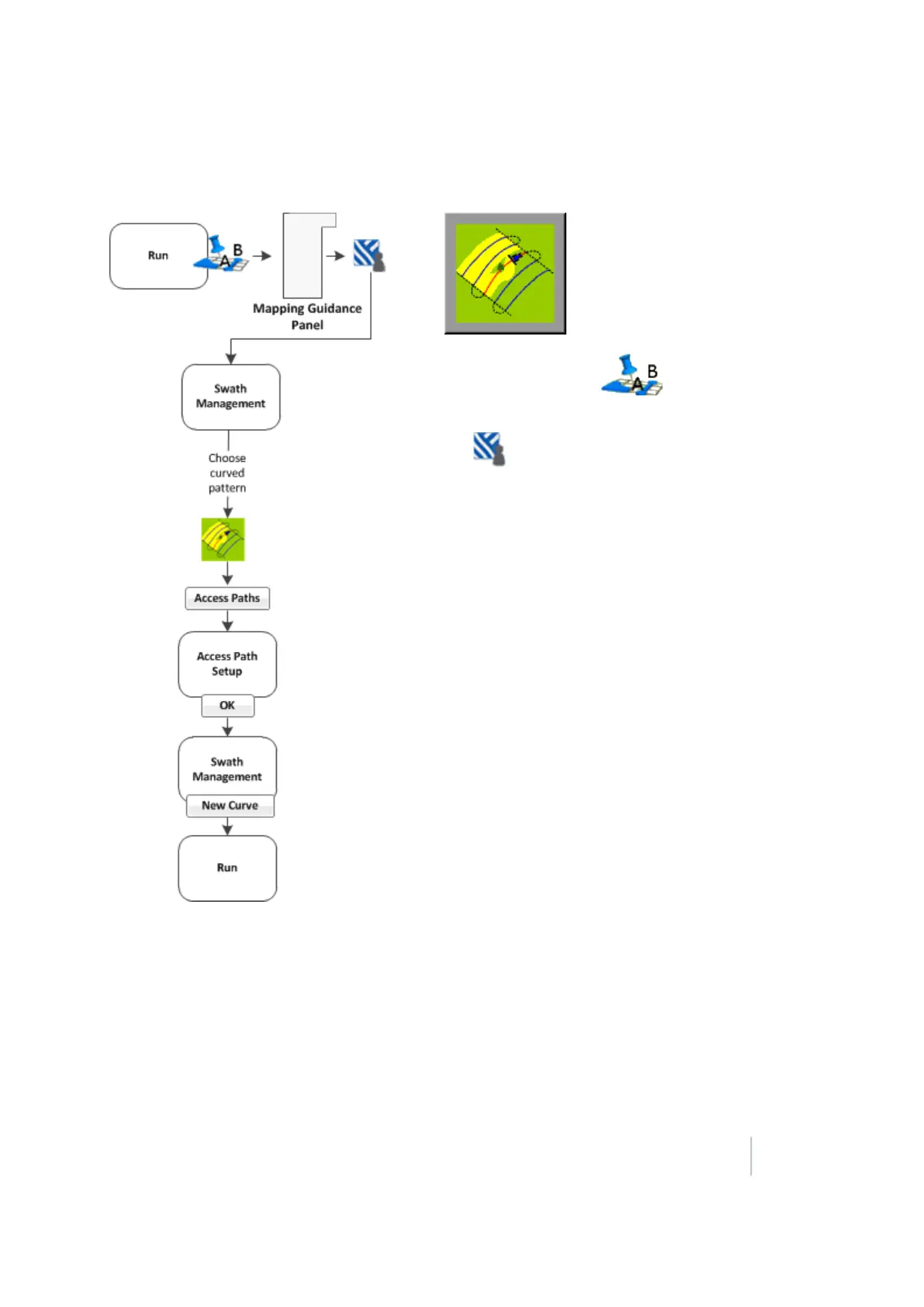
Curved pattern
1.
At the Run screen, tap to open the
Mapping Guidance panel.
2.
Tap Swaths.
3. At the Swath Management screen, select the Curve
pattern from the pattern list.
4. Enter an access path, if required. See Access paths
(page 372).
5.
Tap New Curve. The Run screen displays.
6. Drive to the start point of the curve and then tap
SetA.
7. To stop recording your exact path and create a
straight section of line, tap Record.
8. Drive the curve until you reach the end point and
then tap Set B. The new curve pattern displays
showing all the swaths the system automatically
generated.
9.
If you need to shift or skip a swath, see:
ll Shift a swath (page 378)
l Skip a swath (page 379)
Version 9.25, Revision B FM-1000 Integrated Display User Guide 363



 To Next Page