15
BATrERY
I
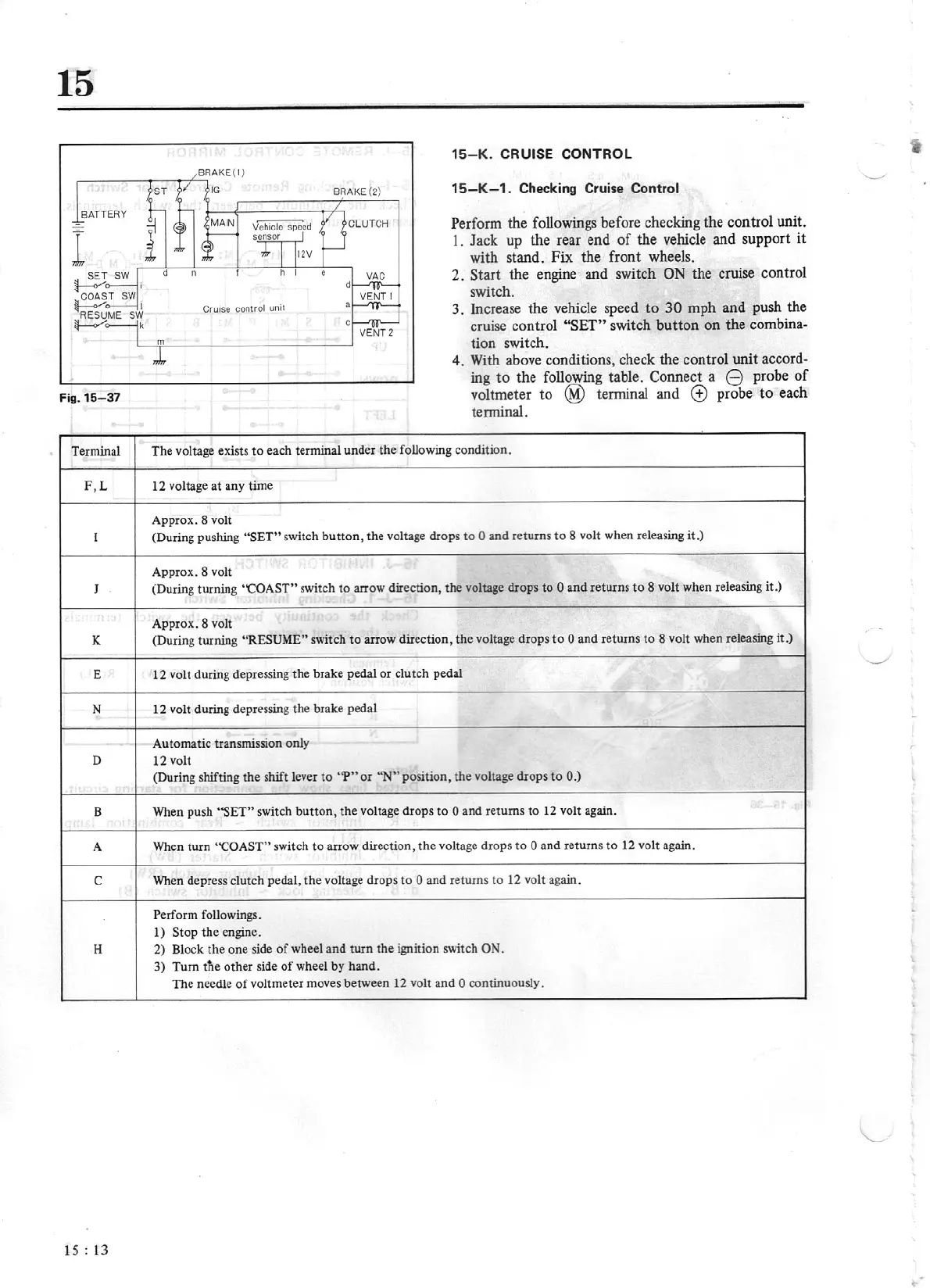
Fig.15-37
Terminal
F,L
l
J
K
E
N
D
B
A
c
H
1
s :
13
8RAKE(2)
CL
UTC
H
CrutSe
c:ontrol
uml
m
15
-K.
CRUISE CONTROL
15-K-1.
Checking Cruise
Control
Perform the followings before checking the control unit.
1.
Jack up the rear end
of
the vehicle and support it
with stand.
Fix
the front wheels.
2.
Start
the engine and switch
ON
the cruise control
switch.
3.
Increase the vehicle speed to
30
mph and push the
cruise control
"SET"
switch button on the combin
a-
tion switch.
4.
With above conditions, check the control unit
accord-
ing to the following table. Connect a
8
probe of
voltmeter to
@
terminal and
(±)
probe to each
tenninal.
T
he
voltage exists
to
each terminal under
the
following condition.
12 voltage
at
any time
Approx. 8 volt
(During pushing
"SET"
switch
button,
the voltage drops
to
0
and returns
to
8 volt when releasing it.)
Approx. 8 volt
(During turning
"COAST"
switch
to
arrow
direction,
the
volt.age drops to
0
and returns to 8 volt when releasing
it.)
Approx. 8 volt
(During turning
"RESUME"
swi
tch
to
arrow
direction,
the
voltage drops
to
0
and returns to 8 volt when releasing
it.)
12
volt during depressing
the
brake pedal
or
clutch pedal
12
volt during depressing
tJ1e
brake pedal
Automatic transmission only
12
volt
(During shifting
th
e shift lever
to
"'P"
or
"N"
position, the voltage drops to
0.)
When push
''SET"
switch
button,
the
voltage drops
to
0
and returns to
12
volt again.
When turn
"COAST"
switch
to
arrow
direction, the voltage d
ro
ps to
0
and returns
to
12
volt again.
When depress clutch pedal,
the
voltage drops
to
0
and returns to
12
volt again.
Perform followings.
1)
Stop
the
engine.
2)
Block
the
one side
of
wheel and turn
the
ignition switch
ON.
3)
Turn tfie
other side
of
wheel
by
hand.
The
needle
of
voltm
eter
moves between
12
volt and 0
continuously.


 To Next Page