lA
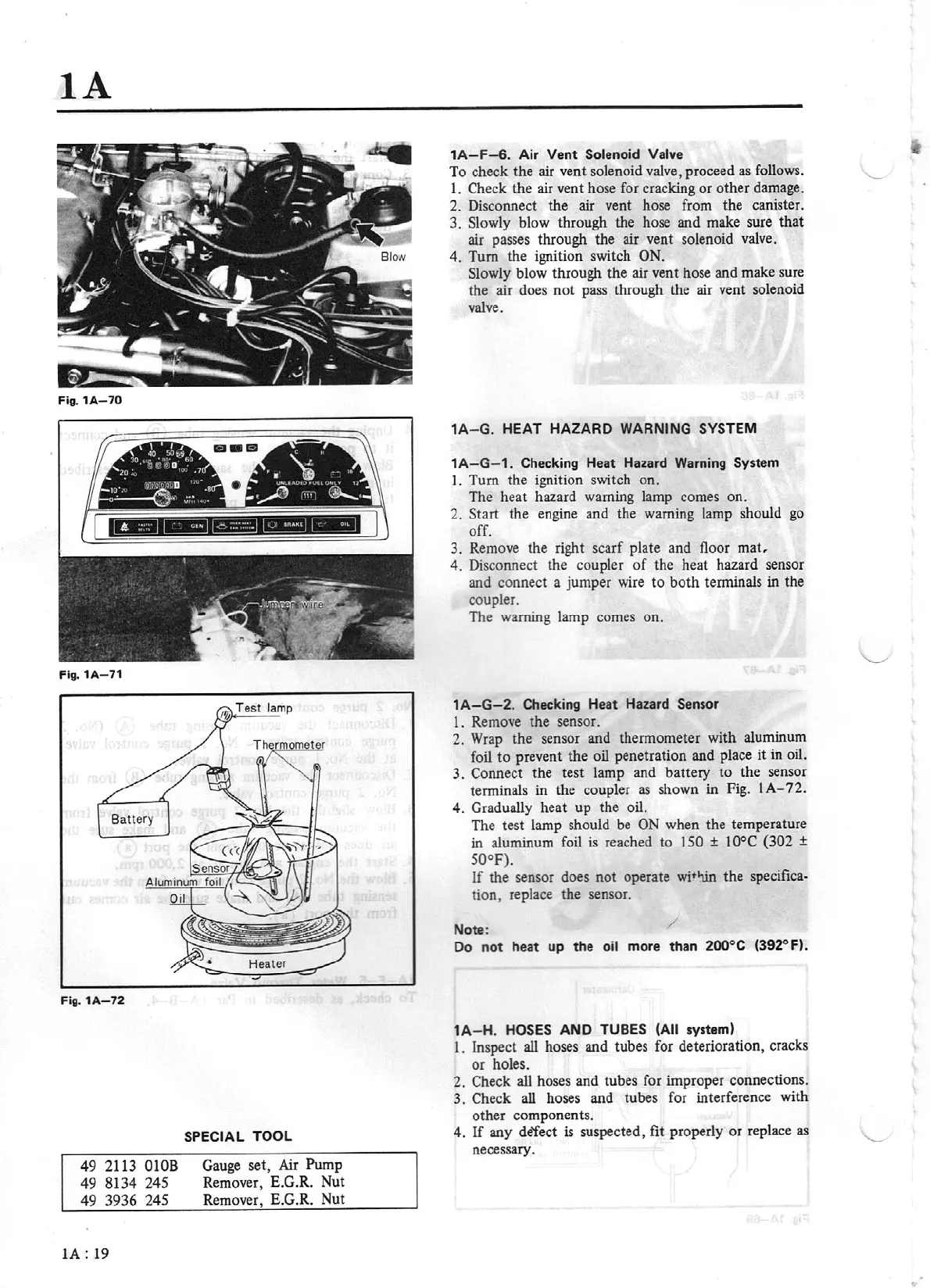
Flg. 1A
-7
0
Fig. 1A- 71
Fig.
1A-72
49
2113
OlOB
49 8134 245
49
3936
245
IA:
19
SPECIAL TOOL
Gauge set, Air Pump
Remover, E.G.R. Nut
Remover, E.G.R. Nut
1A
-F
-6
. Air
Vent
Solenoid Valve
To
check
the
air vent solenoid valve, proceed as follows.
\_
1. Check the air vent hose for cracking
or
othe
r damage.
2. Disconnect
the
air vent hose from
the
canister.
3.
Slowly blow through the hose and make sure that
air passes through
the
air vent solenoid valve.
4.
Turn the ignition switch
ON.
Slowly blow through
the
air vent hose and make sure
the
air does
nol
pass through
the
air
vent solenoid
valve.
1
A-G.
HEAT
HAZARD WARNING SYSTEM
1A-G-1.
Checking H
eat
Hazard Warning
System
I. Turn the ignition switch on.
The
heat
hazard warning lamp comes on.
2.
Start
the engine and the warning lamp should go
off.
3.
Remove
the
right scarf plate and floor
mat,
4.
Disconnect the coupler
of
the heat hazard sensor
and connect a jumper wire
to
both
terminals in
the
coupler.
The warning lamp comes on.
1A-G-2.
Checking H
eat
Hazard
Sensor
1. Remove
the
sensor.
2. Wrap
the
sensor and thermometer with aluminum
foil
to
prevent the oil penetration and place it in oil.
3.
Connect the test lamp and battery to the sensor
terminals in the coupler
as
shown in Fig. I
A-
72.
4. Gradually heat
up
the oil.
The test lamp should be
ON
when the temperature
in
aluminum
foil
is
reached to
150
±
10°C {302
±
50°F).
If
the
sensor does
not
operate
witltln the
specifica-
tion, replace
the
sensor.
Note:
/
Do
not
heat
up
the oil more than
200°C (392"F).
1
A-H.
HOSES
AND TUBES (All
system)
l . Inspect all hoses and tubes for deterioration, cracks
or
holes.
2. Check all hoses and tubes for improper connections.
3.
Check
all
hoses and tubes for interference with
other
com
ponent
s.
4.
If
any de'fect
is
suspected, fit properly
or
replace as
necessary.
...


 To Next Page