File and Project Interchange : Import / Export
18 - 438
Export
Select AAF in the Interchange Export dialog. Choose the appropriate export option and click on Export. The
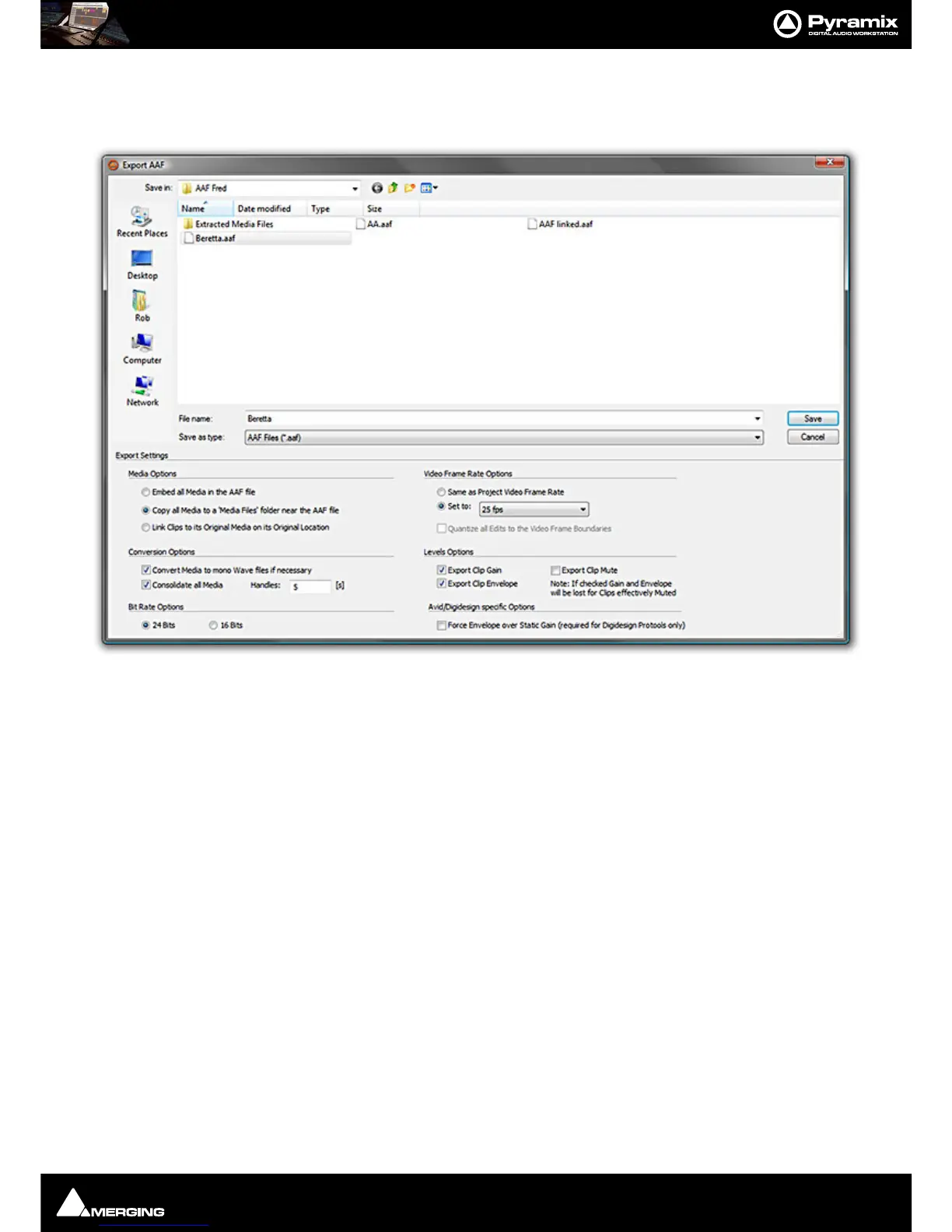
Export AAF File dialog opens:
The lower section of the dialog contains
Export Settings, the upper section is a File Browser. The Save button ini-
tiates the Export once a file name has been typed and the Export Settings have been made.
Export Settings
Media Options
The radio buttons offer the following options:
• Embed all Media in the AAF file. - All Media will be embedded in the AAF file in PCM format.
• Copy all Media to a ‘Media Files’ folder near the AAF file.
• Link Clips to original Media in its Original Location
Conversion Options
Convert Media to mono Wave files if necessary
When ticked (default) all Media not already in the form of mono Wave files will be converted to mono Wave files.
Note: This option is unavailable when Embed all Media in the AAF file is selected.
Consolidate all Media
When ticked only Media used in the project (plus handles - see below) will be embedded or copied. (This function
will be grayed out and unavailable if
Link Clips to original Media in its Original Location is selected above)
Handles:



 To Next Page