Productivity : Tab Windows
26 - 583
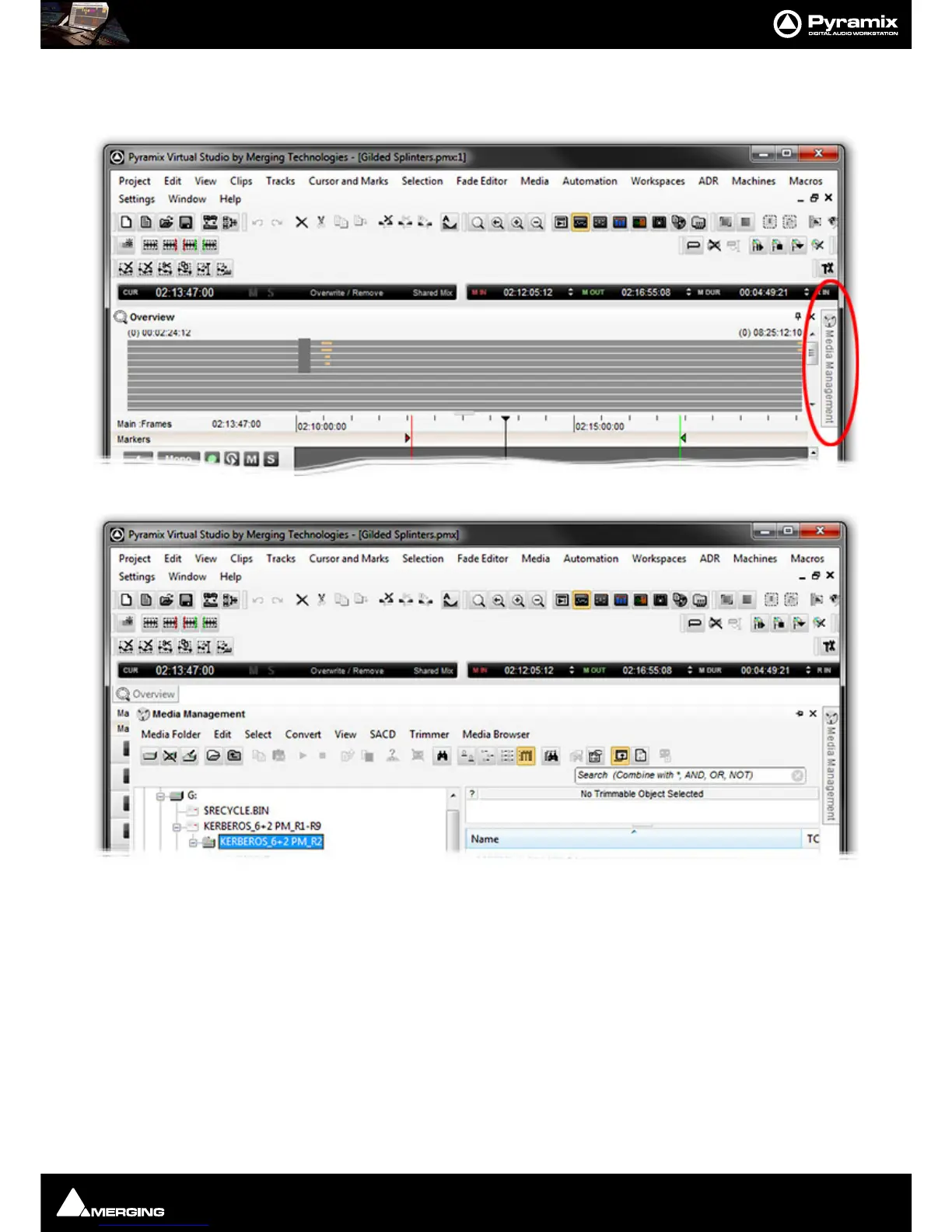
An unpinned Tab can be extremely useful, for example, to give near instant access to the Media Management Tab
Window without disturbing the layout. It is shown here first as a Tab and then with the Tab Window open (both
screenshots cut down to save space):
Note: Unpinned Tab Windows cannot be moved by clicking and dragging until they are pinned
once again.
Note: Once a Tab Window has been unpinned, double clicking on the title bar will pin it, a sec-
ond double-click will open it as a floating Tab Window. A subsequent double-click will now
return it to the place it was unpinned from until it is manually returned to the main Tab Dock.
Managing Tab Windows
The button at the bottom-right of the main timeline (at the conjunction of both scroll bars) Toggles Show/Close
all Tabs. This is extremely useful with big projects when screen space is at a premium.
The
All Settings > Timeline Layout > General : Display Timeline on Top/Left of Tab Windows setting is ren-
dered obsolete by the Tab enhancements, but can still be used for brand new projects to initially place Tabs as



 To Next Page