Media Management & Libraries : Library Tab Windows
4 - 80
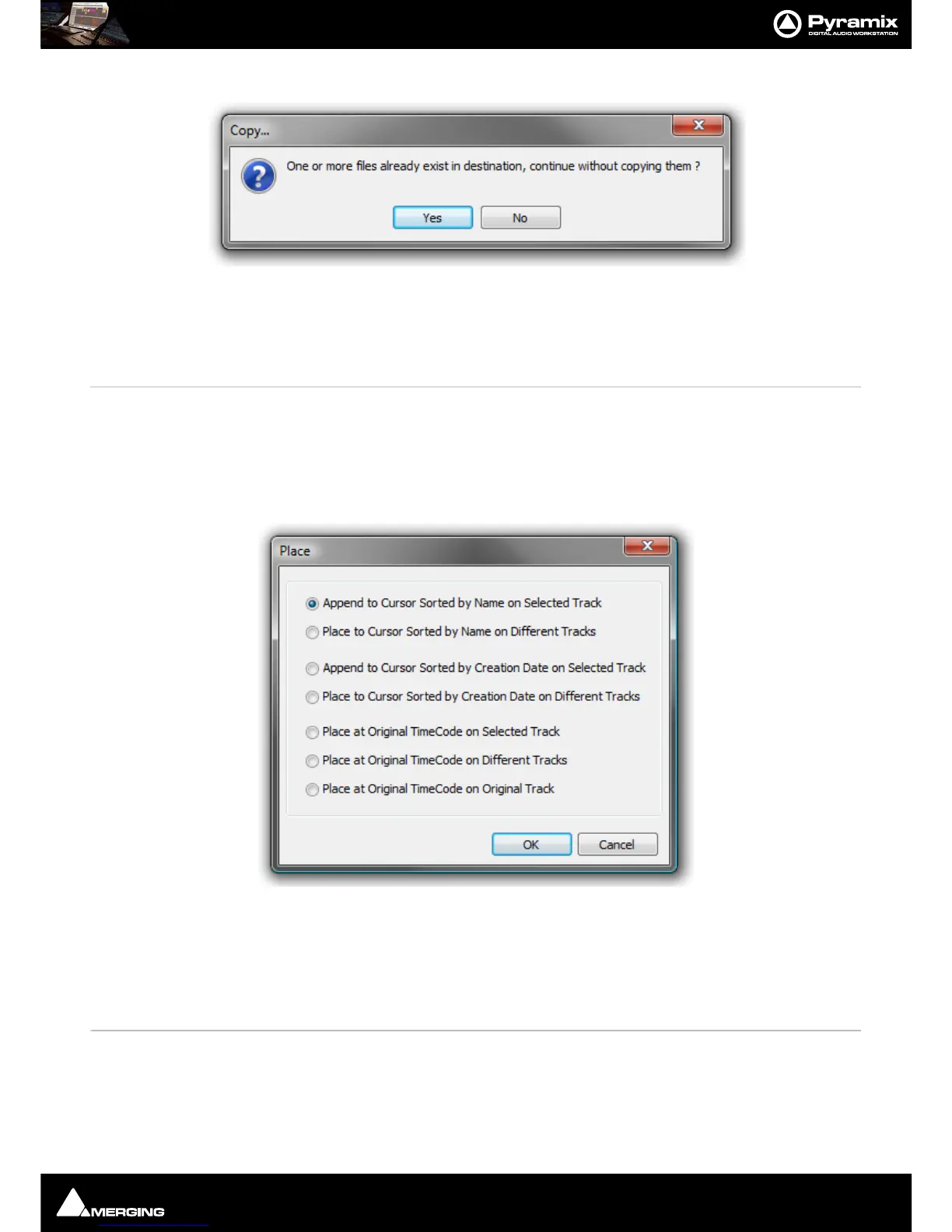
If one or more of the Media Files already exist in the chosen destination a dialog pops-up :
Click on
Ye s to complete the Paste Click on No to abort the operation.
Rename Rename object
Lock Rename When ticked Locks all objects in the library for Renaming. Do you really want your Sound
Effects Library entries to be renamed by anyone who can access it?
Open/Audition/View Opens highlighted (selected) Clip or Composition in the Trimmer and begins audition
play. Opens highlighted (selected) Shelf
Audition Opens highlighted (selected) master Clip in the trimmer and begins audition play.
Stop Audition Stop audition Play and return Cursor to beginning
Place Opens the Place dialog:
The selected object(s) will be placed in the Timeline according to the rule chosen here.
The selected object will be placed in the timeline on the selected Track and Playhead Cursor position at its
Sync
Point
or, if no Sync Point has been set, at its In Point
Placement Tool
Opens the Placement Tool for placing the object. Please see: The Placement Tool on
page 187



 To Next Page