(A) Application parameters
PARAMETERS
539
5
GROUP
A
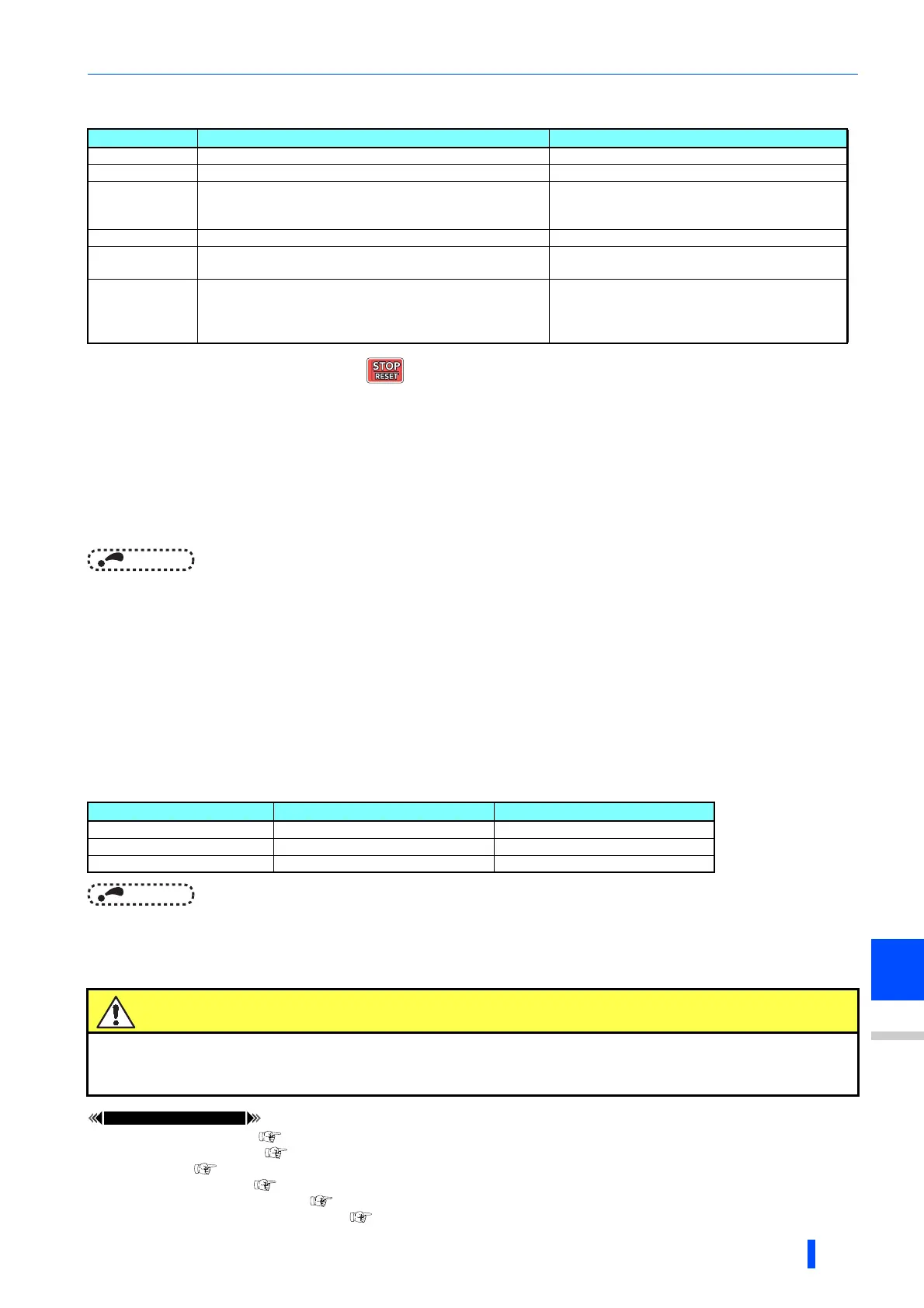
• If offline auto tuning has ended in error (see the table below), motor constants are not set.
Perform an inverter reset and restart tuning.
• When tuning is ended forcibly by pressing or turning OFF the start signal (STF or STR) during tuning, offline auto
tuning does not end properly. (The motor constants have not been set.)
Perform an inverter reset and restart tuning.
• If using a motor falling under the following conditions, set the value of Pr.9 Electronic thermal O/L relay as shown below
after tuning is complete.
- If the rated power supply of the motor is 200/220 V(400/440 V) 60 Hz, set the rated motor current multiplied by 1.1 in Pr.9.
- For a motor with a PTC thermistor, thermal protector or other thermal detection, set "0" (motor overheat protection by
inverter invalid) in Pr.9 to protect the motor from overheating.
NOTE
• An instantaneous power failure occurring during tuning will result in a tuning error.
After power is restored, the inverter goes into the normal operation. Therefore, when STF (STR) signal is ON, the motor runs
in the forward (reverse) rotation.
• Any alarm occurring during tuning is handled as in the normal operation. Note that even if a retry operation has been set,
retry is not performed.
• The set frequency monitor displayed during the offline auto tuning is 0 Hz.
Tuning the second applied motor (Pr.463)
• When performing operation where two motors are switched between one inverter, set the second motor in Pr.450 Second
applied motor, set Pr.463 Second motor auto tuning setting/status = "11", and perform tuning of the second motor.
• Turning ON the RT signal will enable the parameter settings for the second motor as shown below.
NOTE
• The RT signal is assigned to the terminal RT in the initial status. Set "3" in any of Pr.178 to Pr.189 (input terminal function
selection) to assign the RT signal to another terminal.
• Changing the terminal assignment using Pr.178 to Pr.189 (input terminal function selection) may affect the other
functions. Set parameters after confirming the function of each terminal.
Pr.9 Electronic thermal O/L relay page 331
Pr.65, Pr.67 to Pr.69 retry function page 343
Pr.71 Applied motor page 438
Pr.79 Operation mode selection
Pr.156 Stall prevention operation selection page 348
Pr.178 to Pr.189 (input terminal function selection) page 430
Error display Error cause Countermeasures
8 Forced end Set "11" to Pr.96 and retry.
9 Inverter protective function operation Make the setting again.
91 The current limit (stall prevention) function is activated.
Set the acceleration/deceleration time longer.
Set Pr.156 Stall prevention operation selection =
"1".
92 The converter output voltage fell to 75% of the rated value. Check for the power supply voltage fluctuation.
93
Calculation error
The motor is not connected.
Check the motor wiring and make the setting again.
94
Rotation tuning frequency setting error
(The frequency command for the tuning was given to exceed
the maximum frequency setting, or to be in the frequency
jump range.)
Check the Pr.1 Maximum frequency and Pr.31 to
Pr.36 Frequency jump settings.
Function RT signal ON (second motor) RT signal OFF (first motor)
Motor constant (R1) Pr.458 Pr.90
Auto tuning setting/status Pr.463 Pr.96
Frequency search gain Pr.560 Pr.298
Caution
Note that the motor may start running suddenly.
For the offline auto tuning in vertical lift applications, etc., caution is required to avoid falling due to
insufficient torque.

 To Next Page
 Loading...