Raisecom
ISCOM2600G-HI (A) Series Configuration Guide
Raisecom Proprietary and Confidential
Copyright © Raisecom Technology Co., Ltd.
Raisecom(config-
gigaethernet1/1/1)#switchport
private-vlan mapping
primary-
vlan-id
[ add | remove ]
secondary-vlan-list
Configure the mapping of the primary
VLAN and secondary VLANs on the
promiscuous interface.
Use the no switchport private-vlan
mapping command to delete the
association between the primary VLAN
of the promiscuous interface with the
secondary VLAN.
Raisecom(config-
port)#switchport private-vlan
trunk mapping
primary-vlan-id
Configure the interface mapped with the
primary VLAN to be able to forward
tagged packets.
Use the no switchport private-vlan
trunk mapping command to delete this
configuration.
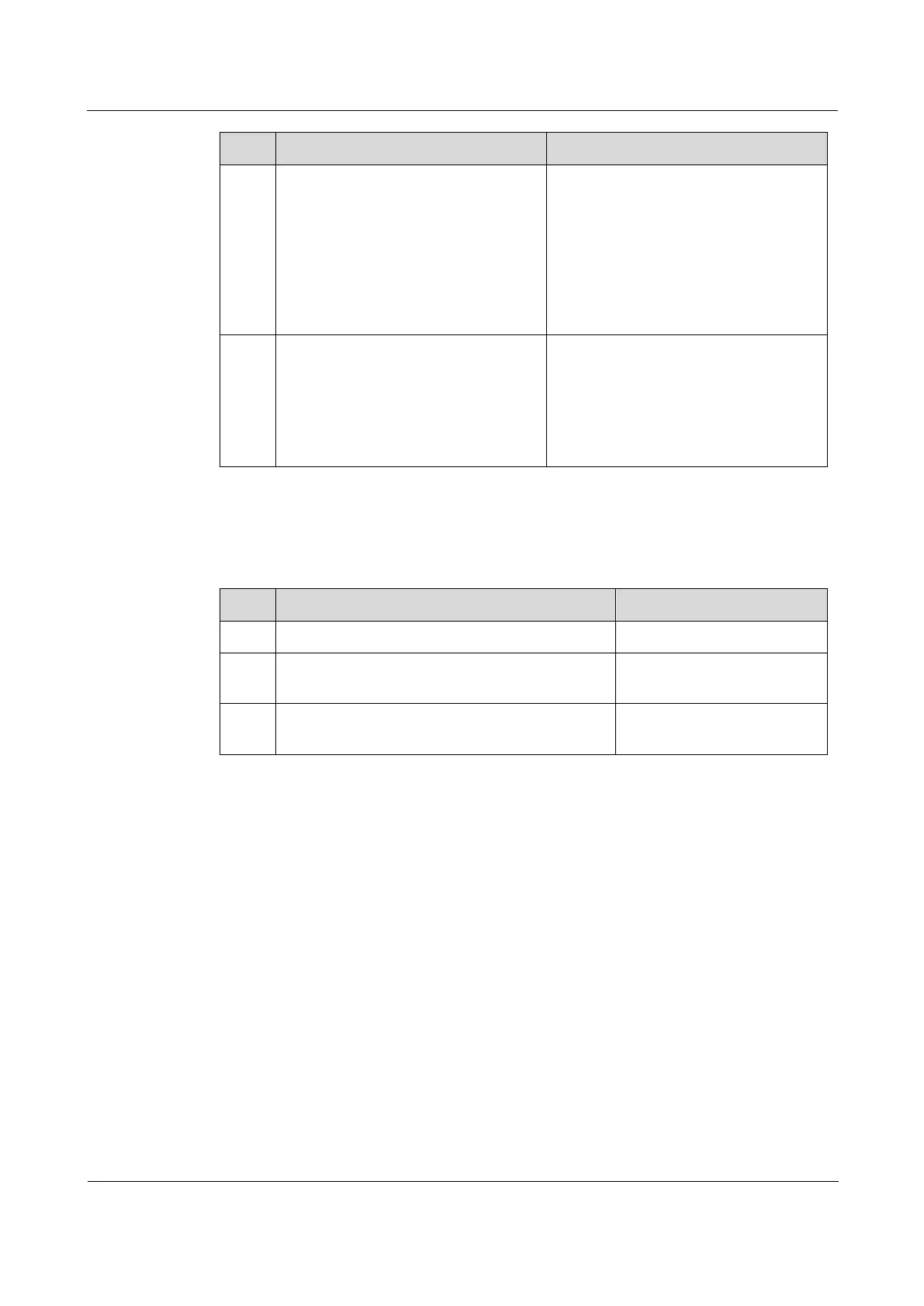
2.3.7 Checking configuration
Use the following commands to check configuration results.
Raisecom#show vlan private-vlan
Show PVLAN configuration.
Raisecom#show switchport interface
interface-type interface-number
Show configuration of
interface VLAN attributes.
Raisecom#show vlan [
vlan-list
|
static | dynamic ] [ detail ]
Show configuration of
VLAN attributes.
2.3.8 Example for configuring PVLAN
Networking requirements
To effectively distribute VLAN resources, you need to properly partition and configure
VLANs. As shown in Figure 2-5, on Switch A, configure VLAN 10 as the primary VLAN,
VLAN 20 as the isolated VLAN, and VLAN 30 as the community VLAN. The detailed
configurations are as below:
Configure GE 1/1/1 and GE 1/1/2 as community interfaces. Associate primary VLAN 10
with secondary VLAN 30.
Configure GE 1/1/3 and GE 1/1/4 as isolated interfaces. Associate primary VLAN 10
with secondary VLAN 20.
Configure GE 1/1/5 as the promiscuous interface. Map PVLAN with VLAN 10, VLAN
20, and VLAN 30.
Connect PC 1 and PC 2 to community interfaces GE 1/1/1 and GE 1/1/2 respectively,
and they can communicate with these two interfaces and the promiscuous interface GE
1/1/1.



 To Next Page
 Loading...



