Raisecom
ISCOM2600G-HI (A) Series Configuration Guide
Raisecom Proprietary and Confidential
Copyright © Raisecom Technology Co., Ltd.
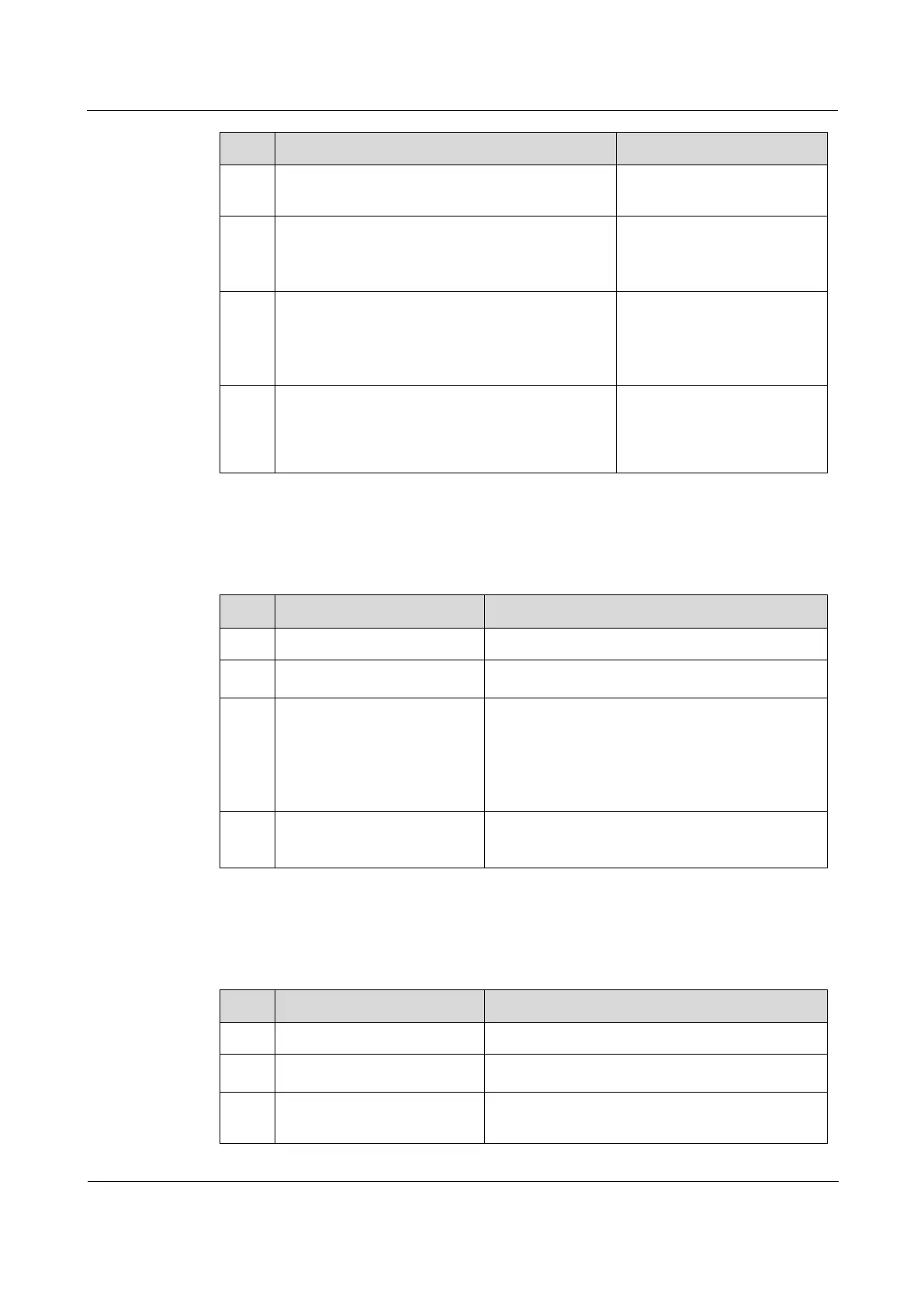
Raisecom(config)#router rip
Enable RIP, and enter RIP
configuration mode.
Raisecom(config-rip)#distribute-list
{ ip-access-list
acl-number
| prefix-
list
list-name
| route-map
rmap-name
}
in [
interface-type interface-number
]
Configure RIP ingress
routing policy.
Raisecom(config-rip)#distribute-list
{ ip-access-list
acl-number
| prefix-
list
list-name
| route-map
rmap-name
}
out [
interface-type interface-
number
]
Configure RIP egress routing
policy.
Raisecom(config-rip)#distribute-list
gateway
list-name
in [
interface-type
interface-number
]
Execute routing policies on
the source address of the
received packets through
RIP.
5.6.9 Configuring route calculation
Configure route calculation for the ISCOM2600G-HI series switch as below.
Enter global configuration mode.
Raisecom(config)#router
rip
Enable RIP, and enter RIP configuration mode.
Raisecom(config-
rip)#distance
administrative-distance
[
ip-address wild-card-
mask
]
Configure the administrative distance of RIP,
namely, the protocol priority. The shorter the
administrative distance is, the higher the priority
will be.
By default, the administrative distance is 120.
Raisecom(config-
rip)#maximum load-
balancing
number
Configure the maximum number of IP equal-cost
multi-path load balancing paths.
5.6.10 Checking configurations
Use the following commands to check configuration results.
Show basic information about RIP.
Raisecom#show ip rip
database
Show information about RIP routing database.
Raisecom#show ip rip
interface
Show configurations and status of the interface
which runs RIP.



 To Next Page
 Loading...



