Raisecom
ISCOM2600G-HI (A) Series Configuration Guide
Raisecom Proprietary and Confidential
Copyright © Raisecom Technology Co., Ltd.
Raisecom(config-vlan1)#ip
management-traffic cos
cos-value
Configure CoS of the
management VLAN.
By default, it is 6.
Raisecom(config-vlan1)#ip
management-traffic mode double-
tagging [ inner-vlan
vlan-id
]
[ inner-cos
cos-id
]
Configure the double-tagged
mode for management packets.
5.1.7 Checking configurations
Use the following commands to check configuration results.
Raisecom#show ip interface
brief
Show configurations of the IP address of
the VLAN interface.
Raisecom#show ipv6 interface
brief
Show configurations of the IPv6 address
of the VLAN interface.
Raisecom#show ip management-
traffic
Show information about management
packets on the VLAN interface.
5.1.8 Example for configuring VLAN interface to interconnect with
host
Networking requirements
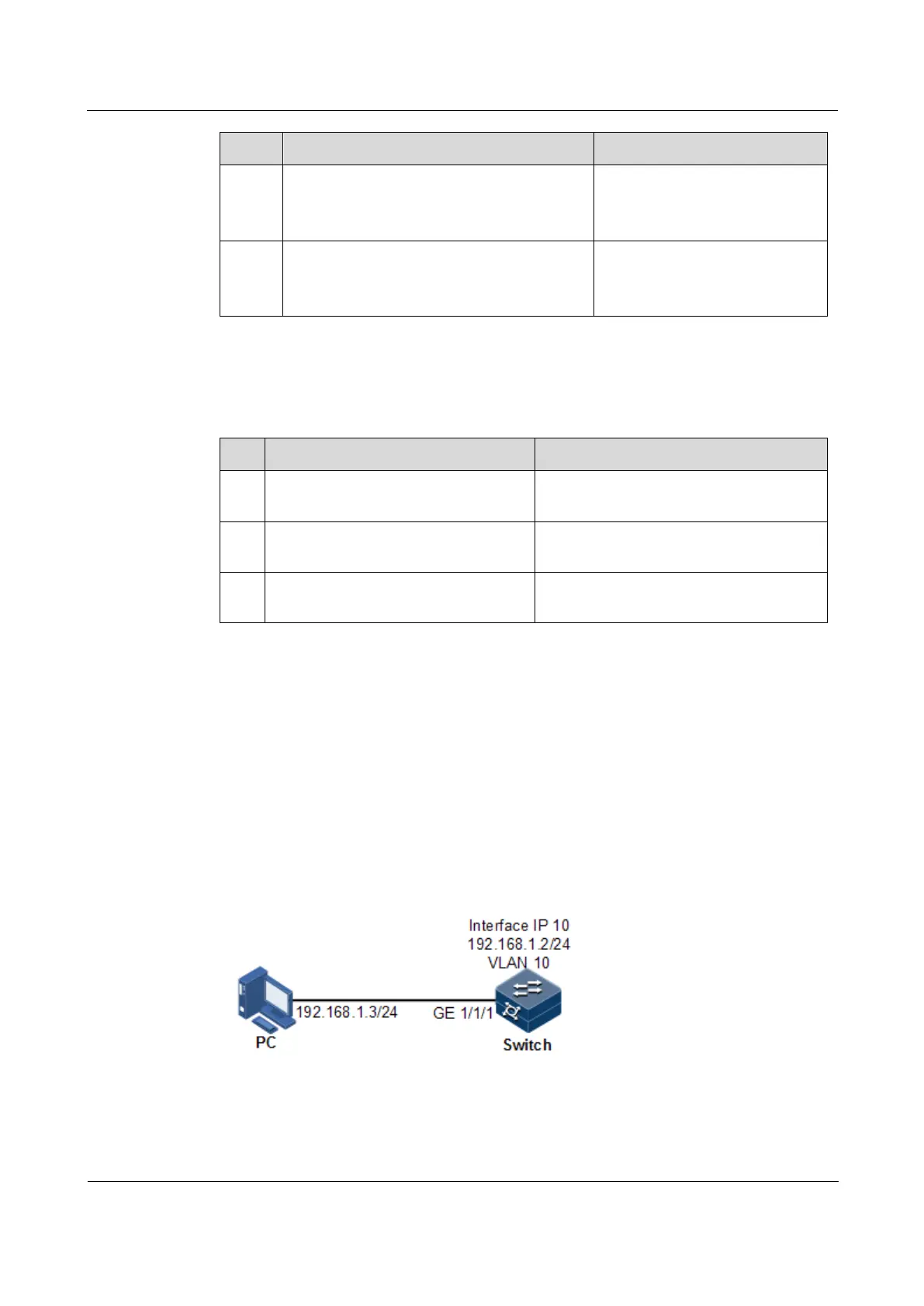
As shown in Figure 5-1, configure the VLAN interface to the switch so that the host and the
ISCOM2600G-HI series switch can ping each other.
Figure 5-1 VLAN interface networking
Configuration steps
Step 1 Create a VLAN and add the interface to the VLAN.



 To Next Page
 Loading...



