Control circuit
46
INSTALLATION AND WIRING
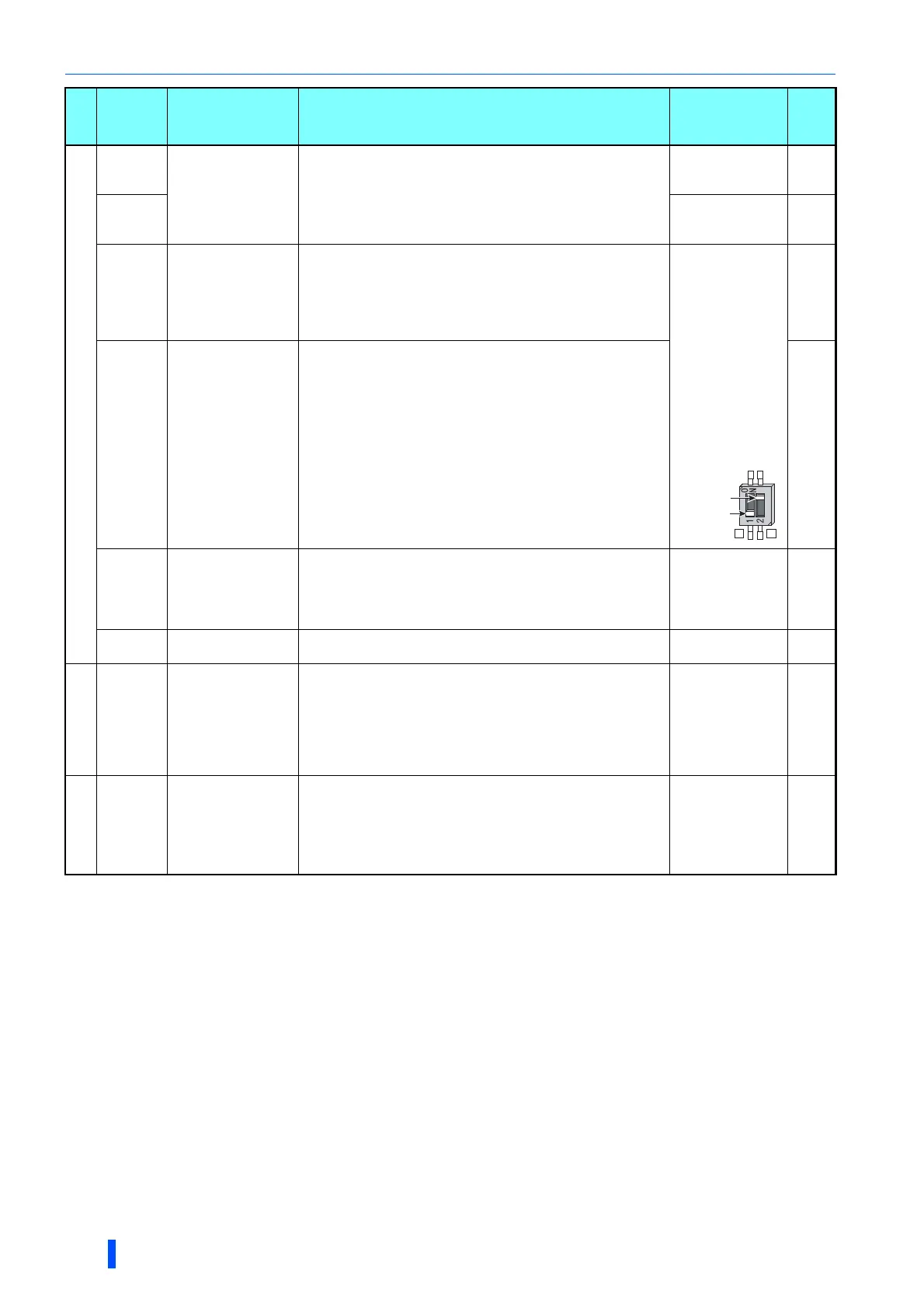
Set Pr.73, Pr.267, and the voltage/current input switch correctly, then input an analog signal in accordance with the setting.
Applying a voltage with the voltage/current input switch ON (current input is selected) or a current with the switch OFF (voltage input is selected)
could cause component damage of the inverter or analog circuits of output devices. (For the details, refer to page 406.)
Sink logic is initially set for the FM-type inverter.
Source logic is initially set for the CA-type inverter.
Frequency setting
10E
Frequency setting
power supply
When connecting the frequency setting potentiometer at an initial
status, connect it to the terminal 10.
Change the input specifications of the terminal 2 using Pr.73
when connecting it to the terminal 10E.
10 VDC 0.4 V
Permissible load
current 10 mA
406
10
5 VDC 0.5 V
Permissible load
current 10 mA
406
2
Frequency setting
(voltage)
Inputting 0 to 5 VDC (or 0 to 10 V, 0 to 20 mA) provides the
maximum output frequency at 5 V (10 V, 20 mA) and makes input
and output proportional. Use Pr.73 to switch among input 0 to 5
VDC (initial setting), 0 to 10 VDC, and 0 to 20 mA. Set the
voltage/current input switch in the ON position to select current
input (0 to 20 mA).
When voltage is
input:
Input resistance 10
k1 k
Maximum
permissible
voltage 20 VDC
When current is
input:
Input resistance
245 5
Permissible
maximum current
30 mA
406
4
Frequency setting
(current)
Inputting 4 to 20 mADC (or 0 to 5 V, 0 to 10 V) provides the
maximum output frequency at 20 mA and makes input and output
proportional. This input signal is valid only when the AU signal is
ON (terminal 2 input is invalid). Use Pr.267 to switch among input
4 to 20 mA (initial setting), 0 to 5 VDC, and 0 to 10 VDC. Set the
voltage/current input switch in the OFF position to select voltage
input (0 to 5 V/0 to 10 V).
Use Pr.858 to switch terminal
functions.
406
1
Frequency setting
auxiliary
Inputting 0 to ±5 VDC or 0 to ±10 VDC adds this signal to terminal
2 or 4 frequency setting signal. Use Pr.73 to switch between input
0 to ±5 VDC and 0 to ±10 VDC (initial setting). Use Pr.868 to
switch terminal functions.
Input resistance 10
k 1 k
Permissible
maximum voltage
20 VDC
406
5
Frequency setting
common
Common terminal for frequency setting signal (terminal 2, 1 or 4)
and analog output terminal AM, CA. Do not earth (ground).
— 406
Thermistor
10
2
PTC thermistor input
For receiving PTC thermistor outputs.
When PTC thermistor is valid (Pr.561 "9999"), the terminal 2 is
not available for frequency setting.
Applicable PTC
thermistor
specification
Overheat detection
resistance:
0.5 to 30 k
(Set by Pr.561)
331
External power
supply input
+24
24 V external power
supply input
For connecting a 24 V external power supply.
If a 24 V external power supply is connected, power is supplied to
the control circuit while the main power circuit is OFF.
Input voltage 23 to
25.5 VDC
Input current 1.4 A
or less
56
Type
Terminal
Symbol
Terminal name Terminal function description
Rated
specification
Refer
to
page
Voltage/current
input switch
2 4
switch1
switch2

 To Next Page
 Loading...