304 Properties of the Modules
imc CANSAS Users Manual - Doc. Version 1.9 - 05.12.2014© 2014 imc Meßsysteme GmbH
6.9 DO16 digital outputs
16 digital outputs
Separate voltage supply for each bank of 8 channels
Each bank of 8 isolated to other bank, power supply and CAN-bus, but not isolated
within bank
Technical data DO16.
6.9.1 Configuring the outputs
The imc CANSAS-DO16 module's outputs can be configured as open-drain or as totem-pole output
stages. This setting applies to whole channel groups, meaning that Signals 1 through 8 share their
settings, as do Signals 9 through 16. This setting must be made in the dialog accessed via the Module
Tree entry Digital outputs.
6.9.2 Starting up the DO16 module
When the module is started, the outputs are set to the value "0". If a power-up value other than 0 (zero)
is set, it only comes into effect after the module has been activated. To boot the module typically takes <
1s. It is recommended to set "0" as the power-up value in the channel's message mapping dialog, if
possible. Only then will there not be any jump after booting.
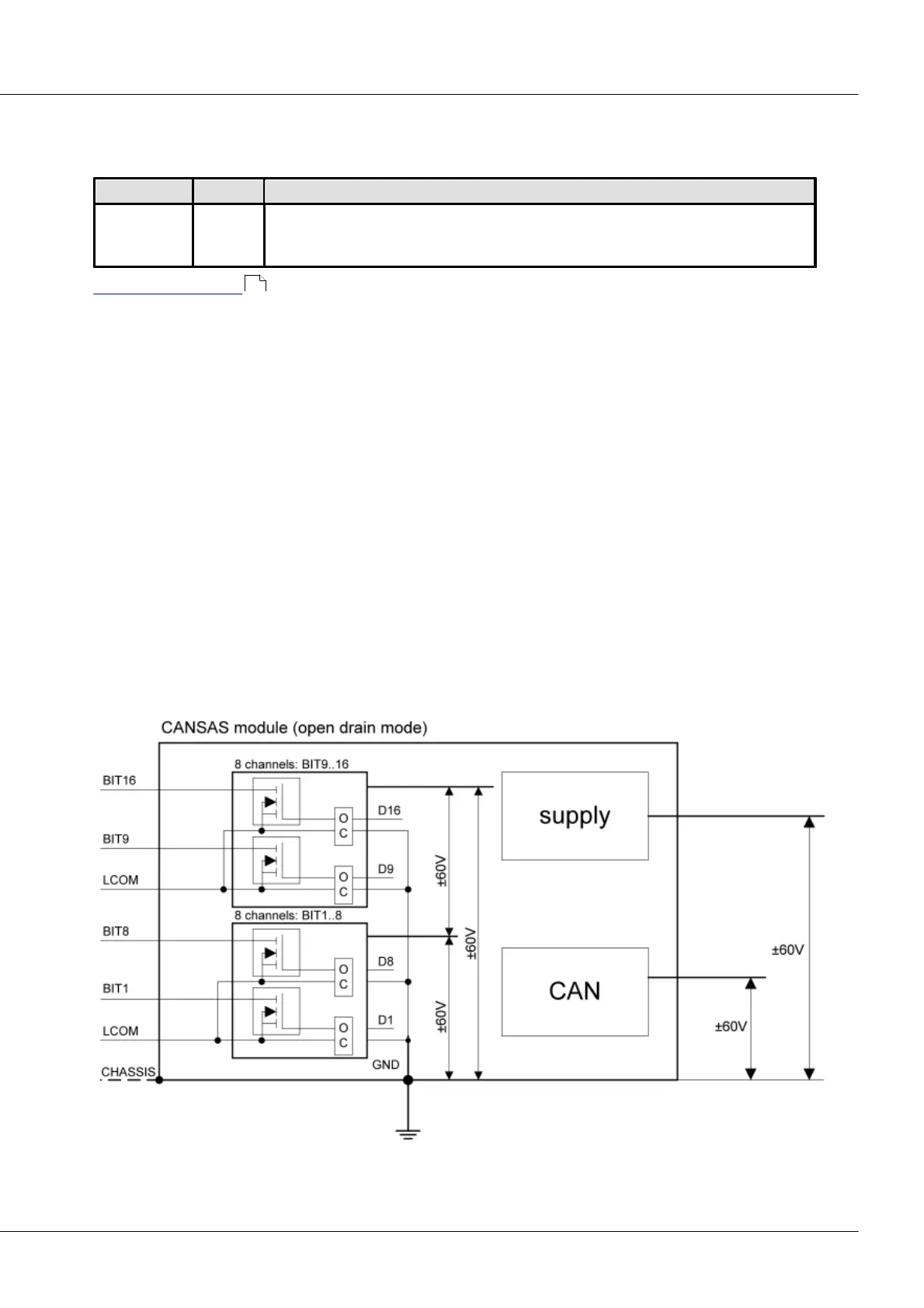
6.9.3 CANSAS-DO16 block diagram
6.9.3.1 Open Drain Mode
Outputs configured as Open drain
479



 To Next Page