358 Properties of the Modules
imc CANSAS Users Manual - Doc. Version 1.9 - 05.12.2014© 2014 imc Meßsysteme GmbH
6.16.7.4 Balancing
To be able to zero-balance (tare) all relative pressure channels, you must first open the measurement
window using the menu item Module / Measure.... Before performing the balancing procedure, first
disconnect the couplings from the pressure module's nipples after having made sure that the tubes are
empty and that there is no large pressure differential to the ambient air. Then select the channels which
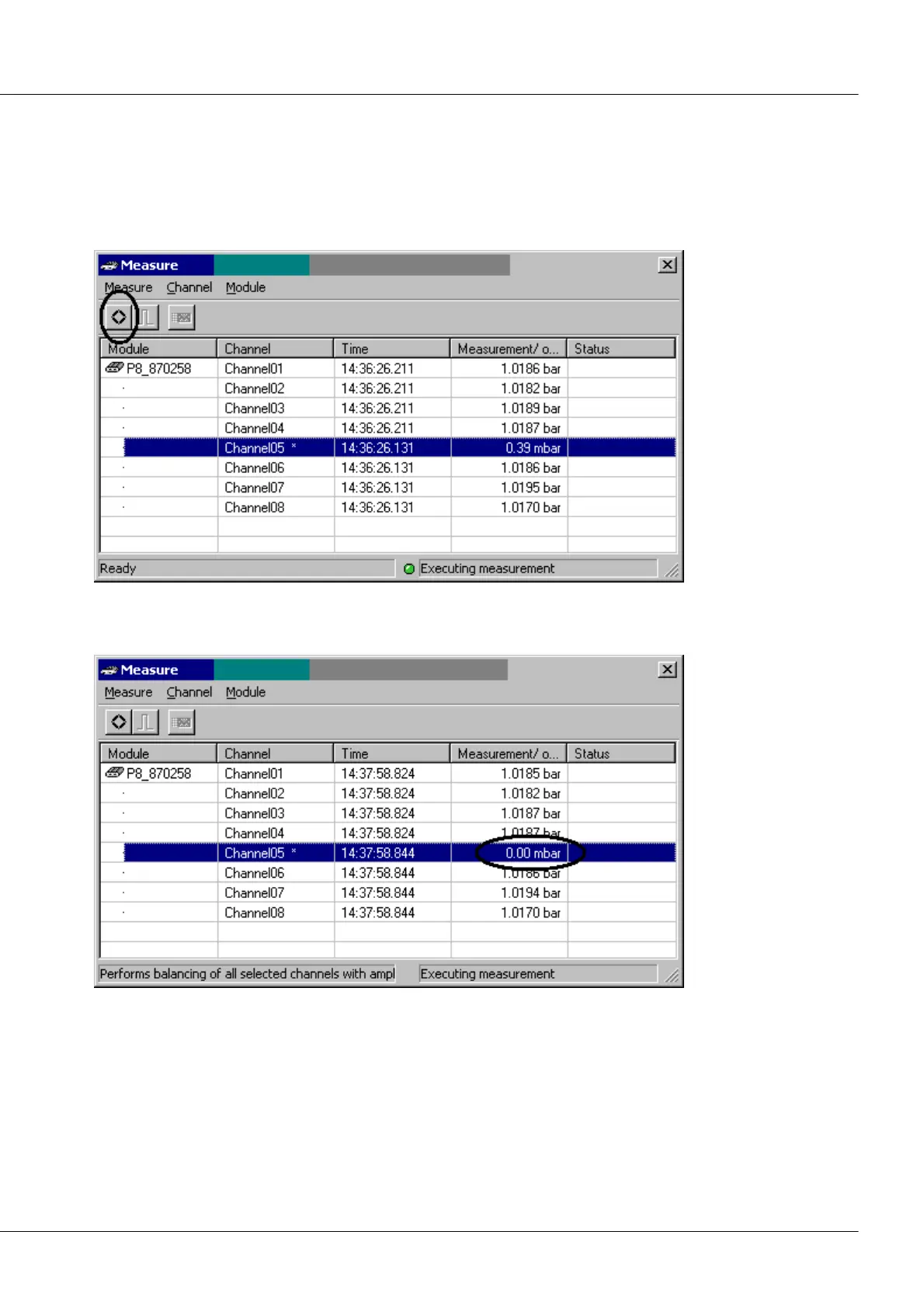
you wish to balance. Then choose the menu item Channel / Perform balancing for selections.
Measurement: before using the tare-function
A few seconds later, the zeroing has been completed. The offset values are written to the module's Flash-
EPROM and are subsequently used for corrections.
Measurement: after using the tare-function
The tare-function can only work if the relative pressure is near zero (which it should be in such a
situation). Taring for absolute pressure channels is not possible. If you have an offset to compensate in
such a case, use a virtual channel. Even after using the tare-function, the measurement value is usually
not precisely 0,0mbar, but may be off by a few bits. The value is only 0,0 for the purposes of the
measurement channel's specified accuracy.



 To Next Page