INC4 incremental encoder channels 335
imc CANSAS Users Manual - Doc. Version 1.9 - 05.12.2014© 2014 imc Meßsysteme GmbH
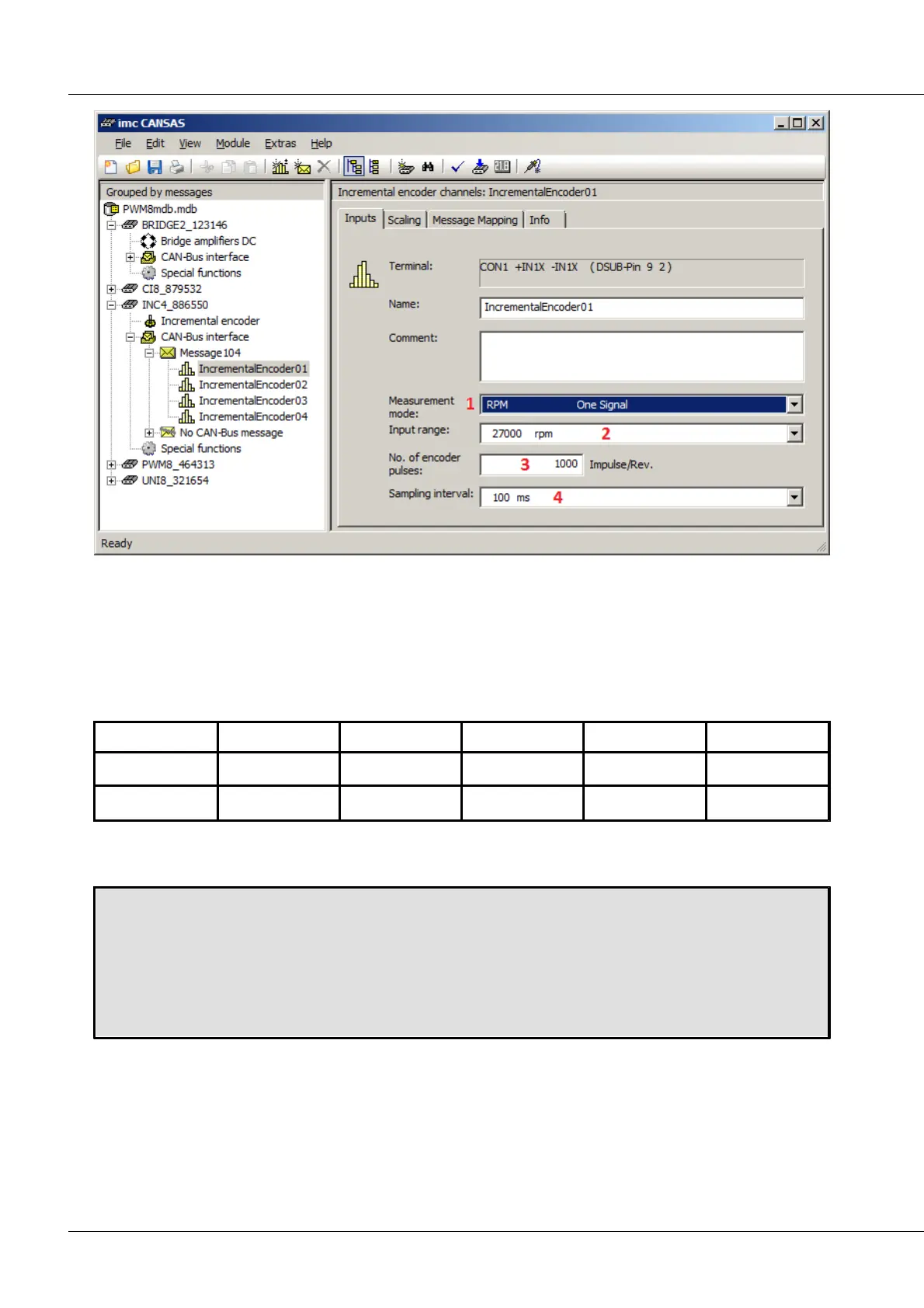
[1] measurement mode [2] measurement range [3] number of pulse per rotation [4] sample rate
The sampling interval determines at what rate result values are returned (or internally: at what intervals
the counter findings are evaluated).
Setting the sampling interval:
IncrementalEncoder0x -> Index card “Inputs” -> Combo box “Sampling interval”
The available selections are:
6.12.2 Comparator configuration
Setting the switching threshold:
Incremental encoder -> Index card “General” -> Input box “Switching threshold”
Setting the hysteresis:
Incremental encoder -> Index card “General” -> Input box “Hysteresis”
Setting the input low pass filter:
Incremental encoder -> Index card “General” -> Combo box “Low pass filter”
Setting the switching threshold or hysteresis can be accomplished either using the sliding button or the
input box to the right of the sliding button:



 To Next Page