SENT: Gateway from SENT to the CAN-Bus 403
imc CANSAS Users Manual - Doc. Version 1.9 - 05.12.2014© 2014 imc Meßsysteme GmbH
6.19.2.4 Scaling the FAST-channels
The scaling of the FAST channels is accomplished by means of the Scaling page, as described in the
chapter Operation .
Each respective channel in the CAN-message is assigned the appropriate scaling according to the entries
made. In this way, the integer value from the SENT message is correctly interpreted as physical units.
Note that on the Scaling page the designations X1, Y1, … are reversed from the order in the other imc
CANSAS modules in conformity to the nomenclature in SAE J2716, according to which, X1 and X2
designate two physical values and Y1, Y2 represent the corresponding integer values from the SENT
message.
The resulting channel scaling in the CAN message can be viewed on the page “Message Mapping”.
Example:
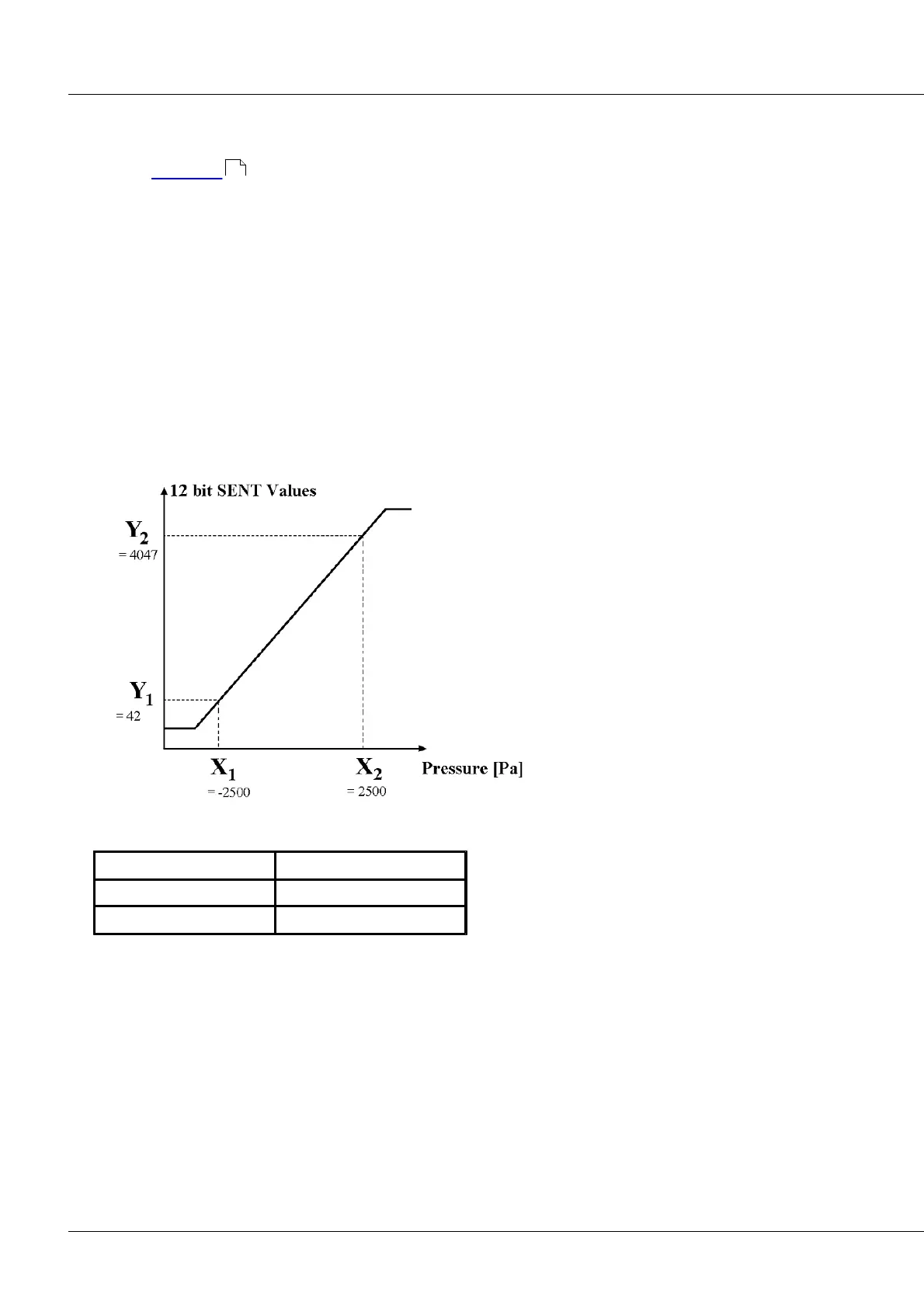
The following diagram shows the scaling of the data in conformity to SAE J2716 of JAN2010:
A relative pressure sensor has this characteristic curve:
This means, for instance, that the 12-bit integer 4047 transmitted in a SENT message corresponds to a
pressure of 2500 Pa.
388



 To Next Page