Field-IQ operation 18 Operations
Page 2 Buttons Tap to...
Bin
Go to the Virtual Bin / Tank Setup screen where you can adjust the
bin settings.
Seed Disc
Fill the seed disk.
Arm Pump
Enable Field-IQ to control the pump.
Gate Setup
Go to the Gate Setup screen.
Density
Go to the Density screen where you can enter the density of the
current product.
Return to the
previous detailed view
.
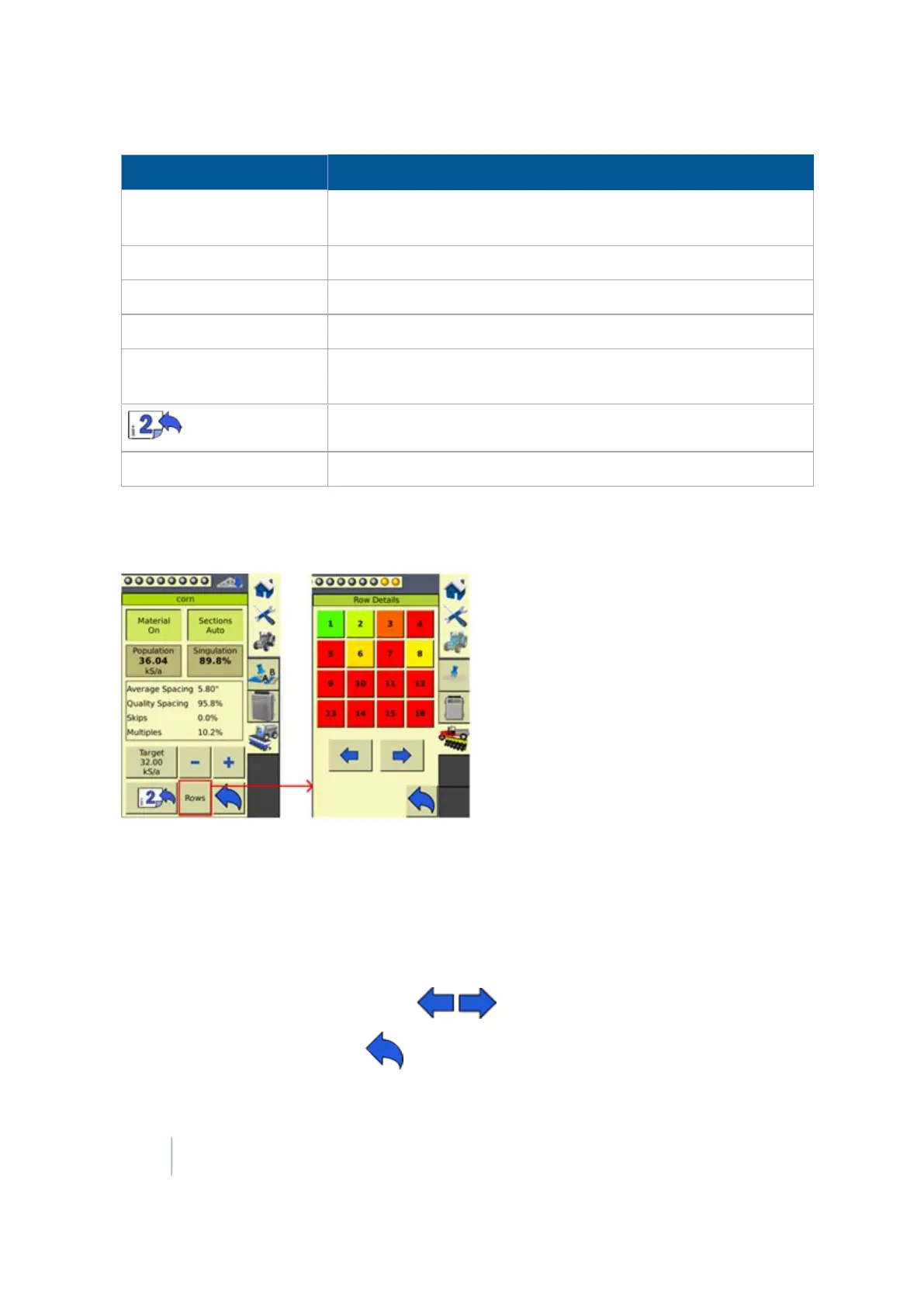
Rows
To go to the
Row detail view (page 388)
.
Row detail view
To see detailed information on the rows, tap Rows.
The color of the row numbers indicate how far off target the rows are applying.
l Green: Rows are applying on target.
l Red: Rows are applying off target.
l Black: Rows have been manually turned off.
l White: Rows have been turned off automatically by the system.
To view more rows, tap the arrow buttons .
To return to the previous view, tap .
388 FM-1000 Integrated Display User Guide Version 9.25, Revision B



 To Next Page