WindO/I-NV4 User’s Manual 24-5
1 Communicating with the MICRO/I
24
Online Function
1.3 Change Communication Settings
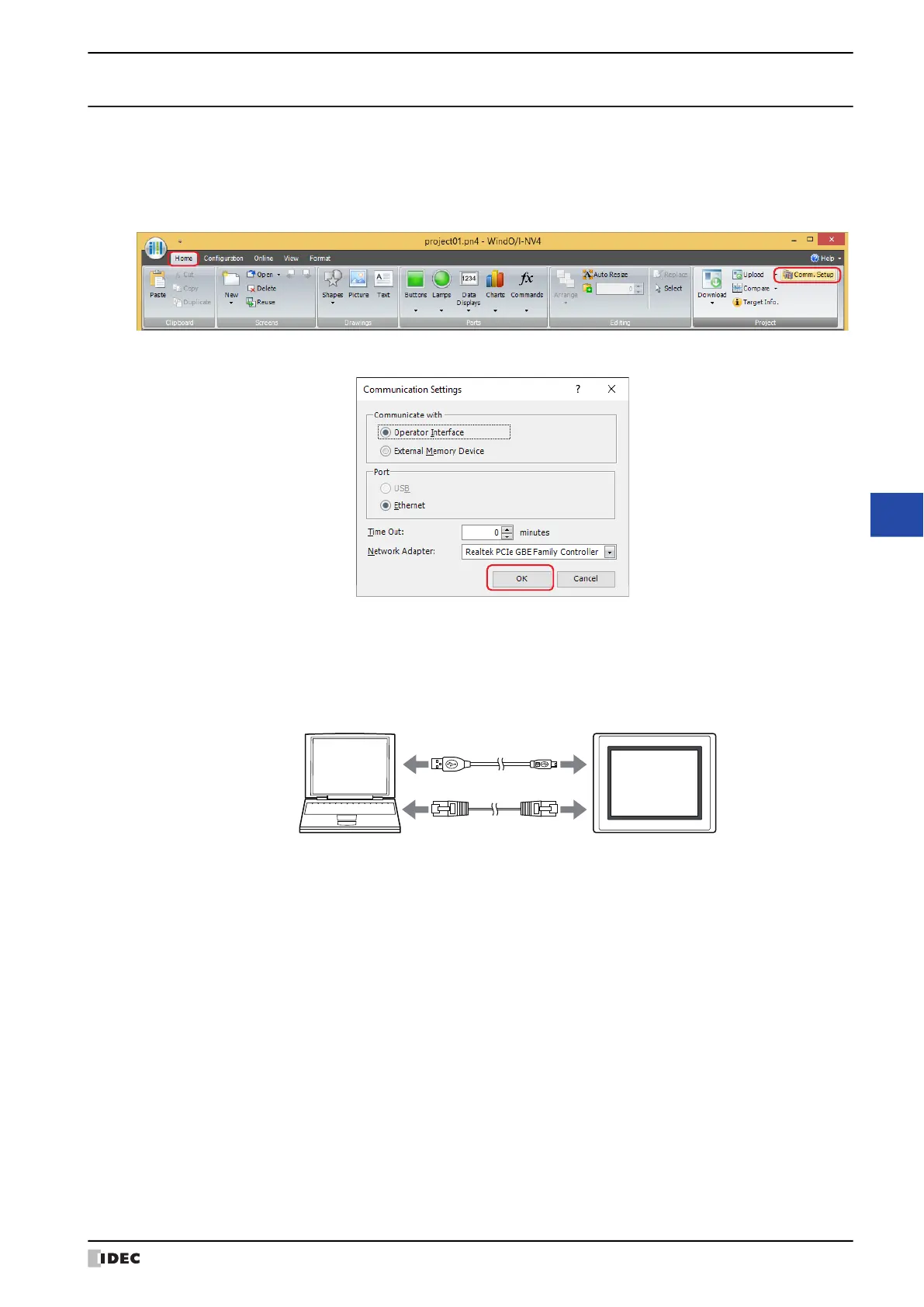
To communicate with the MICRO/I in WindO/I-NV4, configure the settings such as communication speed and port
used to match the connection method for the MICRO/I.
1 On the Home tab, in the Project group, click Comm.Setup.
The Communication Settings dialog box is displayed.
2 Change the settings on each tab as necessary and then click OK.
■ Communicate with
Select the device to communicate with from the following items.
Operator Interface: Communicate with the MICRO/I connected to the computer.
For details, refer to “Using the online function for Ethernet communication” on page 24-7.
External Memory Device: Read or write data to the external memory device inserted in the computer.
For details, refer to Chapter 31 “1.5 Reading/Writing Data” on page 31-4.
MICRO/IComputer
USB cable
Ethernet cable



 To Next Page
 Loading...