WindO/I-NV4 User’s Manual 35-3
1 HG2J-7U
35
MICRO/I Specifications
1.4
External Interfaces
● Serial Interface
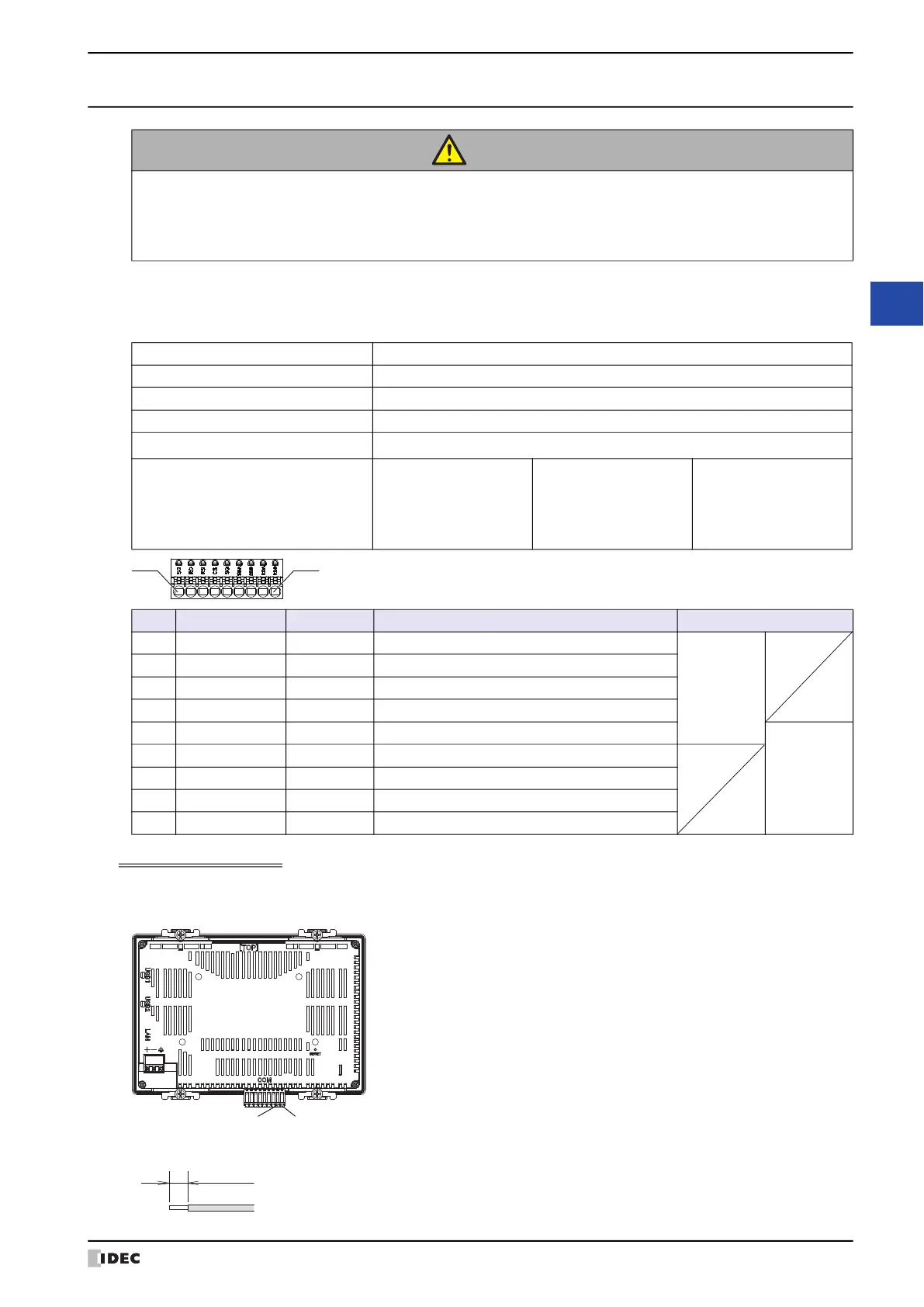
Use applicable cables for wiring and recommended ferrules (made by IDEC, Weidmüller or Phoenix Contact) as
follows.
Using RS422/485 interface
HG2J-7U is not equipped with terminating resistor. Insert a terminating resistor of an appropriate value (about 100 to
120 Ohm, 1/2 W minimum) between terminal number 8 (RDA) and terminal number 9 (RDB), if necessary.
*1 Strip the sheath of the wire 8 to 9 mm from the end.
CAUTION
• Make sure to turn off the power to the HG2J-7U before wiring each interface.
• The serial interface (COM) can be used as the RS232C and RS422/485 interfaces at same time.
• Use the SELV (Safety Extra-Low Voltage) circuit to connect the Serial, USB and Ethernet
interfaces.
Interface Specification RS232C, RS422/485
Connector Detachable Terminal Block 9-pin
Applicable cable AWG16 to AWG28
Conductor Type Solid wire or Stranded wire
Wire Strip Length
*1
8 to 9 mm
Recommended ferrule
ST3L-H025-12WJ
S3TL-H034-12WT
S3TL-H05-14WA
S3TL-H075-14WW
(IDEC)
H0,25/12 HBL
H0,34/12 TK
H0,5/14 OR
H0,75/14 W
(Weidmüller)
AI 0,25-8YE
AI 0,34-8TQ
AI 0,5-8WH
AI 0,75-8GY
(Phoenix Contact)
No. Name I/O Function Communication type
1 SD OUT Send Data
RS232C
2 RD IN Receive Data
3 RS OUT Request to Send
4 CS IN Clear to Send
5 SG ― Signal Ground
RS422/485
6 SDA OUT Send Data (+)
7 SDB OUT Send Data (-)
8 RDA IN Receive Data (+)
9 RDB IN Receive Data (-)
Terminal Number 8 (RDA) Terminal Number 9 (RDB)
8 to 9 mm



 To Next Page
 Loading...