82 Operation
imc CANSAS Users Manual - Doc. Version 1.9 - 05.12.2014© 2014 imc Meßsysteme GmbH
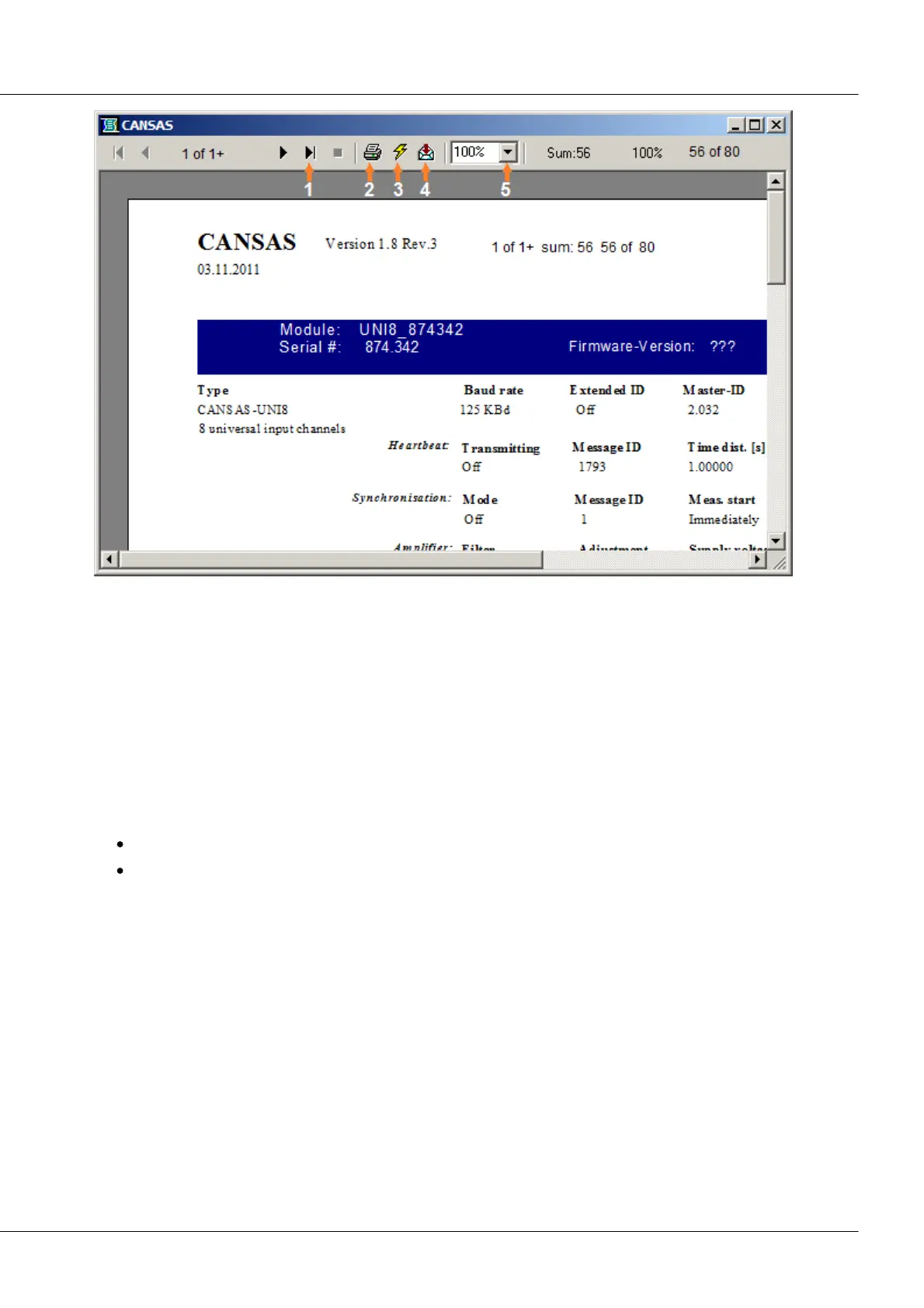
Scroll forwards and backwards through the report [1]
Call the dialog for printing the report [2]
Call the dialog for updating the configuration report with the newest module database data [3]
Call the dialog for exporting the report [4]
Increase/decrease display size [5]
3.4.1.8.1 The 'Print' dialog
The following options let you influence how the document is printed out:
Printing range: Specify which pages of the document to print out:
All prints the entire document
Pages prints a range specified by the controls 'from' and 'to'
Copies: Specifies how many copies of the printing range defined above to print out.
Collate copies prints multiple copies by sequences of report pages, rather than making multiple copies of
each page in separate batches.
3.4.1.8.2 The 'Export' dialog
The 'Export' dialog can be used to export the configuration report as a file formatted to be read by other
applications. For instance, a report could be exported in the Microsoft Excel format and thus opened in
Excel as a normal spreadsheet.
The Export function supports many common word processing, database and spreadsheet formats as well
as a number of standard data transfer formats.
Format: This combo box lists all formats in which the report can be exported.
Target: This combo box lists all targets available to the report.



 To Next Page