Menu functions 91
imc CANSAS Users Manual - Doc. Version 1.9 - 05.12.2014© 2014 imc Meßsysteme GmbH
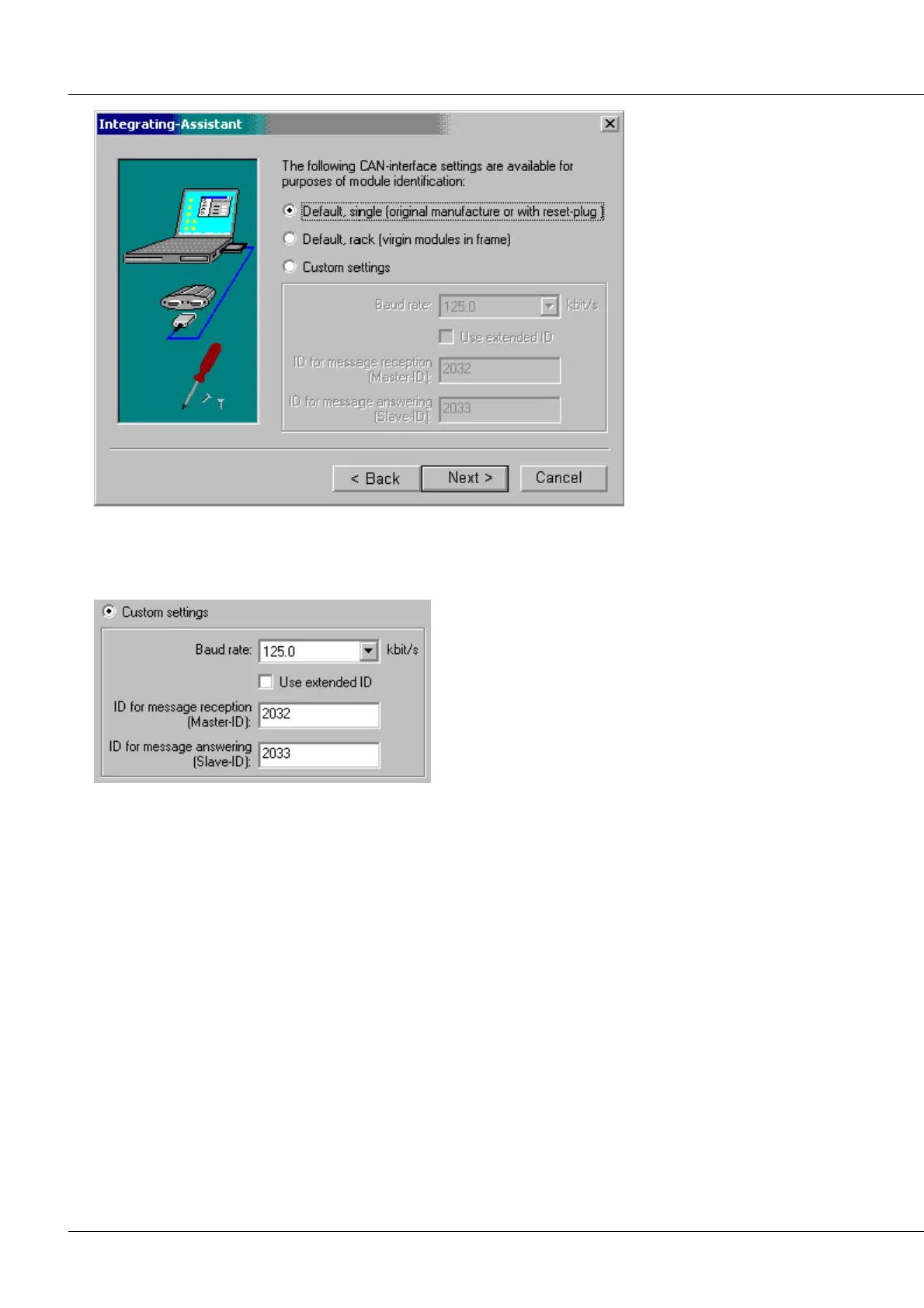
Default, rack: Default settings for a new modules used in a rack. Baud rate is 500 kbit/s; Ids are 2 for
receiving and 3 for send messages.
Custom settings:
The module's Baud rate and ID-numbers for
communication with the PC can also be specified
personally. But the values absolutely must match
those valid for the module in order for the module to
be recognized by the system. This is especially true
of the Baud rate, which tends to be reconfigured
more often than the ID-numbers! Note that only
standard Baud rates can be selected here. This
means that a module configured with a special Baud
rate using Expert settings can only become a default-
setting module by means of a Reset-plug!
Next: The next Assistant dialog prompts you to confirm the instruction to proceed with identification of
the module via the PC's CAN-interface. The process can take some time. This is especially true if the PC-
interface had not yet been used by the imc CANSAS program in the course of the session, since the
interface initialization process still must take place beforehand.
Once identification is completed, the next dialog appears. This is the same dialog which would appear
right after No (or: off-line) is selected. The dialog contains the settings which distinguish the module in
the database:



 To Next Page