8.18
SEL-751 Relay Instruction Manual Date Code 20170927
Front-Panel Operations
Touchscreen Display Front Panel
Touchscreen Display Front Panel
The SEL-751 Feeder Protection Relay can be ordered with an optional
touchscreen display (5-inch, color, 800 x 480 pixels). The touchscreen display
makes relay data metering, monitoring, and control quick and efficient. The
touchscreen display option in the SEL-751 features a straightforward
application-driven control structure and includes intuitive and graphical screen
designs.
Front-Panel Layout
The touchscreen front panel is the same as the two-line display in regards to
the target LEDs, operator control pushbuttons, and the TARGET RESET
pushbutton. Refer to Operation and Target LEDs on page 8.13 for a detailed
description of these features. In addition, the touchscreen front panel features
a HOME pushbutton.
Touchscreen Display
Human-Machine
Interface
This section explains the navigation of the front-panel touchscreen and all the
features it supports.
The touchscreen display allows you to:
➤ View and control bay screens
➤ Access metering and monitoring data
➤ Inspect targets
➤ View event history, summary data, and SER information
➤ View relay status and configuration
➤ Control relay operations
➤ View and edit settings
➤ Enable the rotating display
➤ Program control pushbuttons to jump to a specific screen
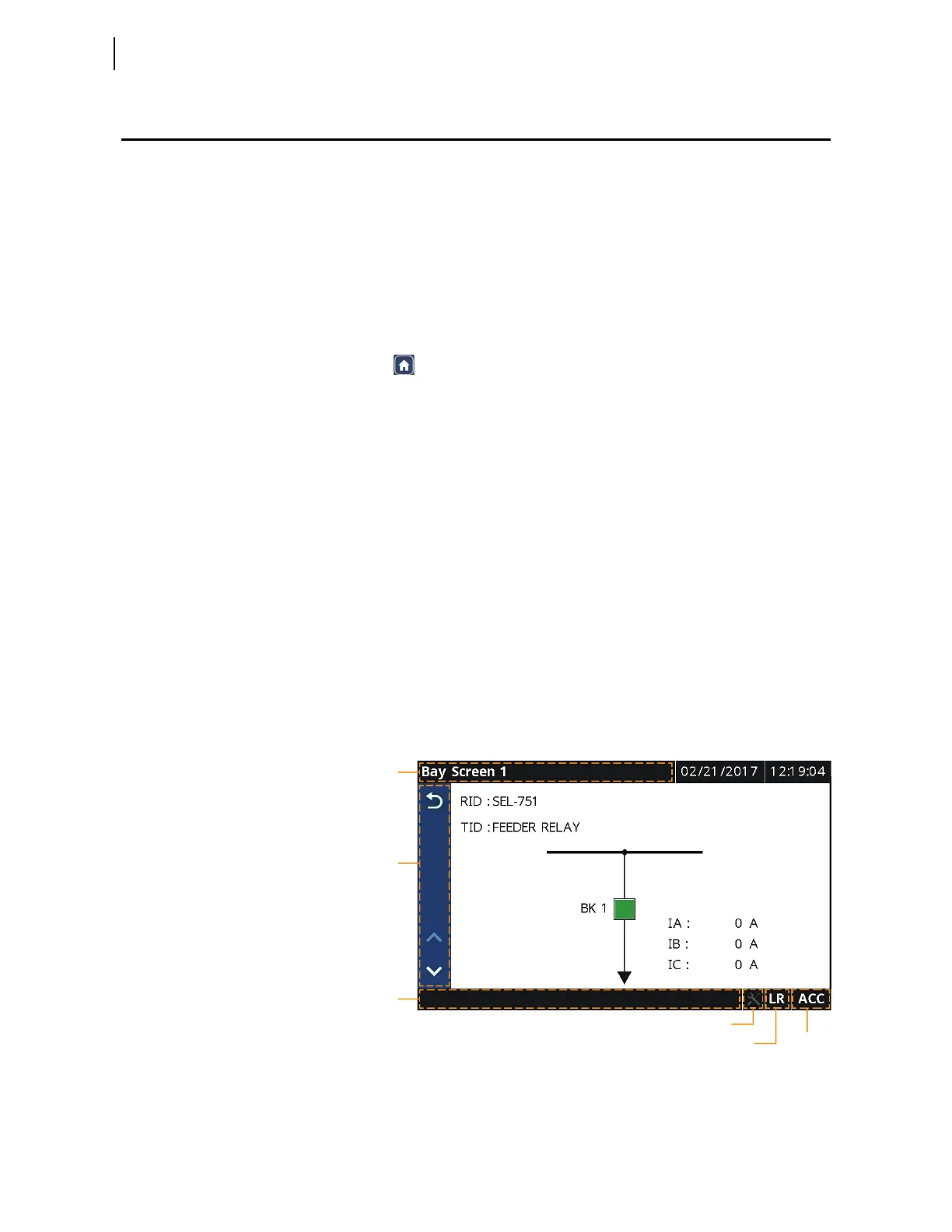
Figure 8.28 shows the relay touchscreen display components and indicators.
Figure 8.28 Touchscreen Display Components and Indicators
Sidebar
Notification
Bar
Screen Title
Diagnostics Icon
Access Level
Indication
Local/Remote
Indication



 To Next Page