9.15
Date Code 20170927 Instruction Manual SEL-751 Relay
Bay Control
Bay Control Application Example
Build Single-Line
Diagrams in Bay
Screen Builder
Use Bay Screen Builder to create single-line diagrams to load onto the
SEL-751 Relay through QuickSet. To create the single-line diagram shown in
Figure 9.10, perform the following steps.
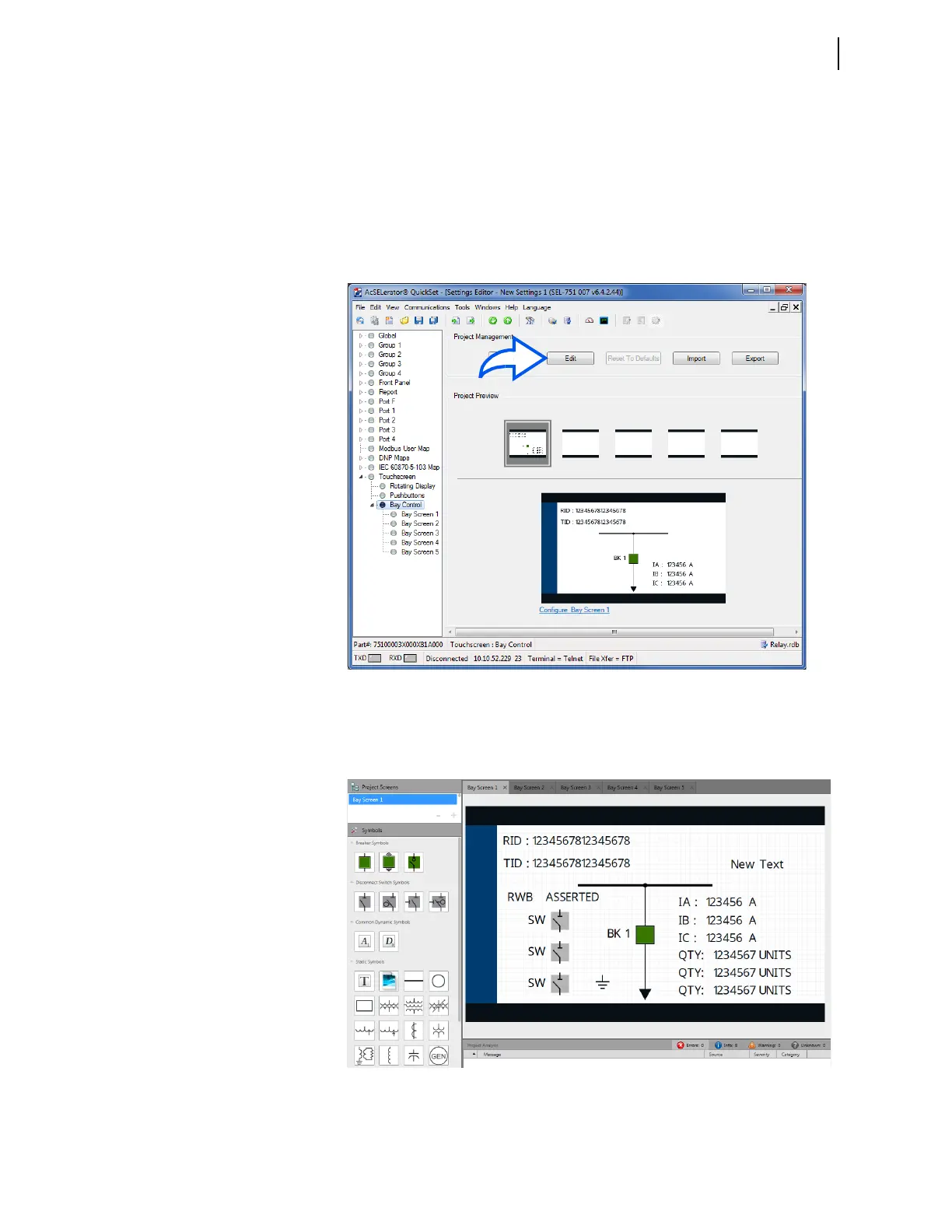
Step 1. Select the screen with the predefined single-line diagram
shown in Figure 9.13 as a starting point for your single-line
diagram.
Step 2. Click the Edit button (Figure 9.13) to open the screen with the
predefined single-line diagram in Bay Screen Builder.
Figure 9.13 Open Single-Line Diagram in Bay Screen Builder
Step 3. Drag-and-drop the additional symbols required for your single-
line diagram onto the screen area from the Symbols pane (see
Figure 9.14). Remove the unused labels (RID/TID).
Figure 9.14 Drag-and-Drop Symbols



 To Next Page