8.21
Date Code 20170927 Instruction Manual SEL-751 Relay
Front-Panel Operations
Touchscreen Display Front Panel
The relay wakes up to the screen set in the FPHOME setting, unless the
rotating display is enabled. If the rotating display is enabled and the inactivity
time has expired, the relay wakes up to the rotating display. Pressing the HOME
pushbutton a second time returns you to the screen set in the FPHOME
setting.
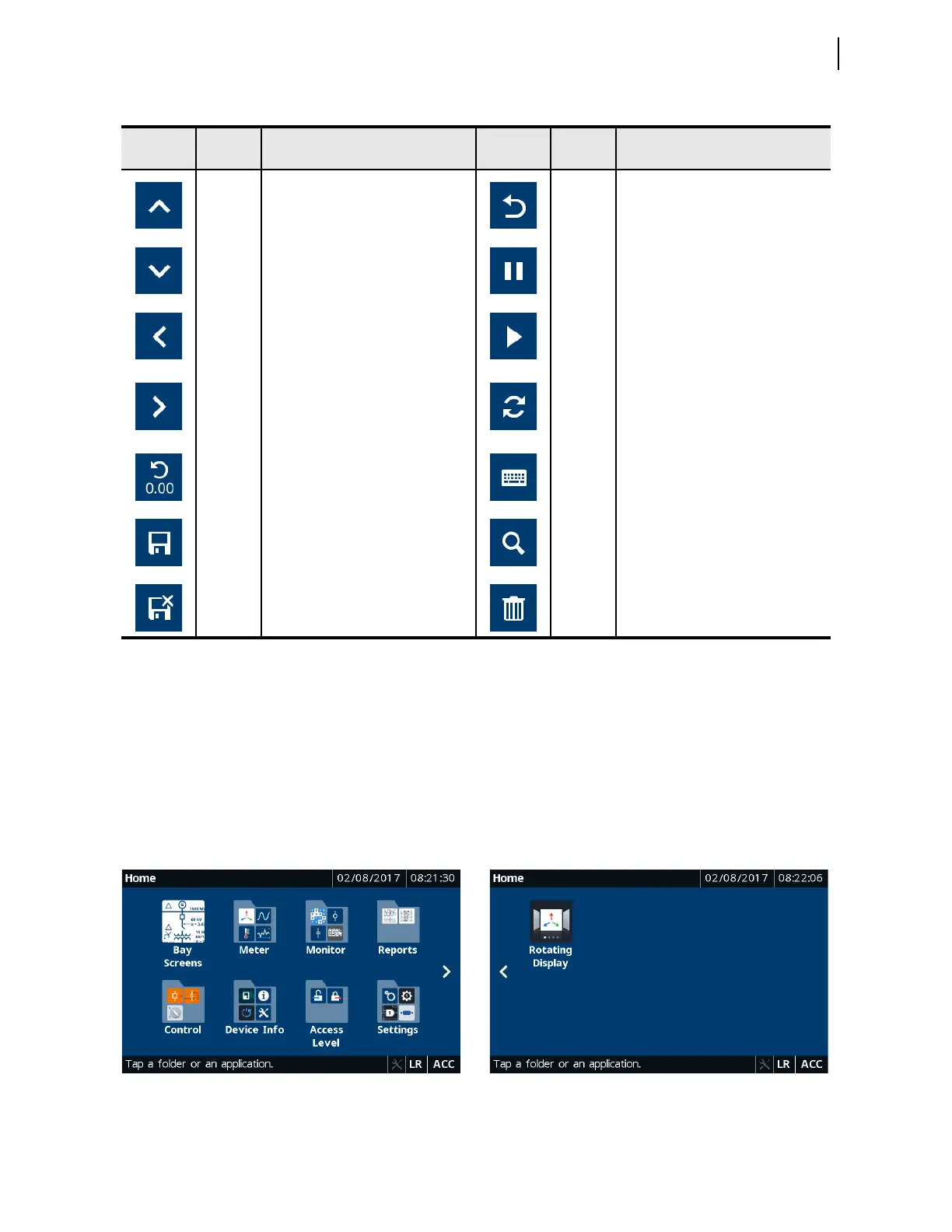
You can navigate the touchscreen by tapping the folders and applications. Tap
a folder or an application to view available applications or access an
application, respectively. Folders and applications are labeled according to
functionality.
Table 8.7 Sidebar Buttons
Button
Button
Name
Function Button
Button
Name
Function
Up
Pages up in applications with multiple
screens; when on the first screen, this
button is disabled.
Back
Returns to the preceding screen,
e.g., from applications to folders.
Down
Pages down in applications with
multiple screens; when on the last
screen, this button is disabled.
Pause Stops updating the phasors.
Left
Pages left on the home screen and in
folders with multiple screens; this
button is hidden if there is no screen
to the left.
Play
Updates the phasor values from the
relay as the screen refreshes.
Right
Pages right on the home screen and in
folders with multiple screens; this
button is hidden if there is no screen
to the right.
Refresh
Reloads the data when new data are
available.
Reset
Resets the accumulating quantities,
such as energy, to zero.
Keyboard Use to edit relay settings.
Save Saves the edited settings to the relay. Search
Search tool (e.g., search for the status
of a Relay Word bit).
Cancel
Save
Cancels the setting edits. Trash Deletes the records from the report.
Figure 8.29 Home (Default FPHOME Setting)



 To Next Page