Troubleshooting
6-122 Manual # 42-02-7223
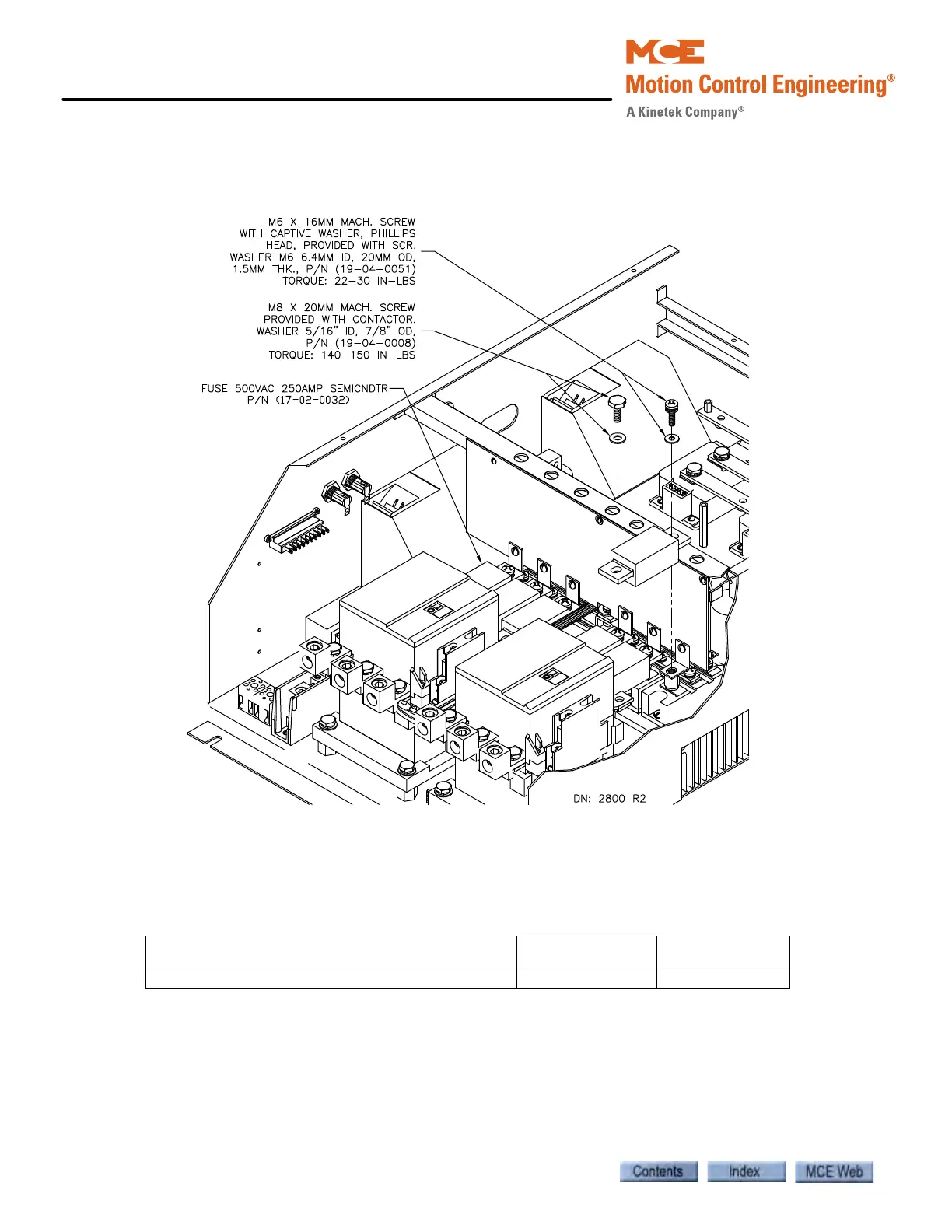
Semiconductor Fuses Replace semiconductor fuses as described here.
Figure 6.21 Replacing the Semiconductor Fuses
The semiconductor fuses (FL1 - FL6) are rated at 200 Amps, 500 Volts. Before removing or
replacing a fuse, ensure that all power is OFF. The cover of the 12–Pulse SCR Drive must be
removed to access the semiconductor fuses.
1. Remove the two screws that hold the fuse in place (see the illustration). When removing
screws, make sure that no loose parts (bolts, screws, or washers) fall into the drive.
2. Install the replacement semiconductor fuse. Replace the screws.
3. On the SCR side of the fuse, torque the screw to 22-30 inch pounds. On the Contactor
side of the fuse, torque the screw to 140-150 inch pounds. Ensure that no loose parts are
left in the drive enclosure.
Table 6.32 Parts List for Semiconductor Fuses
ITEM (DESCRIPTION) MCE PART # UNIT
Semiconductor Fuse (fuse 500VAC 250 Amp) 17-02-0032 Each



 To Next Page