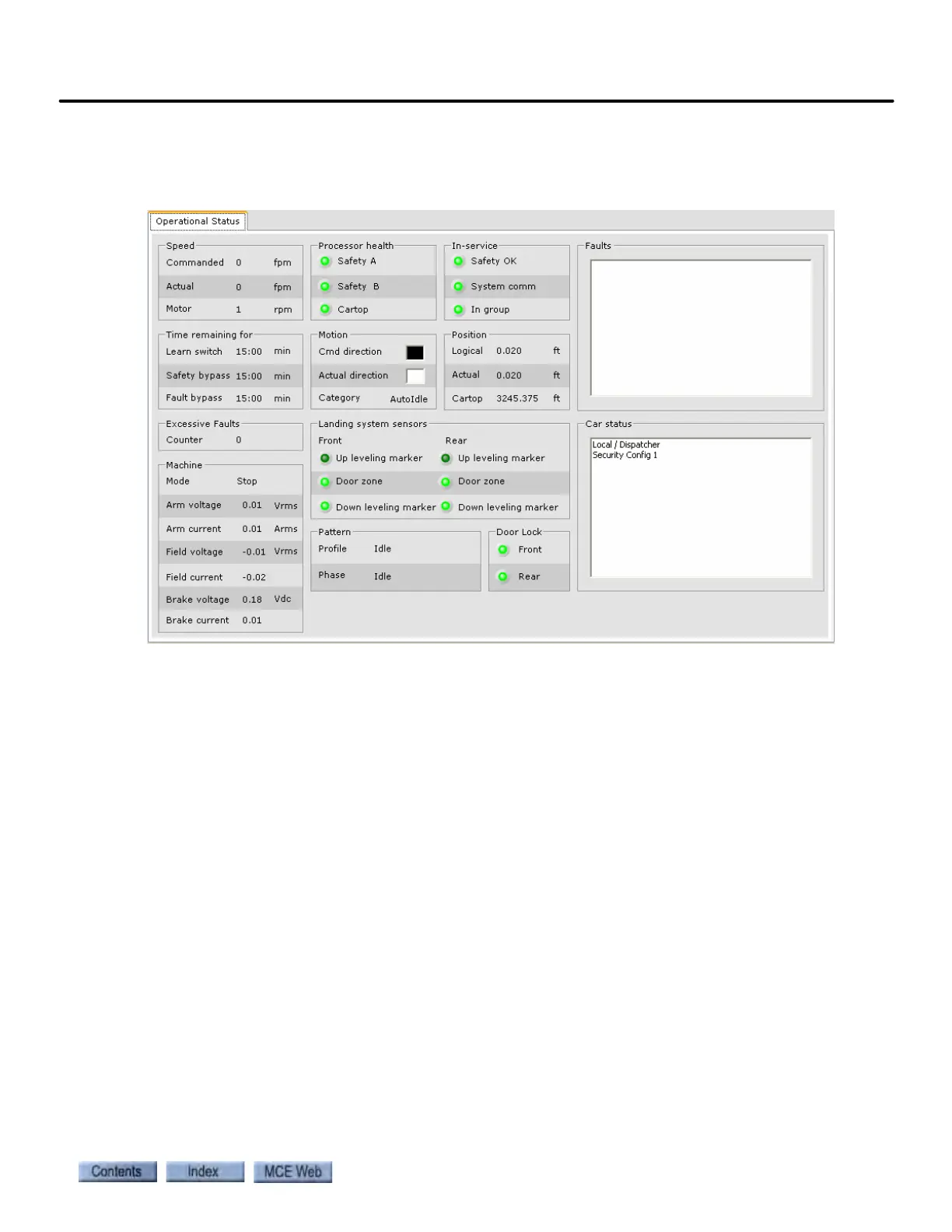
Operational Status tab
9-7
9
iControl DC
Operational Status tab
The Operational Status tab is displayed, along with the Hoistway pane, when iView first con-
nects to an iController.
Speed
• Commanded: Speed commanded by the control system
• Actual: Actual car speed reported by the landing system encoder.
• Motor: Speed reported by the motor encoder.
Processor health
• Safety A: Indicates that Safety processor A is ok.
• Safety B: Indicates that Safety processor B is ok.
• Cartop: Indicates that the Cartop processor is ok.
In-service
• Safety OK: Indicates safety string is made up.
• System communication: Indicates system communication is ok.
• In group: Indicates car is operating under group dispatcher control.
Time Remaining for
• Learn switch: Time remaining until the Learn switch timer elapses. Reset the timer by tog-
gling the iBox LEARN switch OFF and then back to ON.
• Safety bypass: Time remaining until the Safety bypass timer elapses. Reset the timer by
removing and then reinstalling the jumper (SB to 3 on the iBox).
• Fault Bypass: Time remaining until the Fault bypass timer elapses. Reset the timer by tog-
gling the iBox FAULT/FUNCTION BYPASS switch to OFF and then back to ON.



 To Next Page