iView - Controller View
9-88 Manual # 42-02-7223
Car Operation - Shuttle Service
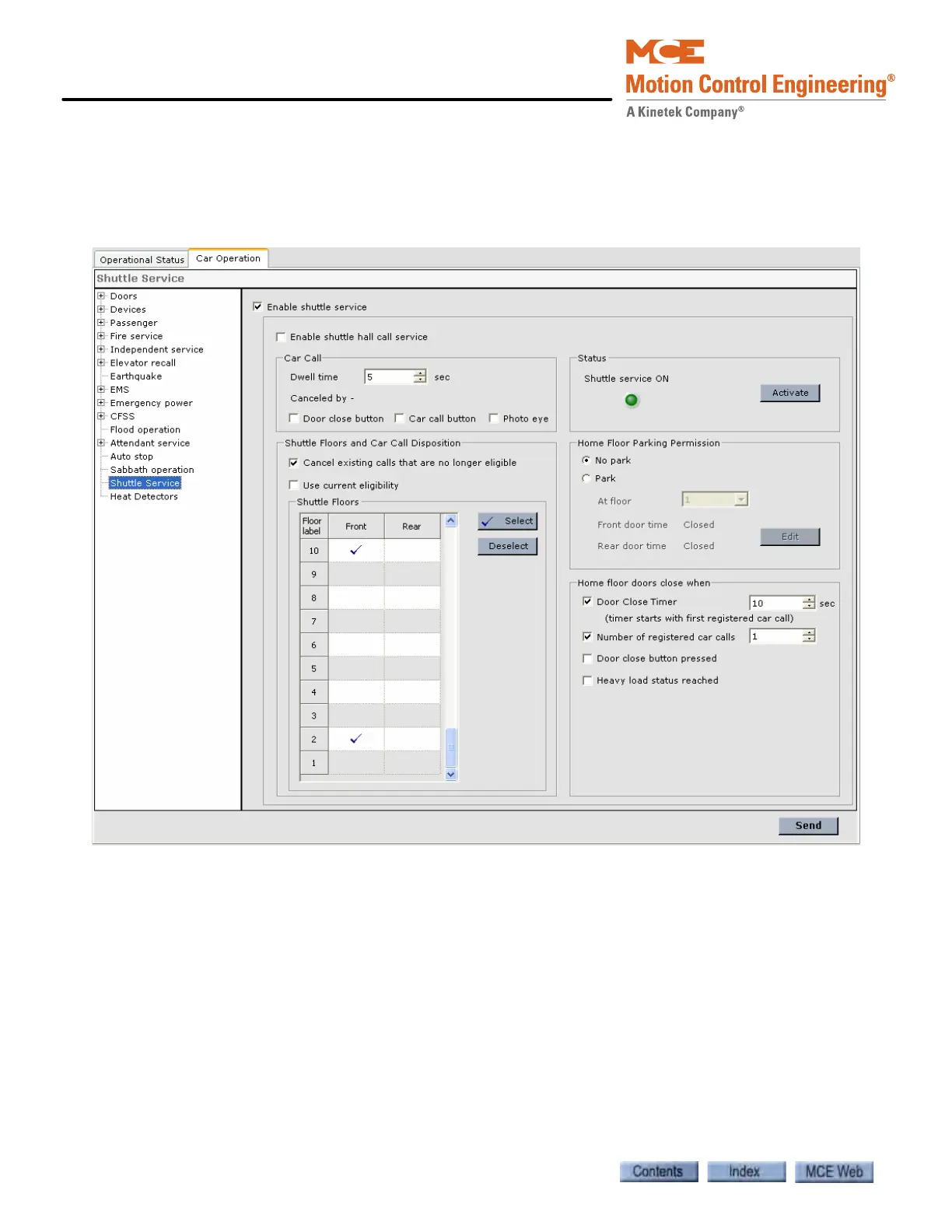
The Shuttle service option allows the car to be used to provide express service for a subset of the
building’s floors. Shuttle service is available only during Passenger mode and is turned On/Off
via a key-switch/input or software command (Activate/Deactivate button). A key-switch/input
may also be used to immediately override Shuttle service.
• Enable shuttle service: Indicates that the job has shuttle service and enables the shuttle
service controls.
• Enable shuttle hall call service: Determines if hall call service is enabled while on Shuttle
service.
Car Call
• Dwell time: Sets the door dwell time when the car is responding to a car call.
• Canceled by - Car call dwell time is canceled by any of the following that are checked.
• Door close button: Activation of the door close button cancels car call dwell time.
• Car call button: Activation of a car call button cancels car call dwell time.
• Photo eye: Activation of the photo eye cancels car call dwell time.



 To Next Page