iView - Controller View
9-94 Manual # 42-02-7223
Jail Operation - Secure mode
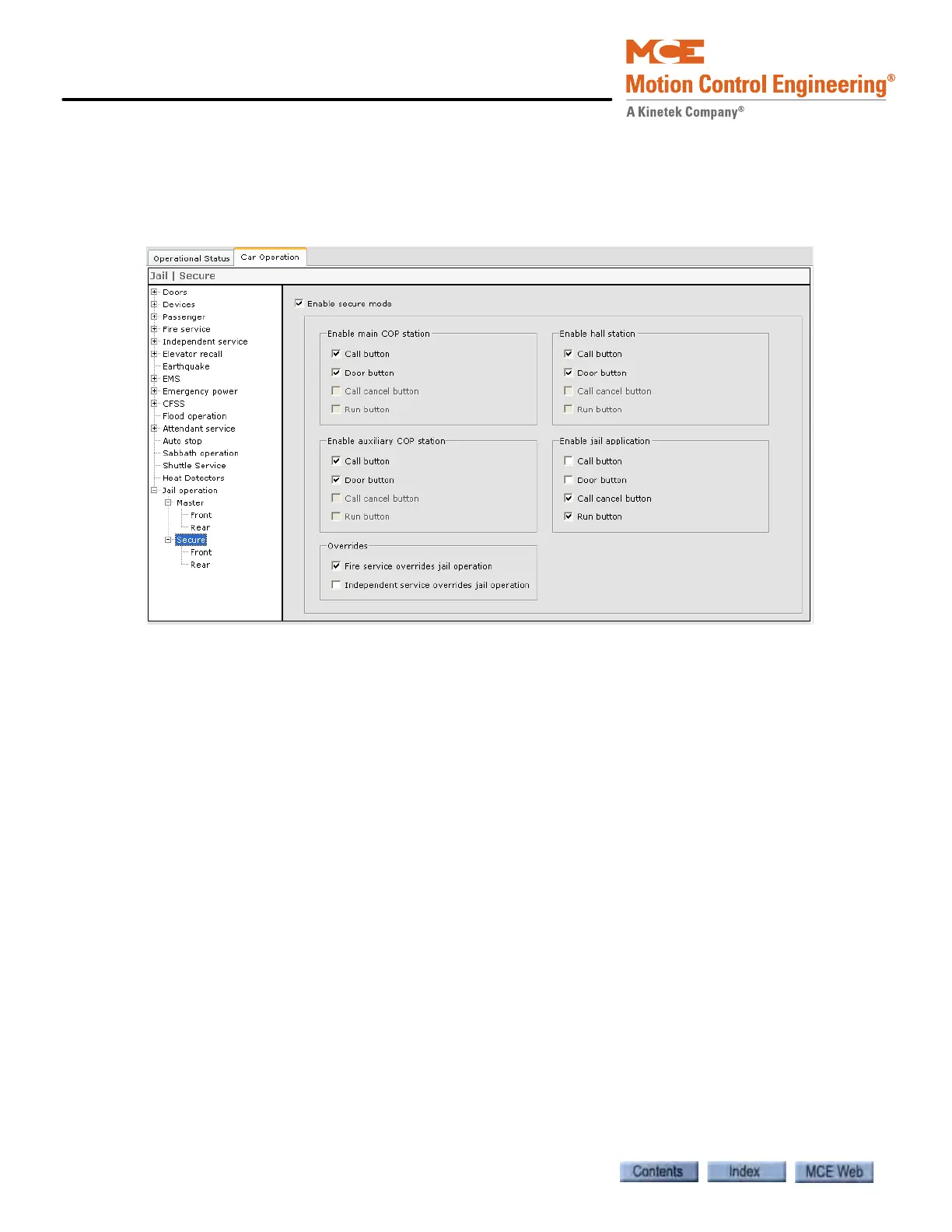
The Configure > Car Operation > Jail operation > Secure tab allows configuration of the Jail
operation - Secure mode parameters. The default settings for Jail - Secure mode allow calls to
be registered using the main/Aux COP and hall stations. A security operator then authorizes the
car to complete the call by clicking the Run button in the Jail Operation PC application.
• Enable Secure mode: Check to enable secure mode. This parameter must be checked in
order to configure (edit) the Jail operation - Secure mode parameters.
• Enable main COP station: The configuration options are the same as in Jail operation -
Master mode (See “Jail operation - Master mode” on page 9-91.).
• Enable auxiliary COP station: The configuration options are the same as in Jail operation
- Master mode (See “Jail operation - Master mode” on page 9-91.).
• Enable hall station: The configuration options are the same as in Jail operation - Master
mode (See “Jail operation - Master mode” on page 9-91.).
• Enable jail application: These options apply to the special Jail Operation PC application.
The configuration options are the same as in Jail operation - Master mode (See “Jail oper-
ation - Master mode” on page 9-91.). However, when Run is checked, hall and car calls can
be registered at the COP and hall stations if enabled, but the car will not run until the secu-
rity operator clicks the Run button.
• Overrides:
• Fire service overrides jail operation: (See “Jail operation - Master mode” on page 9-
91.).
• Independent service overrides jail operation: (See “Jail operation - Master mode” on
page 9-91.)
Jail Operation - Secure mode - Front / Rear tabs
The Configure > Car Operation > Jail operation > Secure > Front and Rear tabs determines how
the front and rear doors will operate while on Jail - Secure mode. The parameters to be config-
ured for Jail operation - Secure mode - Front and Rear are the same as for Jail operation - Mas-
ter mode (See “Jail Operation - Master mode - Front / Rear tabs” on page 9-92.).



 To Next Page