iView - Controller View
9-40 Manual # 42-02-7223
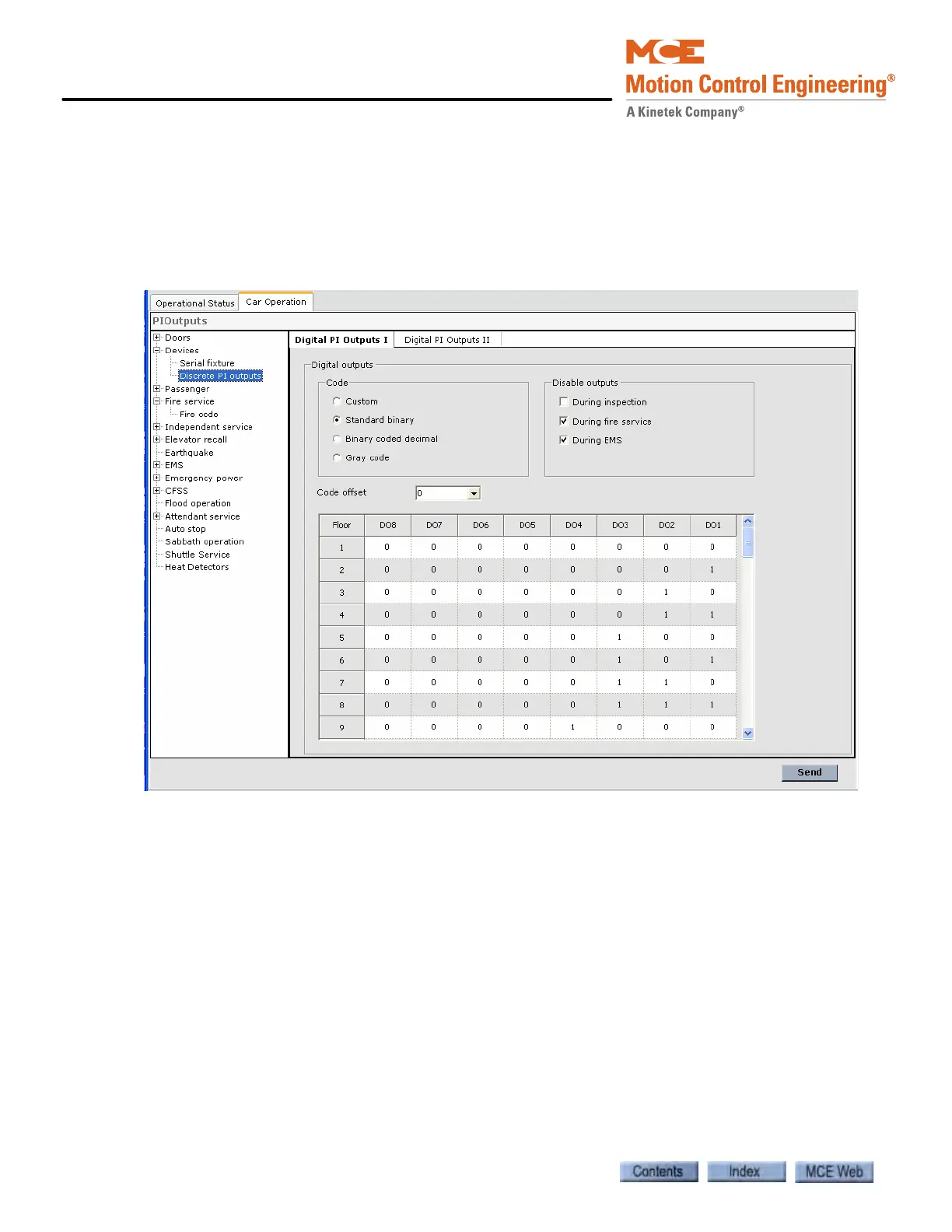
Discrete PI Outputs
Use these parameters to configure the eight digital outputs of the Position Indicators Digital
Outputs I and Position Indicator Digital Outputs II (See “Output Signal Groups” on page 9-
137.).
Digital PI Outputs I and II The following parameters can be used to configure the
Position Indicators Digital Outputs in groups I and II.
Code selection Select one of the following know codes or customize by editing the table:
• Custom: Edit the table to create a custom output configuration.
• Standard binary: Configures the outputs to the standard binary scheme.
• Binary coded decimal: Configures the outputs to the binary coded decimal scheme.
• Gray code: Configures the outputs to the gray code scheme.
Code offset Use this parameter to set the starting value for the standard binary, binary
coded decimal or gray code schemes (parameter is not active when “custom” is selected).
Disable outputs Cancel digital PI outputs based on the selected options (applies to all
digital PI outputs including one line per floor and Rotodial outputs):
• During inspection: Cancel digital PI outputs when the elevator is on inspection.
• During fire service: Cancel digital PI outputs when the elevator is on fire service.
• During EMS: Cancel digital PI outputs when the elevator is on EMS.



 To Next Page