System - Hoistway
10-85
10
iControl DC
Call Registration
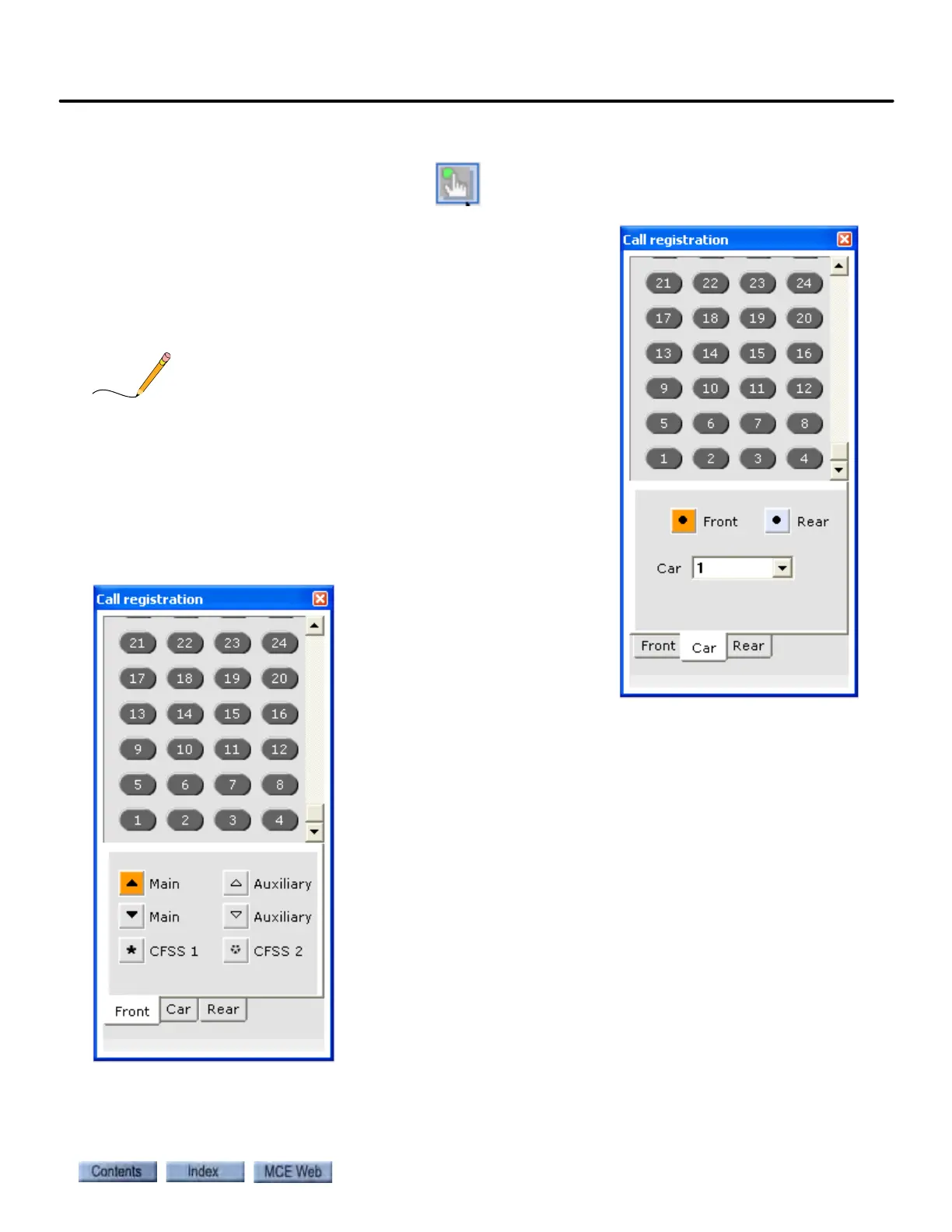
Click the Call Registration button to
open the dialog used to register calls.
To register car calls:
1. Click the Car tab.
2. Select the Car from the drop-down list (if applicable).
3. Select Front or Rear car panel if appropriate.
4. Click a floor button to register a call.
Multiple calls may be placed if desired. Rear panel calls may
be placed only if the panel exists and is configured.
5. To close the dialog, click the “X” in the upper right cor-
ner.
To register hall calls:
1. Click the Front or Rear tab (or
Hall tab if the car has only
front doors).
2. Select the hall call type.
• Main (Up): Front up hall call.
• Main (Down): Front down
hall call.
• CFSS1: Configure for Special Services. iControls have two cus-
tomer assignable configurations. Typically they are used for
hospital calls, VIP calls, etc.
• Auxiliary (Up): Rear up hall call.
• Auxiliary (Down): Rear down hall call.
• CFSS2: Configure for Special Services. iControls have two cus-
tomer assignable configurations. Typically they are used for
hospital calls, VIP calls, etc.
3. Click a floor button to register a call. Multiple calls may be placed
if desired. Only hall call types actually available and configured
in the group will be available.
4. To close the dialog, click the “X” in the upper right corner.



 To Next Page