1.
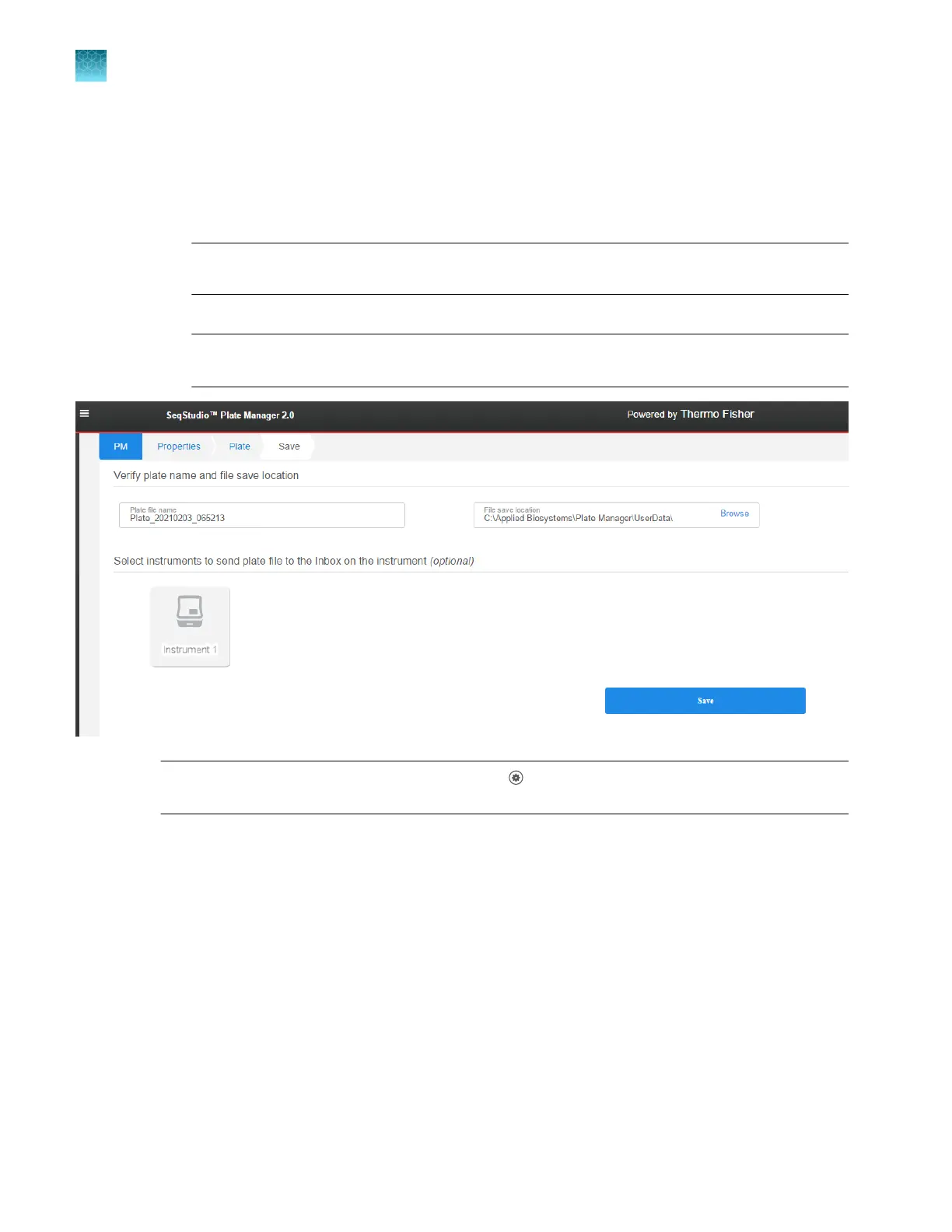
In the Save tab, perform these optional tasks as needed.
•
Change the settings for Plate file name and File save location. This location specifies the
default location for plate files only.
If you do not send the plate file directly to the instrument, save it to a network drive or a USB
drive so that you can open it on an instrument.
IMPORTANT! Perform a virus scan on a USB drive before inserting it into a port on the
computer.
•
Select an instrument if you want to send the plate file to the Inbox on the instrument.
Note: If an instrument is not shown, see “Connect the Plate Manager software (desktop) to an
instrument” on page 103.
Note: To set the default File save location, click (Settings) in the Plate Manager home screen,
then click Save Location.
2.
Click Save.
The plat
e file (PSM file) is saved in the specified location. If you selected an instrument, the plate
file is also sent to the Inbox and to the plate files library on the instrument.
The home screen is displayed when the plate file is sent or saved.
Chapter 5 Cr
eate a plate file in the Plate Manager software
Set up a plate file
5
120
SeqStudio
™
Flex Series Genetic Analyzer with Instrument Software v1.0 User Guide













 To Next Page