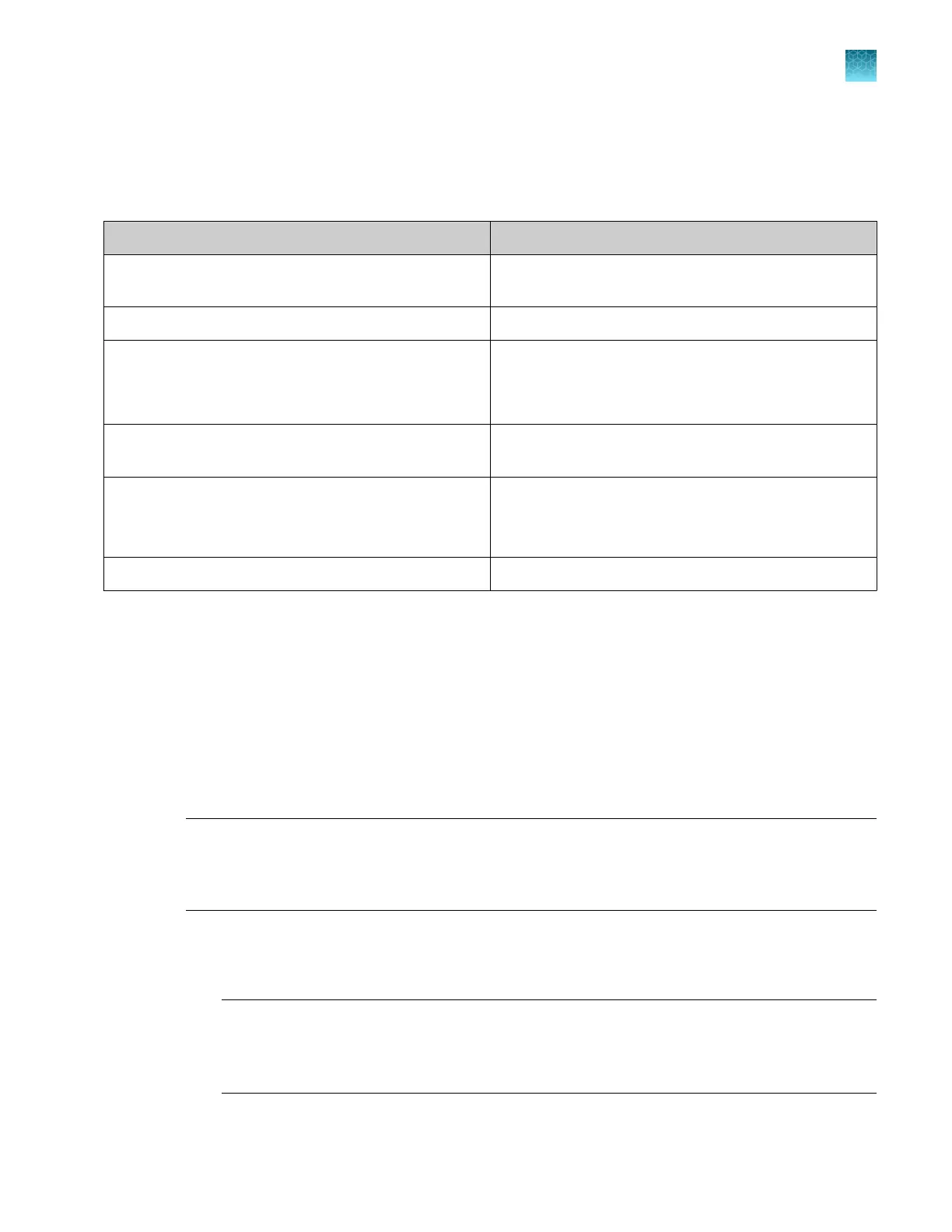
Overview of Thermo Fisher
™
Connect features
The following features are available when Thermo Fisher
™
Connect is enabled on an instrument, and
your Thermofisher.com account is linked to the instrument.
Feature For information, see
Plate Manager software (cloud) “Get started with the Plate Manager software (cloud)” on
page 105
Voice commands on the instrument “Use voice commands” on page 231
Smart Help
Note: You can use this feature when you are logged in
with a local or a remote profile.
“Use Smart Help to request assistance from Technical
Support or Instrument Service” on page 473
Automated cloud analysis “Use cloud analysis in the Remote Monitoring software”
on page 202
Monitor instruments remotely from a computer or a
smart device
“Monitor a run from the Remote Monitoring software” on
page 182
“Monitor a run from a mobile device” on page 195
Sign in to any instrument with the same profile —
Administrator set up for Thermo Fisher
™
Connect
Before the instrument can be used with Thermo Fisher
™
Connect by any user, a local administrator
must do the following:
•
Sign in with a local administrator profile, then enable Thermo Fisher
™
Connect access on the
instrument.
•
Link the local administrator profile to the administrator's Thermofisher.com account.
Linking overwrites a local profile user name with a cloud profile user name.
IMPORTANT! The first user to link the instrument to a Thermofisher.com account is automatically
assigned the role of cloud administrator for the instrument. Ensure that an administrator is the first
user to link. If another user is the first to link, that user must grant administrator privileges to an
administrator.
1.
Perform the following steps on the instrument.
a.
Create a personal local administrator profile for linking. See “Create a local profile (one time
only)” on page 29 and “Change the role of a local profile (administrator only)” on page 447.
Note: Do not use the default Admin profile for linking. Linking a local profile to a
ThermoFisher.com account overwrites the profile user name. If you use the default Admin
profile for linking, the default Admin profile will no longer be available in the Select
instrument profile screen when you sign in.
Chapter 9 Use the instrument with Thermo Fisher
™
Connect
Overview of Thermo Fisher
™
Connect features
9
SeqStudio
™
Flex Series Genetic Analyzer with Instrument Software v1.0 User Guide
211













 To Next Page