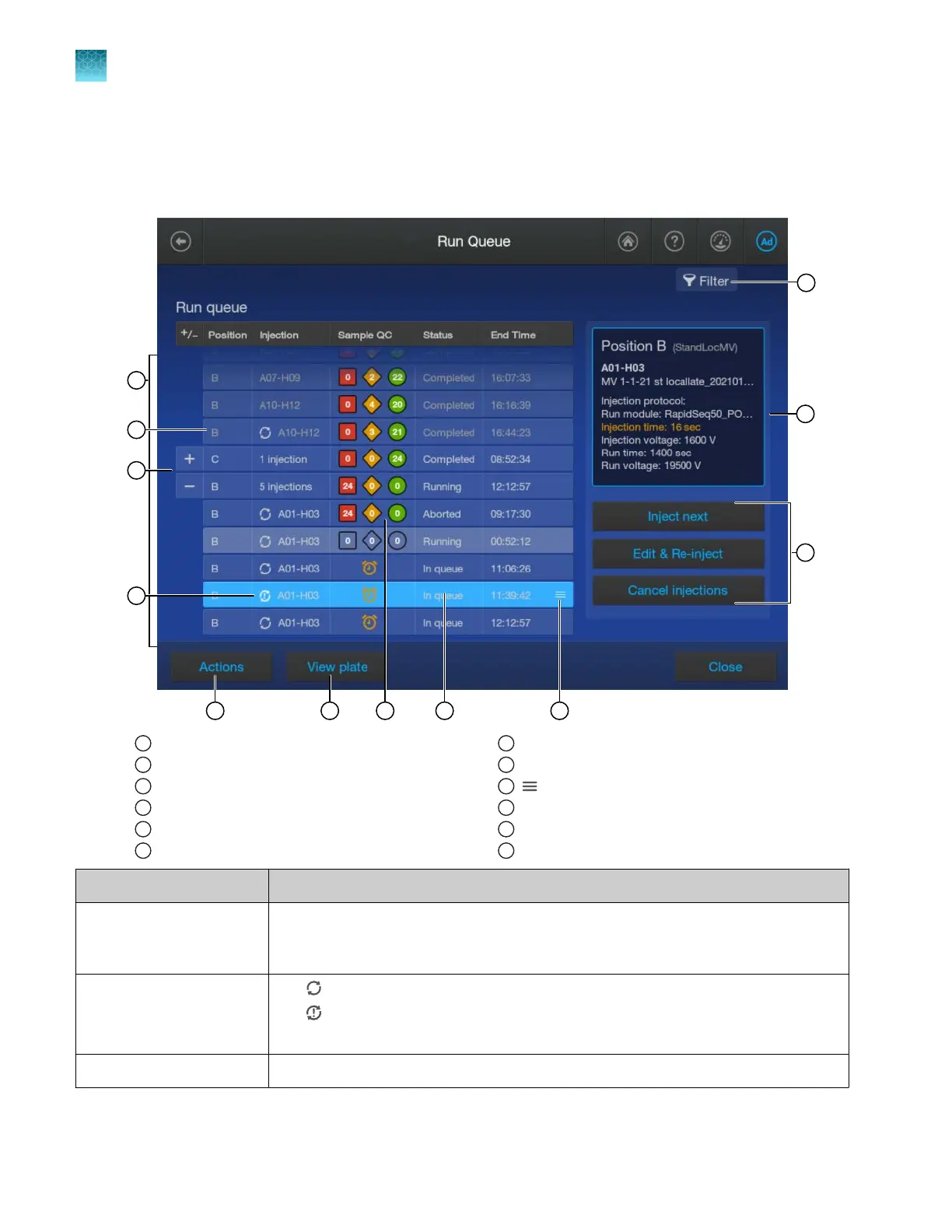
Use the Run queue to monitor a run on the instrument
Parts of the Run Queue screen
1
Run queue (injection list)
2
Position of the plate in the drawer
3
+/– (Expand/Collapse) t
oggle
4
Re-injection status
5
Actions menu
6
View plate butt
on
7
Sample QC
8
Injection status
9
(Move)
10
Filter by injection status
11
Injection details
12
Injection controls
Screen element Description
Run queue (injection list)
and +/– (Expand/Collapse)
t
oggle
Swipe up to display more rows in the list. Tap + (plus) to expand the list to show
all injections for the plate positions. Tap – (minus) to collapse all injections under the
plate position.
Re-injection status symbol
•
Re-injection
•
Re-injection with dier
ent injection parameters (Run module, Injection time,
Injection voltage, Run time, Run voltage)
Actions menu Displays the Pause instrument or Resume run button.
Chapter 6 Start and monitor a run
Use the Run queue to monitor a run on the instrument
6
160
SeqStudio
™
Flex Series Genetic Analyzer with Instrument Software v1.0 User Guide













 To Next Page