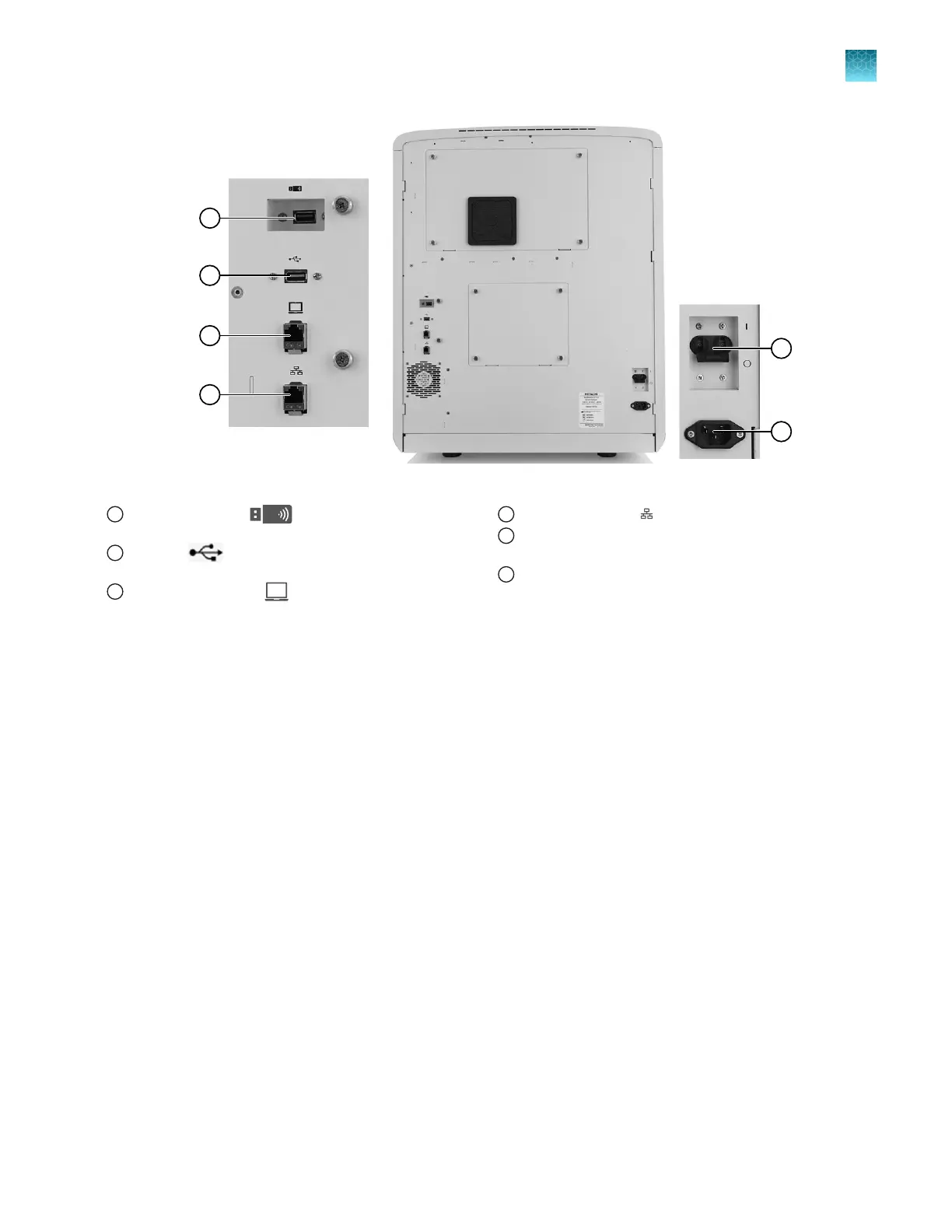
Figure 5 Instrument rear panel connections
1
Recessed USB port (for use with the wireless
network adapter; adapter not shown)
2
USB port (for optional USB barcode scanner
connection)
3
Direct connection port (to allow computer connection
without a network)
4
Wired network port
5
Circuit breaker (rear power switch; use the power switch on
the front panel for normal operation)
6
Power receptacle
Theory of operation
Preparing samples
When DNA samples are prepared for sequencing and fragment analysis on the instrument, fluorescent
dyes are attached to the DNA.
Preparing the instrument
The following runs are required to prepare the instrument for routine operation. After initial preparation
these runs are not required unless a new capillary array is installed or a new dye set/polymer
combination will be used.
•
Spatial calibration—Associates the signal from each capillary to a specific position on the CCD
camera. For more information, see “Run a spatial calibration” on page 304.
•
Spectral calibration—Generates a matrix for each capillary that compensates for dye overlap and
is used to convert the 20–color data into 4-, 5-, or 6-dye data. For more information, see “Run a
spectral calibration” on page 310.
•
Install run—Ensures that the instrument meets specifications for the application types being run.
For more information, see “Perform an install run” on page 328.
Chapter 1 Product information
Theory of operation
1
SeqStudio
™
Flex Series Genetic Analyzer with Instrument Software v1.0 User Guide
23













 To Next Page