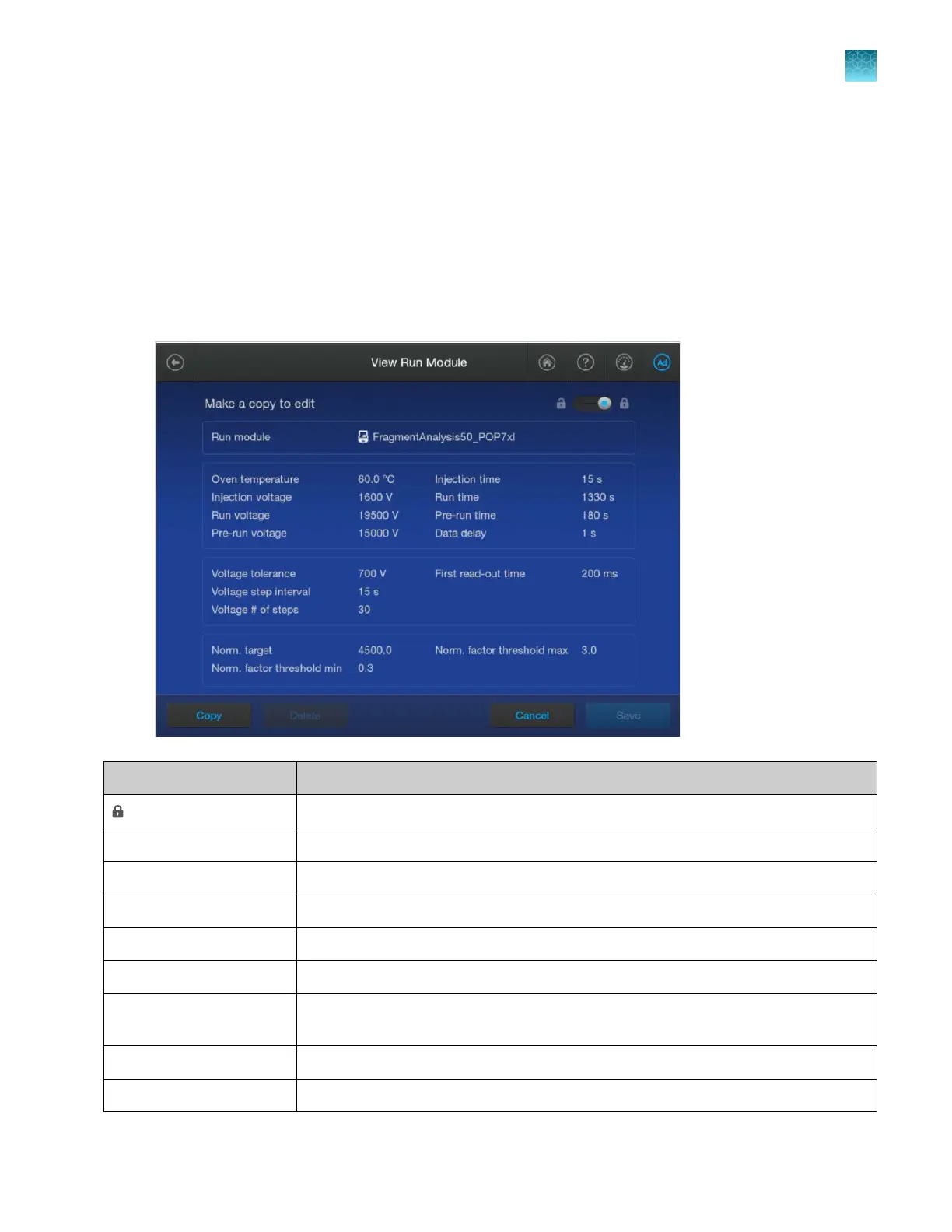
2.
Tap a row, tap Open, then tap Copy.
3.
Enter a name for the run module, then tap Enter.
4.
Tap sections of the screen and modify settings as needed (see “Run module settings” on
page 273).
5.
Tap Save.
Run module settings
Setting
Description
(Lock) See “Lock or unlock a library entry” on page 255.
Oven temperature (°C) Temperature setting for the instrument oven and the detection cell throughout the run.
Injection voltage (volts) Injection voltage setting for sample injection.
Run voltage (volts) Final sample electrophoresis separation run voltage.
Pre-run voltage (volts) Pre run voltage setting before sample injection.
Injection time (sec) Sample injection time.
Run time (sec) Length of time data is collected after voltage is ramped up to the run voltage and the
run star
ts.
Pre-Run time (sec) Prerun voltage time.
Data delay (sec) Time from the start of separation to the start of sample data collection.
Chapter 11 Manage library resources on the instrument
Run modules library
11
SeqStudio
™
Flex Series Genetic Analyzer with Instrument Software v1.0 User Guide
273













 To Next Page