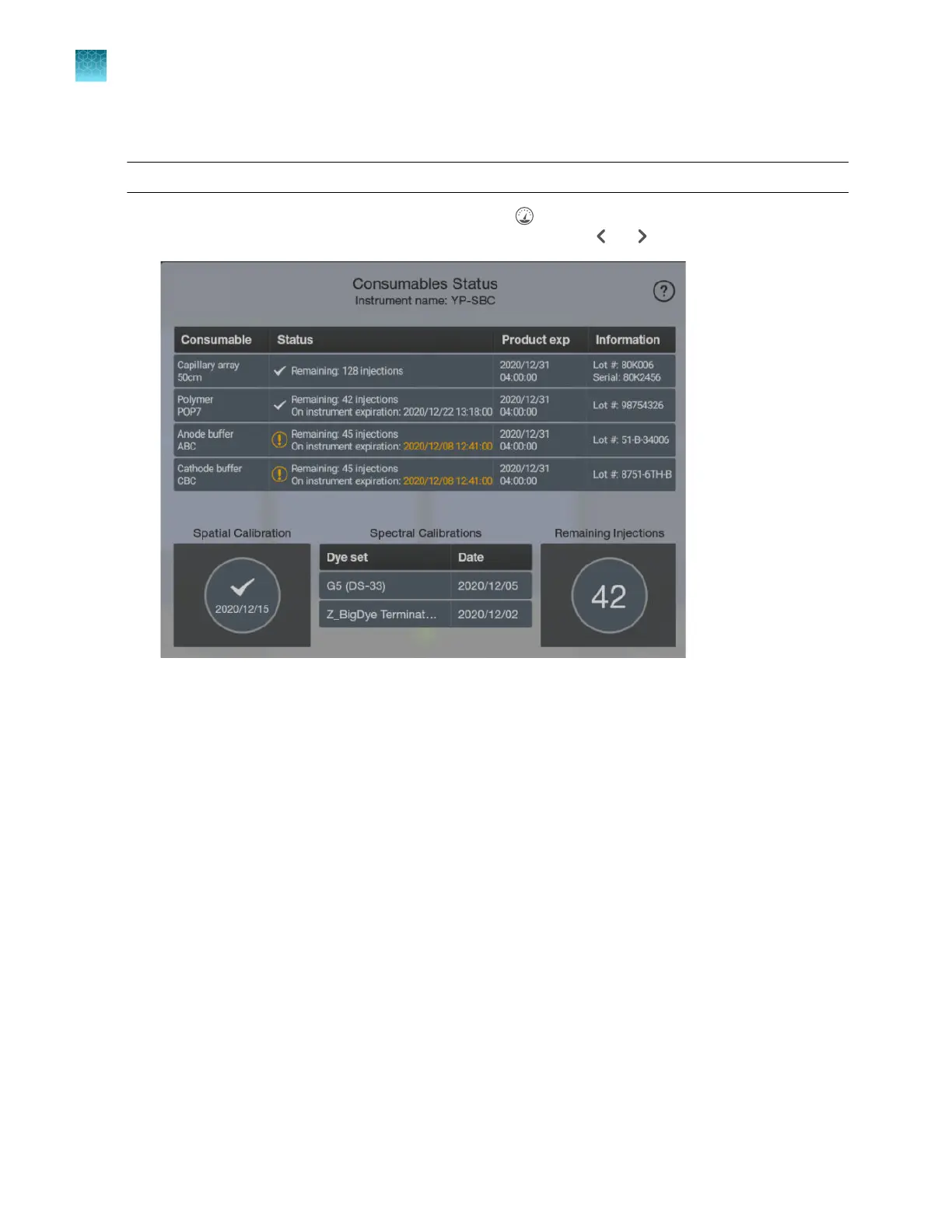
Check consumables status
Note: The home screen displays an alert if any consumables need replacement.
1.
Display the consumables status screen by tapping (Dashboard) at the top right of the home
screen. If the consumables status screen is not displayed, tap or .
The screen displays expiration dates and lot numbers (determined from the RFID tags on the
consumable containers).
The Remaining injections number corr
esponds to the consumable with the fewest remaining
injections.
Consumables information is displayed in orange if any of the following conditions are met.
•
One or more consumables has expired or exceeded the on-instrument usage limit (the
maximum number of days that the consumable can be installed on the instrument)
•
The consumable is within the following days of product expiration:
–
Capillary array—1 day
–
Polymer—14 days
–
Buer—7 days
•
The percentage of maximum number of injections remaining for a consumable is ≤10%
•
The polymer and/or the buer is within 1 day of the on-instrument usage limit
If the software is configured to prevent running if a consumable has expired or exceeded the usage
limit, you must replace the consumable before you can start a run.
2.
Check the consumables for the number of injections, samples, or days remaining for a
consumable.
Chapter 2 Get star
ted
Prepare the instrument
2
66
SeqStudio
™
Flex Series Genetic Analyzer with Instrument Software v1.0 User Guide













 To Next Page