(continued)
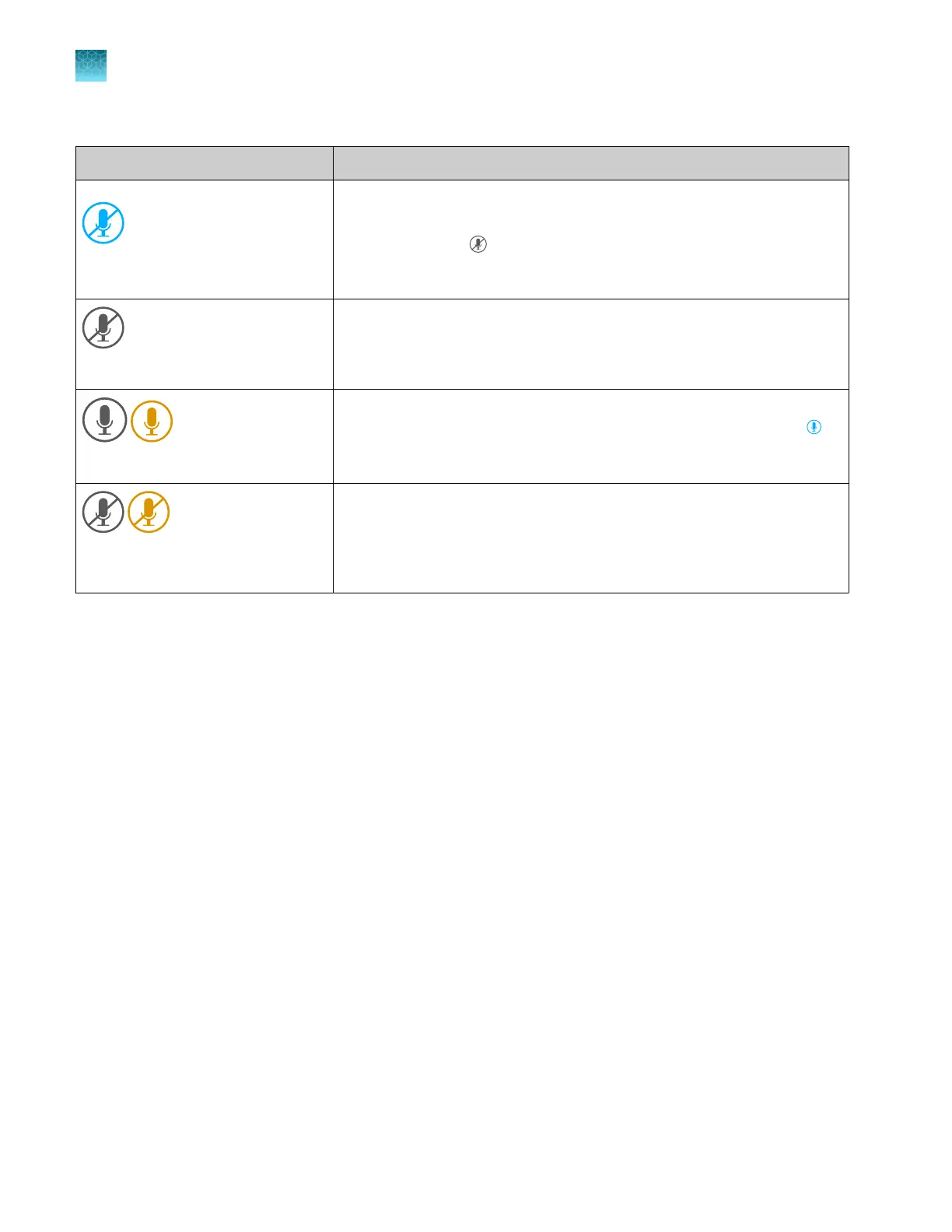
Microphone icon states Status of voice commands
(Blue with strikethrough symbol)
The microphone is muted and cannot accept voice commands. Tap the icon
to unmute the microphone.
The icon turns gray if the proximity sensor does not detect a person or
if Thermo Fisher
™
Connect access is interrupted. It turns blue again when a
person is detected or Thermo Fisher
™
Connect access is restored.
(Gray with strikethrough symbol)
Thermo Fisher
™
Connect access is int
errupted or this is the first time you
have signed in with your cloud profile. See “Enable (register) the voice
command function” on page 231.
(Gray) (Amber)
Displayed briefly aft
er the microphone is unmuted. The icon turns blue
when the microphone is ready to accept commands.
(Gray) (Amber) with strikethrough
symbol
Displayed the first time you sign in with your cloud pr
ofile. See “Enable
(register) the voice command function” on page 231.
Chapter 9 Use the instrument with Thermo Fisher
™
Connect
Use voice commands
9
236
SeqStudio
™
Flex Series Genetic Analyzer with Instrument Software v1.0 User Guide













 To Next Page