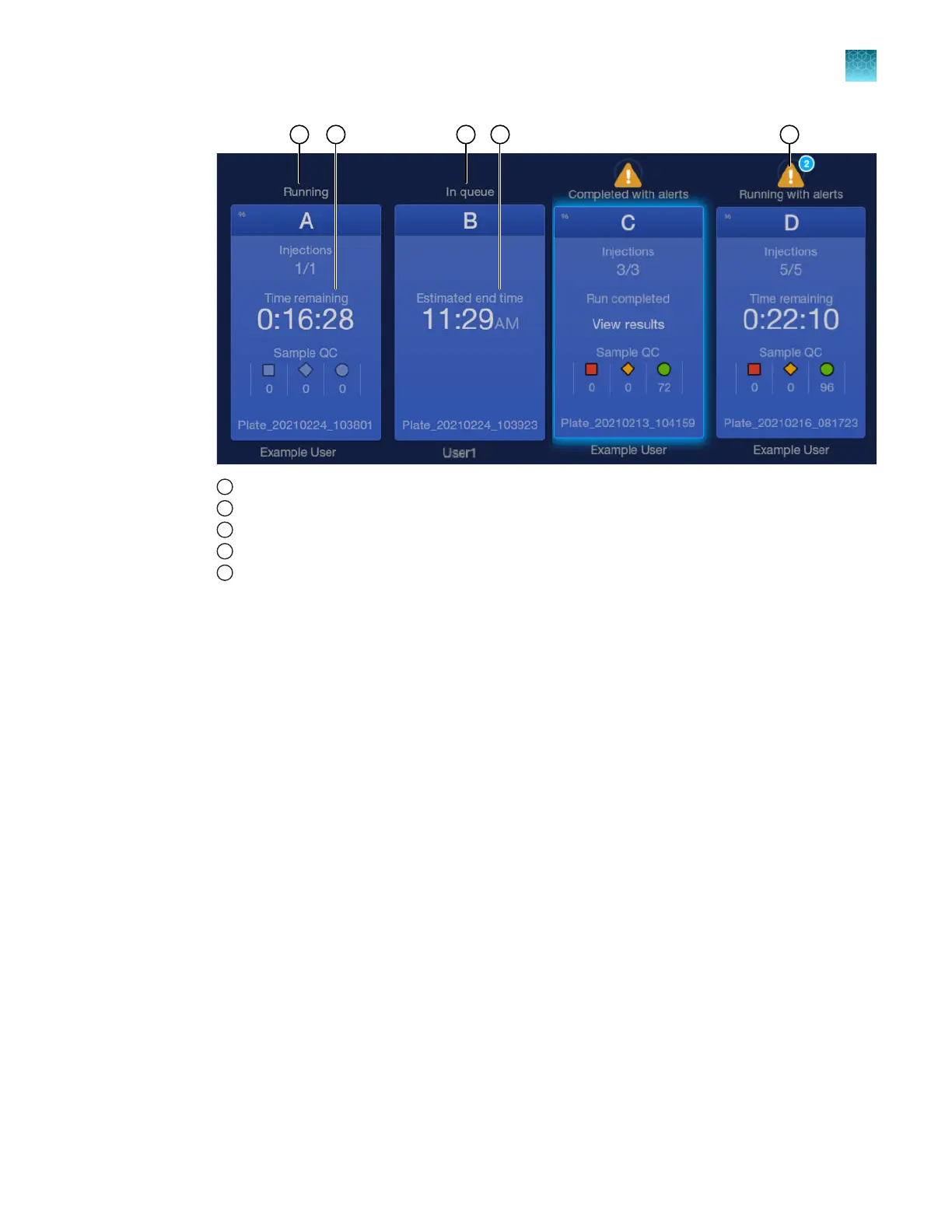
1
Plate run status is set to running if no other plates are in the run queue
2
Time remaining for a running plate
3
Plate run status is set to In queue if other plates are in the run queue
4
Estimated end time for a plate that is in the run queue but has not started
5
Plate alerts and number of alerts
For more information on plate run statuses, see “Plate position status and plate run status” on
page 39.
•
Displays the End time in the Run Queue scr
een for each injection.
•
Performs an auto-spectral calibration. For information, see “Auto-spectral calibration during an
injection” on page 150.
•
Changes the status to Analyzing when data collection is complete and results are being analyzed.
Analysis can take up to 3 minutes. The next injection can start while the results for an injection are
being analyzed.
•
Changes the status to Exporting if a save location other than the instrument is specified.
•
Updates the Sample QC in the home screen and the Run Queue screen after each injection is
analyzed.
Chapter 6 S
tart and monitor a run
Processes that the instrument performs during a run
6
SeqStudio
™
Flex Series Genetic Analyzer with Instrument Software v1.0 User Guide
145













 To Next Page