3.
Remove the capillary array:
a.
Loosen the array port lock by turning it ~1/4 turn counter-clockwise until it stops. Adjust it
until the rectangular opening aligns with the rectangular head of the array tip.
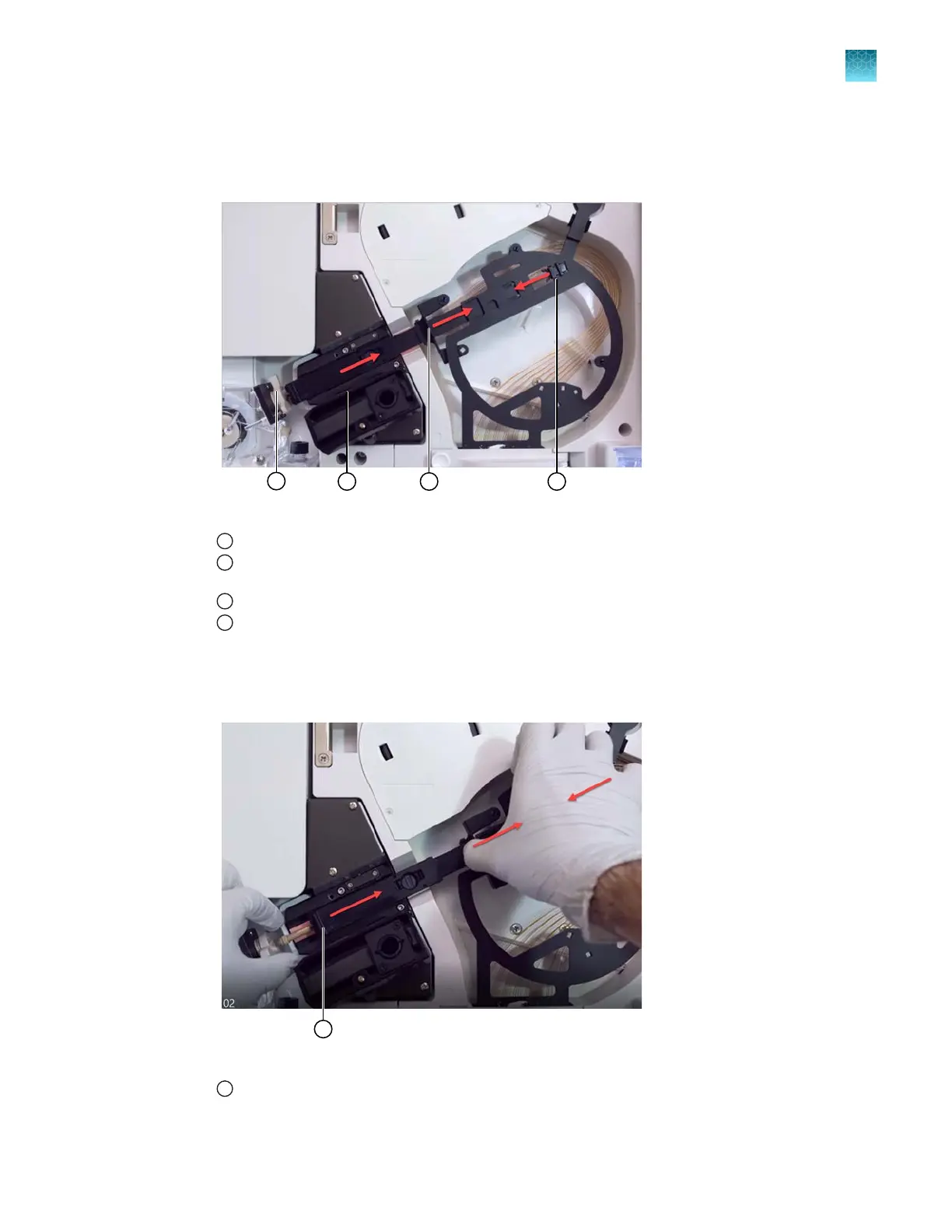
Figure 27 Array port lock
1
Array port lock and array-port end of the capillary array
2
Retractable end of capillary array that protects the tip (slides to the right when you squeeze tab 1 and tab 2
t
oward each other)
3
Tab 1
4
Tab 2
b.
Grasp the array-port end of the array and ease the tip out of the pump block.
c.
Slide the retractor tab on the array to the right until it clicks into place in the retracted position.
Figure 28 Retracted end of the capillary array exposes the array tip
1
End retracted
Chapter 13 Maintain the Instrument
Maintenance wizard procedures
13
SeqStudio
™
Flex Series Genetic Analyzer with Instrument Software v1.0 User Guide
385













 To Next Page