5.
Install the new polymer pouch:
a.
Remove the seal from the conditioning reagent pouch.
b.
With the label facing the rear of the instrument, insert the pouch fitting into the slot on the
pump lever mechanism.
c.
Push the polymer pouch lever up.
6.
Tap Verify pouch to update the pouch information.
7.
Tap Next to continue.
Reactivate Instrument—Install ABC
In this procedure, you install the anode buer container (ABC).
IMPORTANT! If an aut
osampler error or a "power save" message is displayed, or if the CBC is not in
the forward, home position when you need to install the CBC, see “Check the position of the cathode
buer container (CBC)” on page 483.
1.
Open the instrument doors.
2.
Remove the wast
e ABC.
3.
Re-install the ABC that was removed earlier, or install a new ABC. See “Install the anode buer
container (ABC)” on page 364.
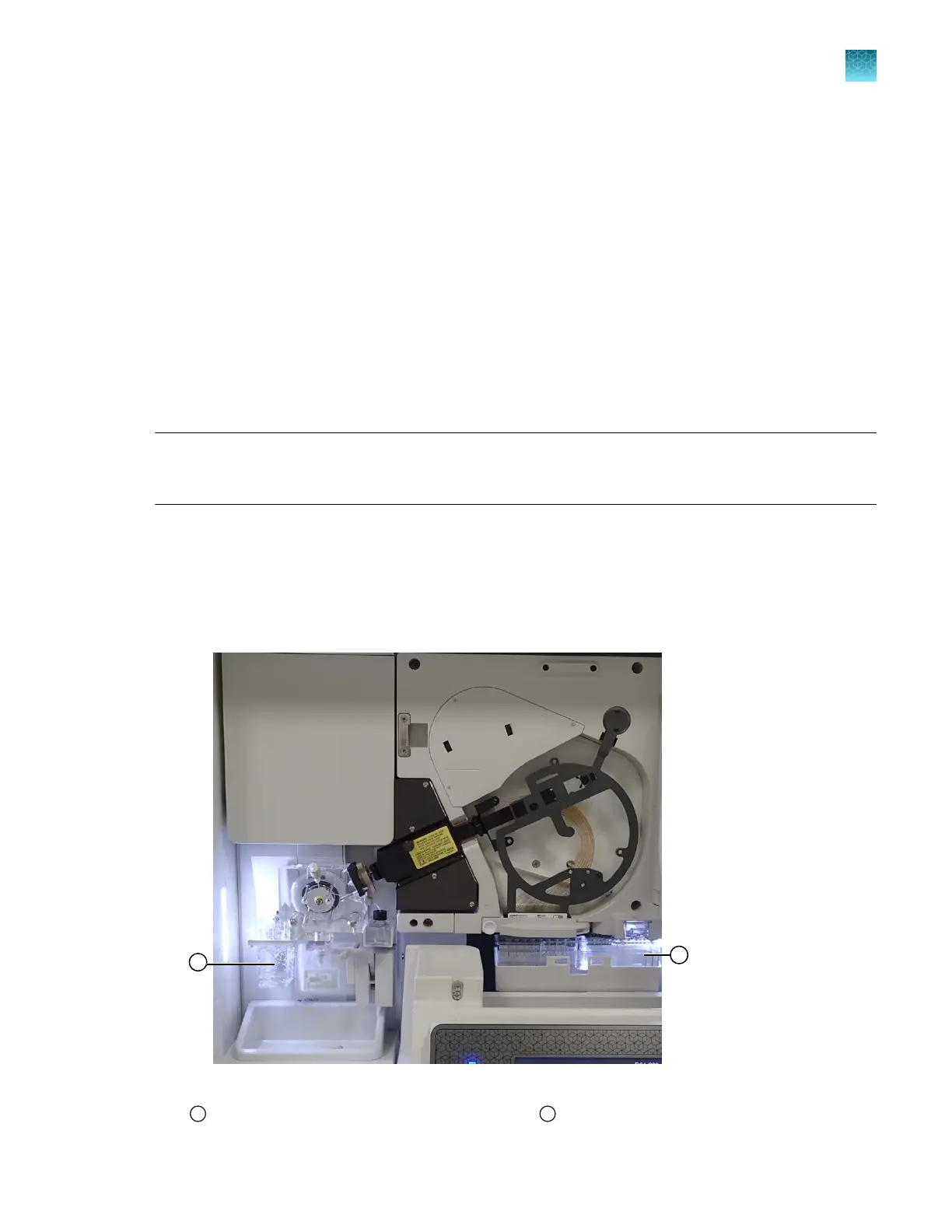
Figure 86 Location of ABC and CBC
1
Anode buer container (ABC)
2
Cathode buer container (CBC)
Chapter 13 Maintain the Instrument
Maintenance wizard procedures
13
SeqStudio
™
Flex Series Genetic Analyzer with Instrument Software v1.0 User Guide
437













 To Next Page