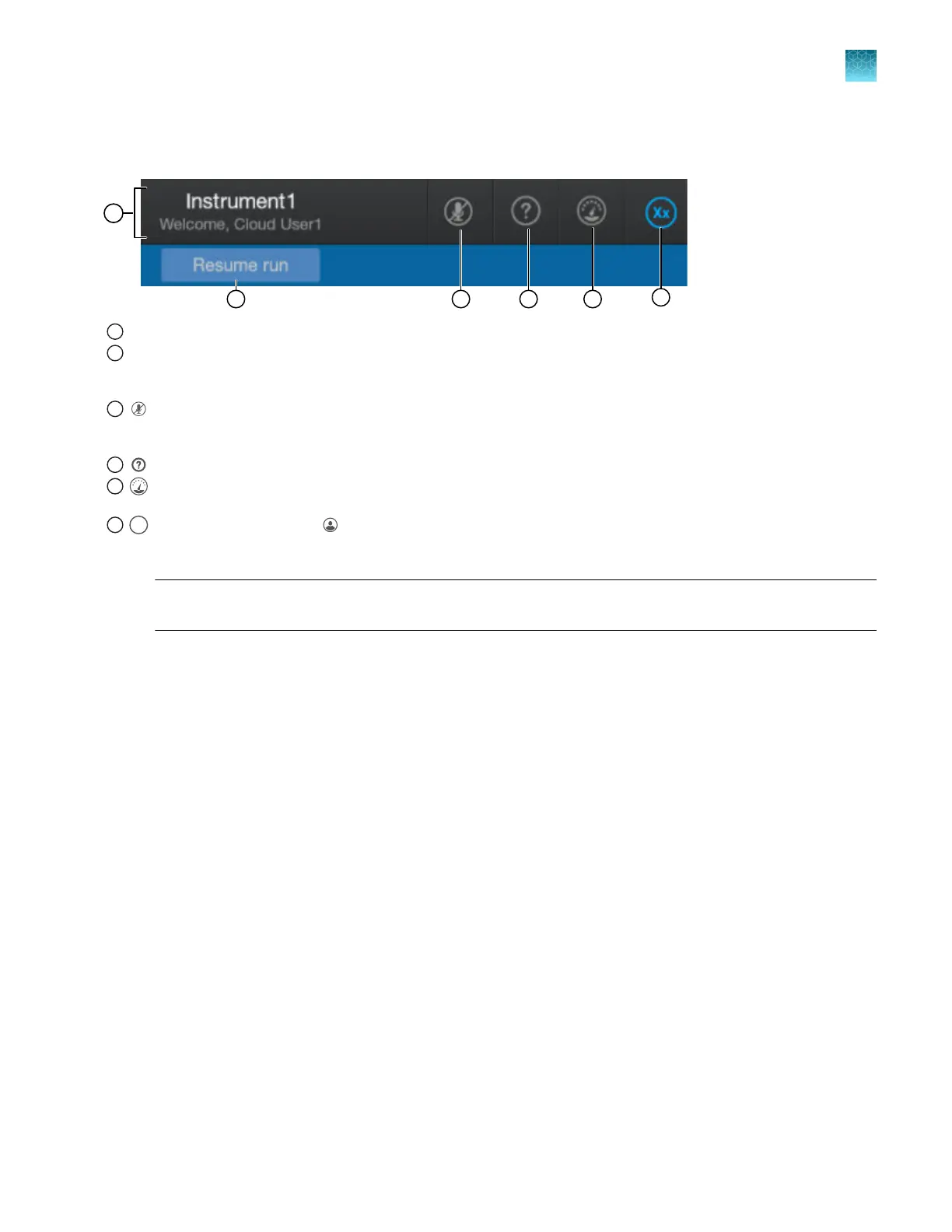
Icon bar
1
Instrument name and signed-in user name.
2
Pause indicat
or and Resume run button—Resume run is displayed after you click Pause instrument or if the instrument is
paused because of an error condition. When the instrument is completely paused, the indicator changes to the Resume run
button. See “Pause the instrument in the home screen” on page 157.
3
—Microphone for voice commands. Displayed only when a user is signed in with a cloud pr
ofilw. When enabled, can
be used to issue voice commands for linking a plate, starting a run, and other functions. See “Use voice commands” on
page 231.
4
Help—Provides information on using the instrument.
5
Dashboard—Displays screens for instrument status, consumables status, and upcoming maintenance. See “Prepare the
instrument” on page 64.
6
initials of the signed-in user ( (P
rofile) icon is displayed if no user is signed in). In the example above, "Xx" is displayed
for user name "Xxxxxx". For more information, see “Local profile and cloud profile: when to use, user name, and user initials”
on page 213.
Note: For information on Thermo Fisher
™
Connect features, see Chapter 9, “Use the instrument with
Thermo Fisher
™
Connect”.
Chapter 1 Product information
About the SeqStudio
™
Flex Series Instrument Software v1.0
1
SeqStudio
™
Flex Series Genetic Analyzer with Instrument Software v1.0 User Guide
37













 To Next Page