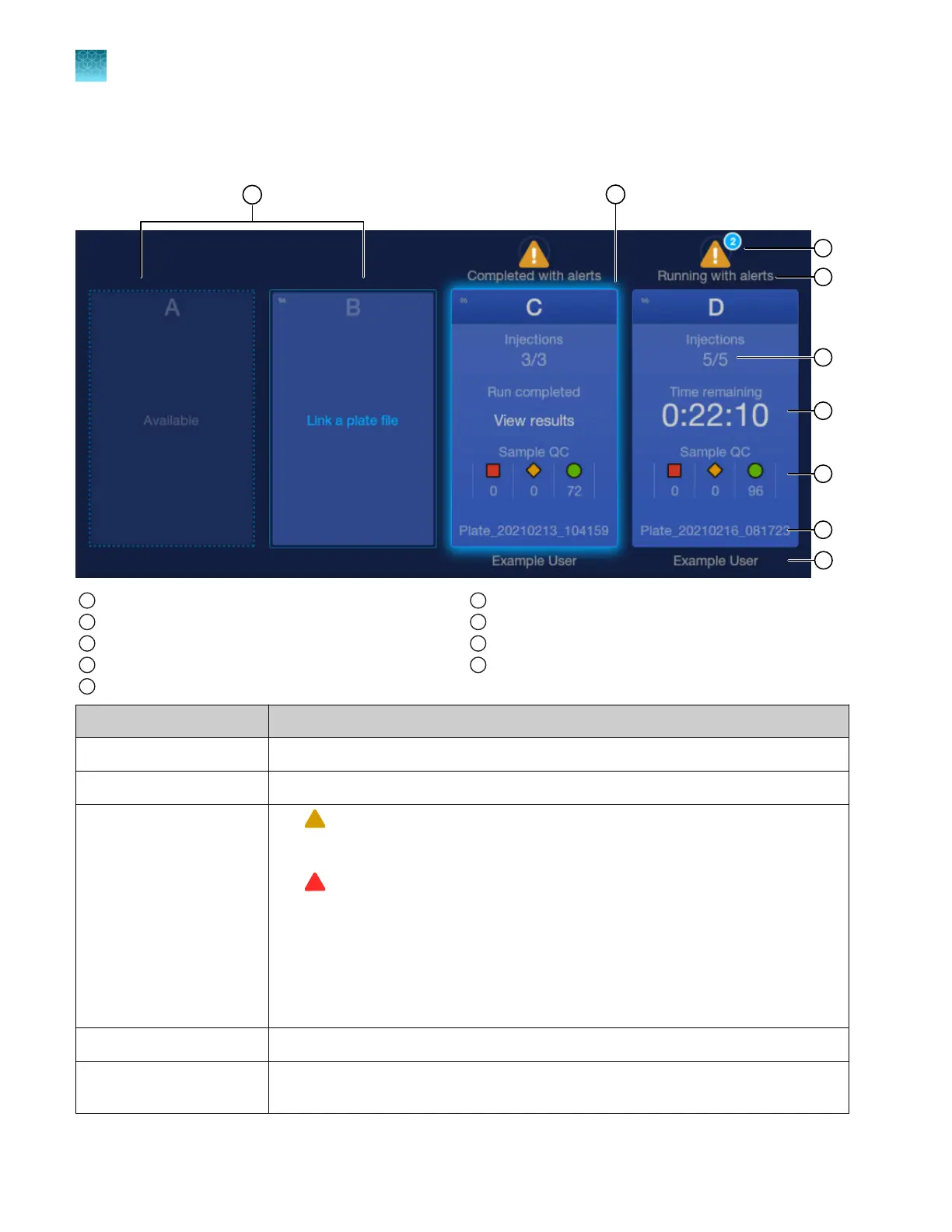
Plate positions in the home screen
1
Plate position and status
2
Glowing border on a completed plate position.
3
Plate alerts
4
Run status
5
Plate injections
6
Time remaining or Estimat
ed end time
7
Sample QC (or Spectr
al QC or Install QC) for the plate
8
Plate name
9
User name
Screen element Description
Plate position and status See “Plate position status and plate run status” on page 39.
Glowing border Indicates that the plate run status is Complet
ed.
Plate alerts
•
—Displays alert information about injection order changes, re-injections,
insucient polymer
, and other conditions. The number of alerts is indicated
above the symbol.
•
—Displays alert information during an automated barcode workflow run that
pause the instrument and pr
event the run from continuing.
For more information on plate alerts, see the following sections:
• “Pre-run check messages and plate alerts during a run” on page 146
• “Plate alert troubleshooting” on page 507
• “Plate alert troubleshooting (automated barcode workflow)” on page 509
Run status See “Plate position status and plate run status” on page 39.
Plate injections The number of the currently running or completed injection and the total number of
injections for the plate.
Chapter 1 Product information
About the SeqStudio
™
Flex Series Instrument Software v1.0
1
38
SeqStudio
™
Flex Series Genetic Analyzer with Instrument Software v1.0 User Guide













 To Next Page