BPswitch Operators Manual
142 / 413
Assigning a Source to Key 1-3
Each of the three keys may hold a variety of sources, including a cg, animation,
still, a DVE box (picture-in-picture window) for camera, etc. Each source is
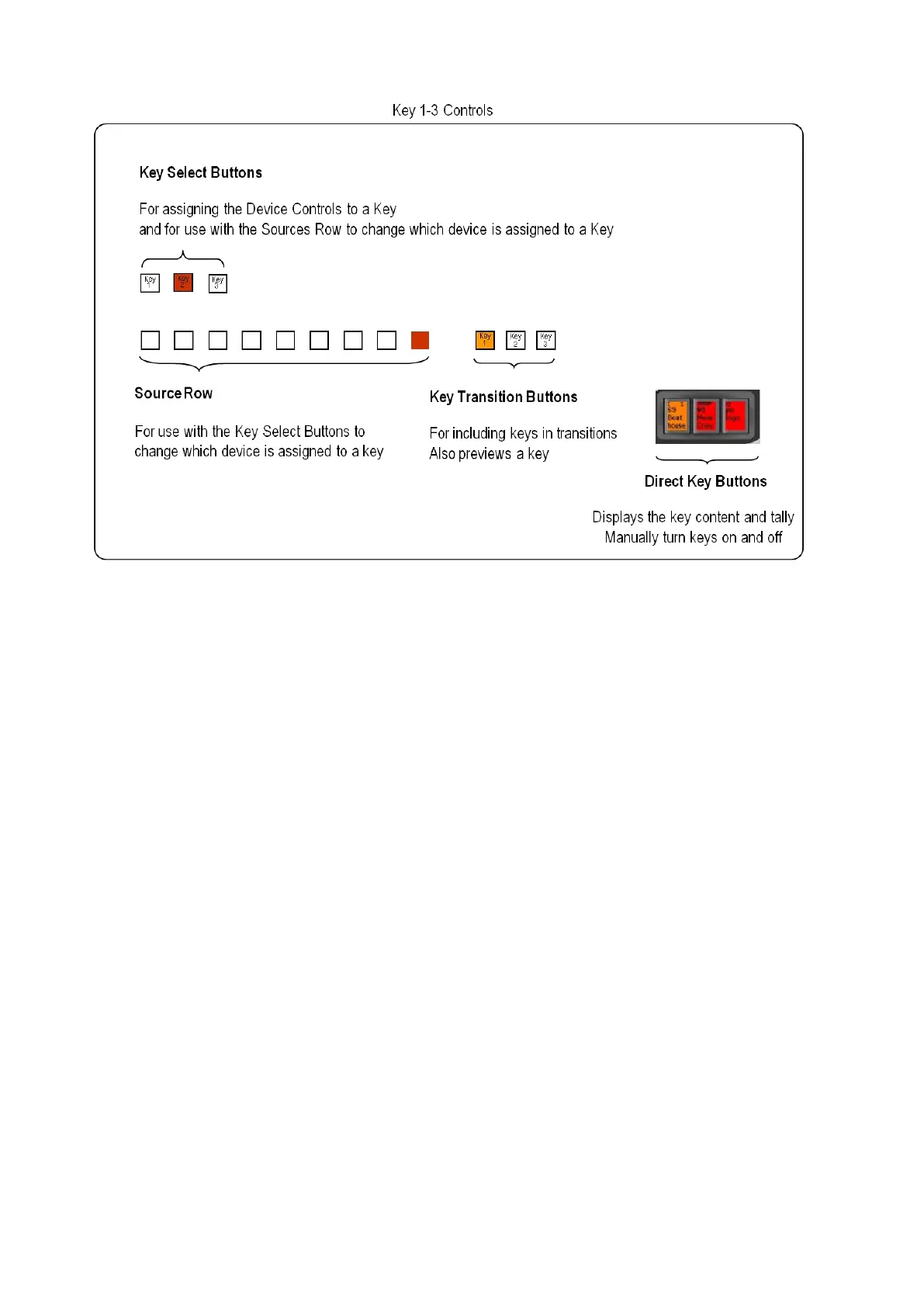
assigned to Key 1, 2 and 3 by using the Key Selection and Source Row controls
To assign a source to a Keyer:
Press the desired Key Selection Button, either [Key 1 Select], [Key 2
Select] or [Key 3 Select].
The button pressed will illuminate orange (or red if the key is on program),
and one button in the source row will also illuminate. This lit button in the
source row will indicate which source is currently assigned to the selected
key. For example, in the illustration shown below, the CG 1 device is fed into
Key 2.
(You can see the name of the source by looking at the device icon on the top
of the PixButtons in the program row).
The lit source button will illuminate red if this key is on program. This will
warn you that if you now change to a different source you will be impacting
the on-air content. The lit source button will illuminate orange if this key is not
on air. If a shifted source (10-18) is currently in the key, it will blink on the
Control panel, and illuminate a small light above the button on the SoftPanel.



 To Next Page