BPswitch Operators Manual
244 / 413
minutes, depending on how many
clips are on the external server.
If the DDR/Omneon control is not
added to the current show, the Select
Clips button will not be visible. See
Adding DDR Control to a Show for
adding the server control to a show.
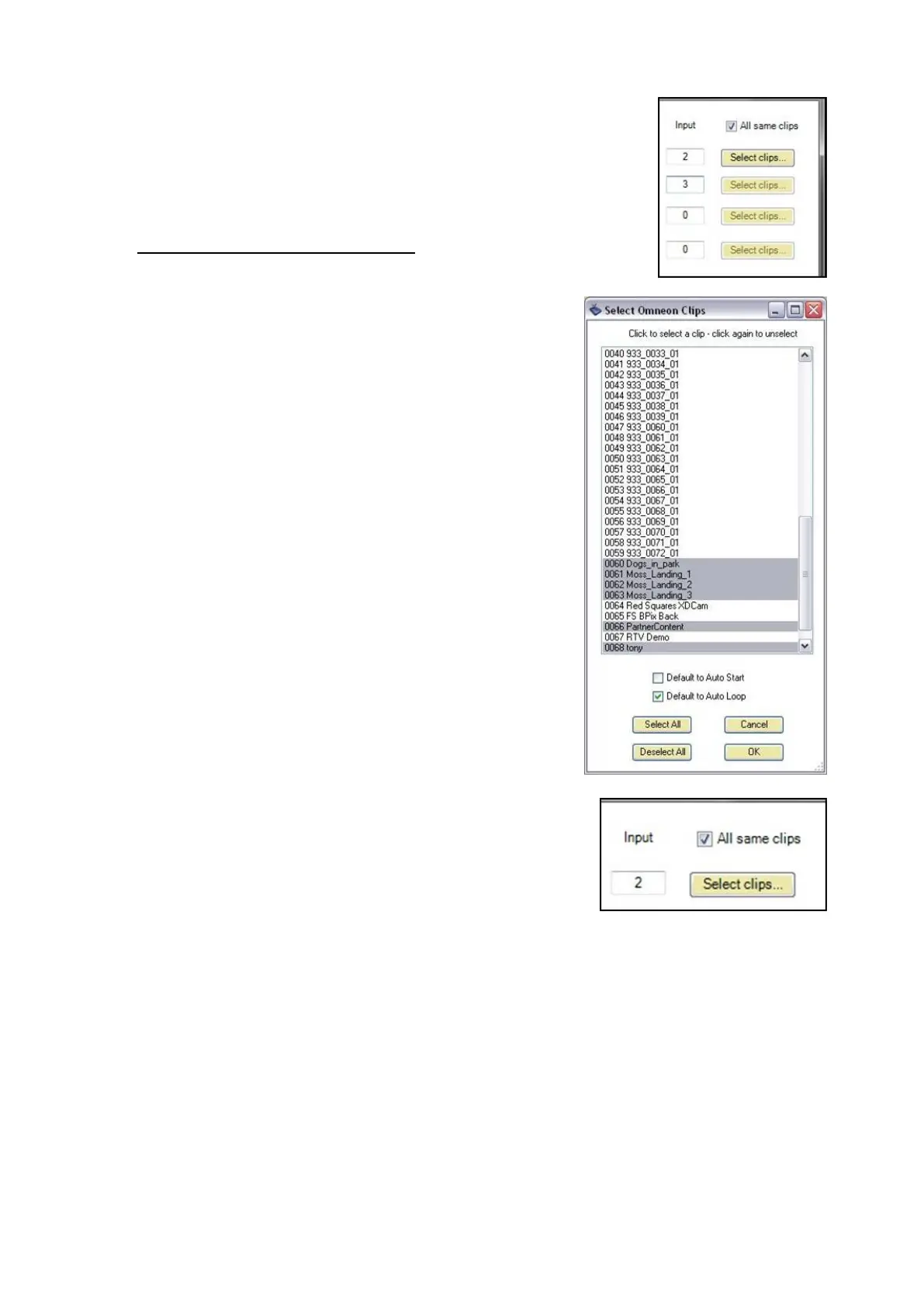
Select the clips you wish to access
from the panel by clicking on each
clip individually, and each it will
highlight, as shown.
To deselect a clip, click on it again
and it will revert to white.
To have all the clips Auto Start, place
a check mark next to Default to
AutoStart, as shown on the right.
To have all the clips Auto Loop, place
a check mark next to Default to
AutoLoop, as shown on the right.
Click on the OK button on the Select
DDR Clips window.
To have all the channels use the
same clip list, check the All same
clips check box, as shown on the
right. To use different clips for each
channel, deselect this option and
follow steps 8-12 above.
Then click on the OK button on the
DDR settings window, to save your
clip settings.
NOTE: When naming your clips on an external server, it is important not to have a name longer
than 8 characters long or UTF-8 or Unicode. The VDCP protocol only supports file names with 8
or less characters in ASCII
Controlling External DDR
When a show contains the External DDR, one of the 4 wildcard device PixButtons



 To Next Page