BPswitch Operators Manual
263 / 413
to the camera. Straight cat5 shielded cables are used for this type of installation.
Alternatively you may control these cameras serially with the AW-CA20T6G
breakout cable.
There are no COM ports out of the Broadcast Pix Server, a 4/8 port USB extender
(Edgeport) is required to control cameras serially. Panasonic PTZ cameras
support star configurations using a USB to Serial Edgeport. You may either
connect 1 camera with a RS-422 converter or have all cameras connect to the
Server with several serial ports using a star configuration. If using the USB
extender (Edgeport) ensure that the port flags are set to RS-422, as described in
Verifying Installation of External DDR Software.
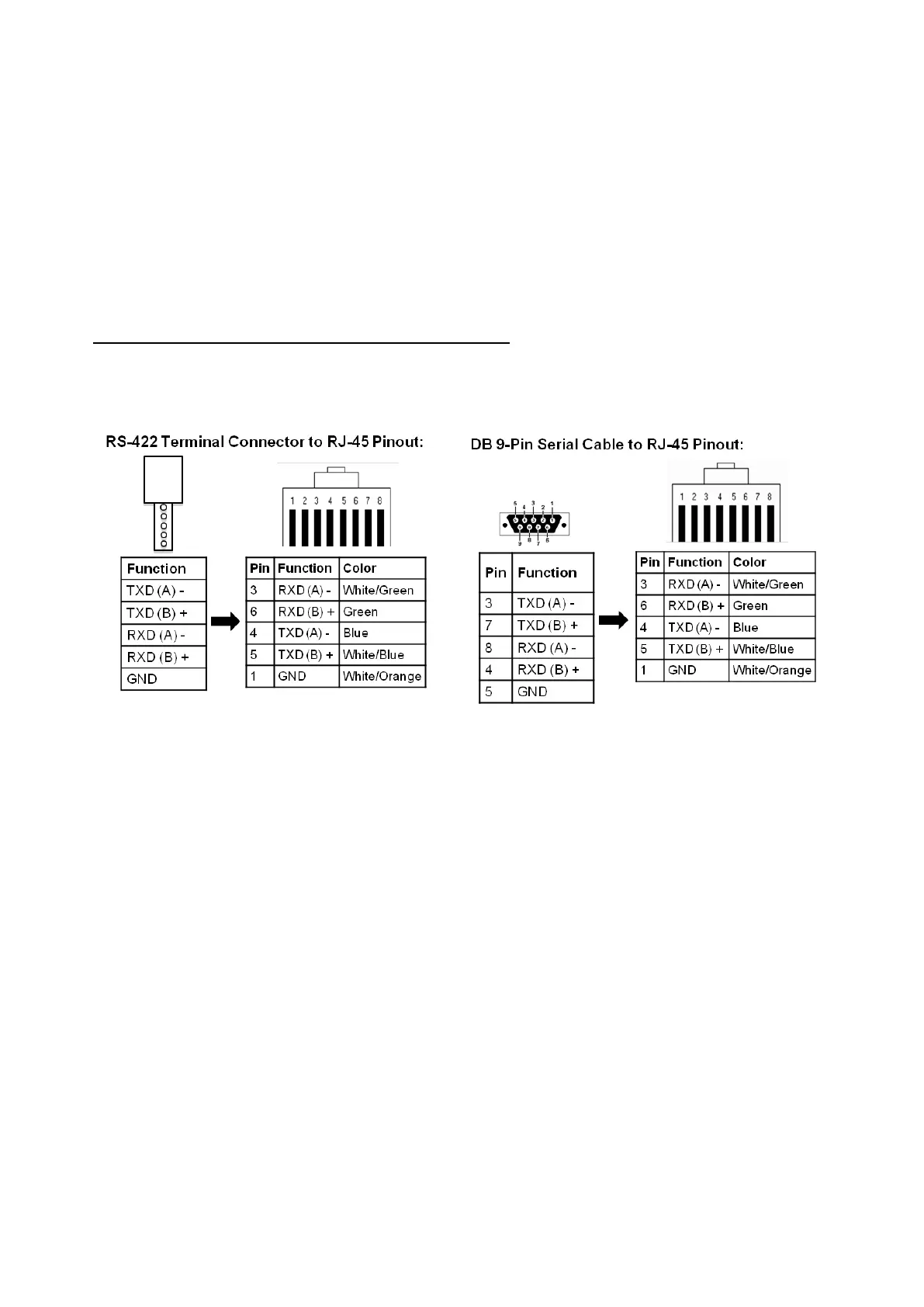
Below is the wiring diagram needed for serial cables connecting Panasonic
Cameras to Broadcast Pix COM ports.
A star wiring configuration is when all camera control cables from each camera is
connect to the Server, through an Edgeport, instead of daisy chaining to each
camera. See diagrams on next page.
Panasonic Wiring Configurations
Single or Multiple Panasonic RS-422 Configuration:



 To Next Page